
Quadcopter Drone Control Tutorial
Introduction
This tutorial starts from mathematical fundamentals and gradually builds a complete control system for quadrotor drones. The core problems addressed in each chapter and their interrelationships are as follows:
| Chapter | Core Problem Solved | Relationship with Other Chapters |
|---|---|---|
| 1. Coordinate System and Rotation Basics | How to describe the attitude of a drone in three-dimensional space? | Mathematical prerequisites; foundation for all subsequent chapters |
| 2. Dynamics Modeling | How forces and torques drive the motion of the drone? What are the motion equations? | Depends on 1 (rotation matrix); provides the plant model for controller design |
| 3. Differential Flatness | Can the trajectory of |
Depends on 2 (Newton’s equations); serves as the bridge between “trajectory planning” and “control” |
| 4. PID Control Basics | How do controller parameters affect system response? | Introduction to control theory; starting point for all subsequent control methods |
| 5. Model-Based Control | How to use model information to improve control performance? (2D) | Depends on 2 (linearized model) + 4 (PID); introduces feedforward+feedback structures |
| 6. 3D Trajectory Tracking | How to extend 2D control to full 3D flight? | 3D extension of Chapter 5; adds handling of yaw angle coupling |
| 7. SE(3) Control | How to avoid the universal joint lock of Euler angles during large-angle maneuvers? | Depends on 3 (construction of attitude matrix); nonlinear alternative to Chapter 6 |
| 8. MPC Control | How to perform local planning and control simultaneously under constraints? | Combines planning and control; depends on 2 (prediction model) |
Reading Recommendations:
- Quick Start (understanding basic control): 1 → 2 → 4 → 5
- Comprehensive Learning: Follow the order 1 → 8
- Special Topic Reading: 3 (differential flatness) is prerequisite knowledge for understanding the trajectory planning tutorial
Control tutorial (8 code blocks):
-
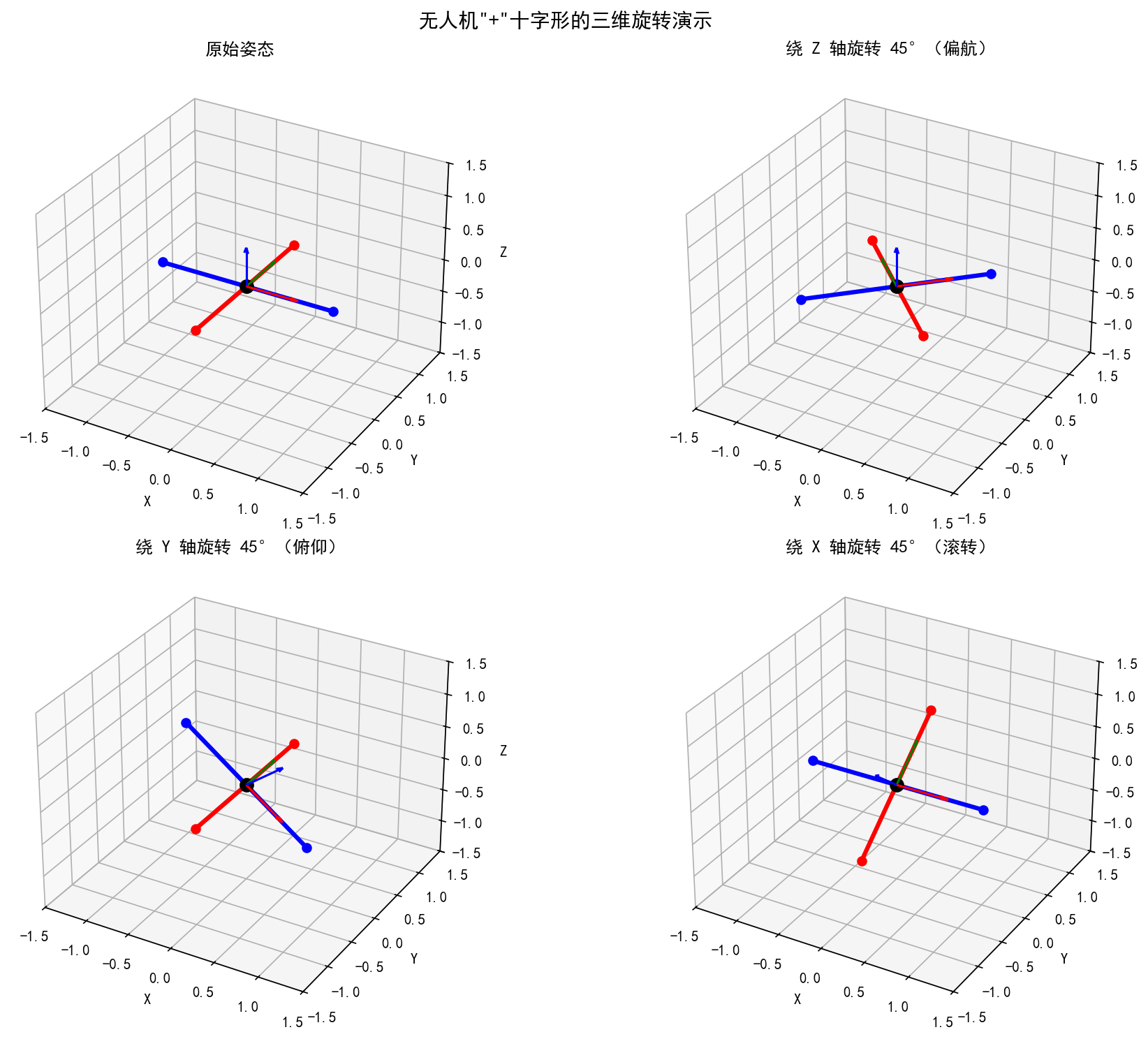
Coordinate system and rotation basics — 3D rotation visualization: UAV “+” shape rotation around Z/Y/X axes
-
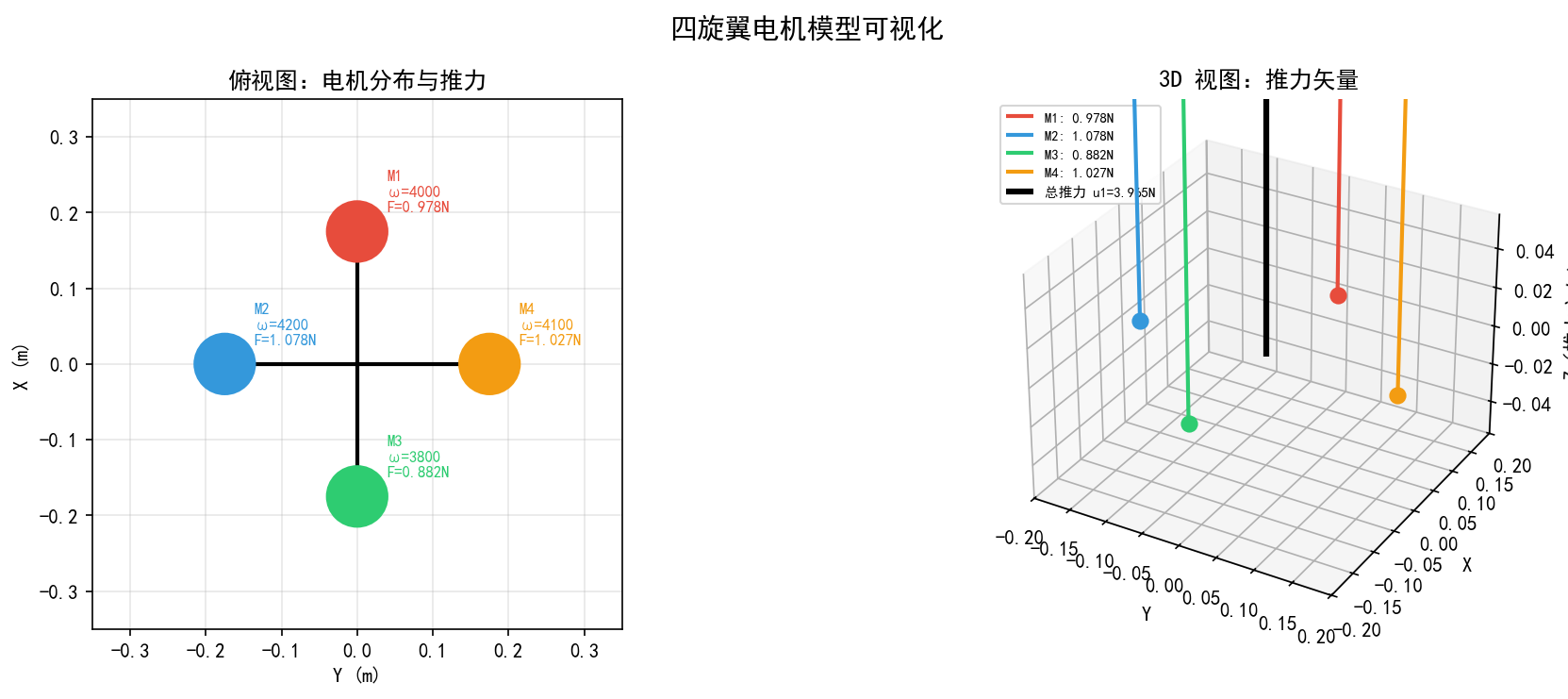
Dynamic modeling — Given the speeds of 4 motors, calculate thrust/moment, and visualize the thrust direction.
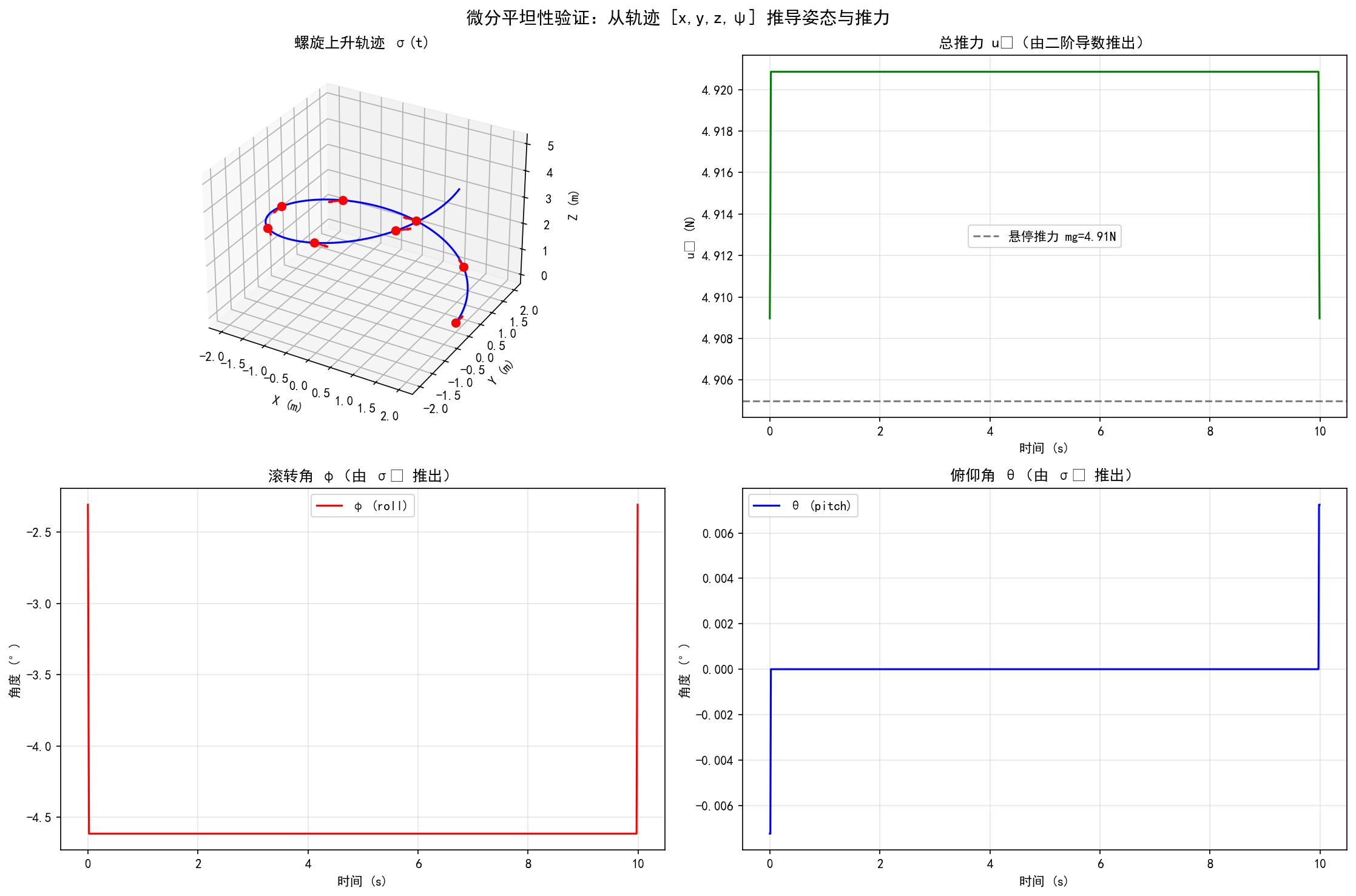
III. Differential flatness — spiral trajectory → Derive attitude angle and thrust from flat output
-
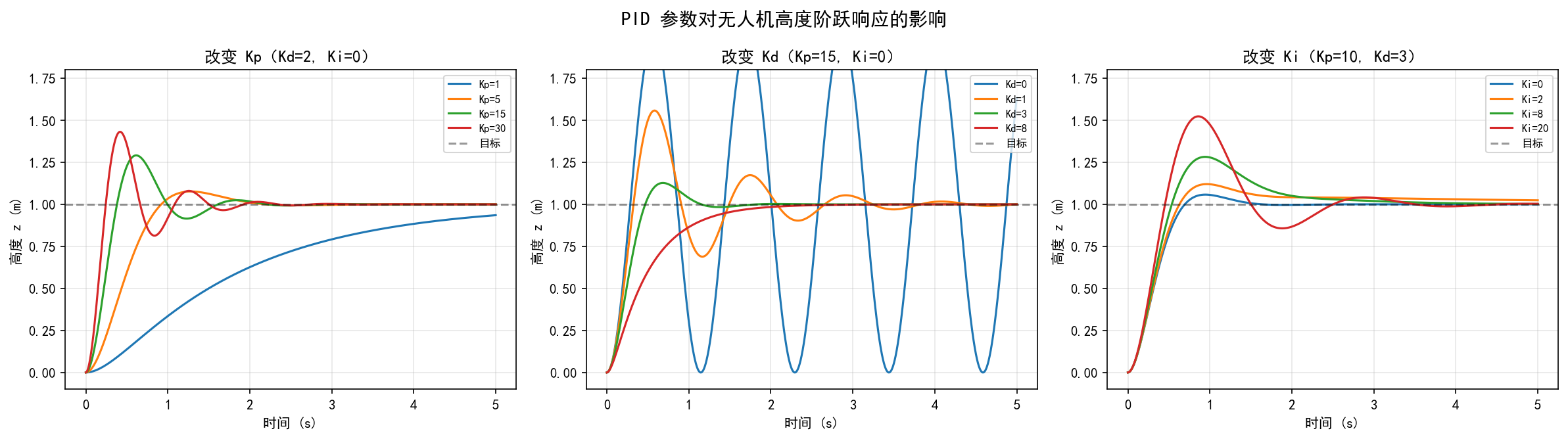
PID Control — Comparison of the Impact of Kp/Kd/Ki on the Step Response of Second-Order Systems
-
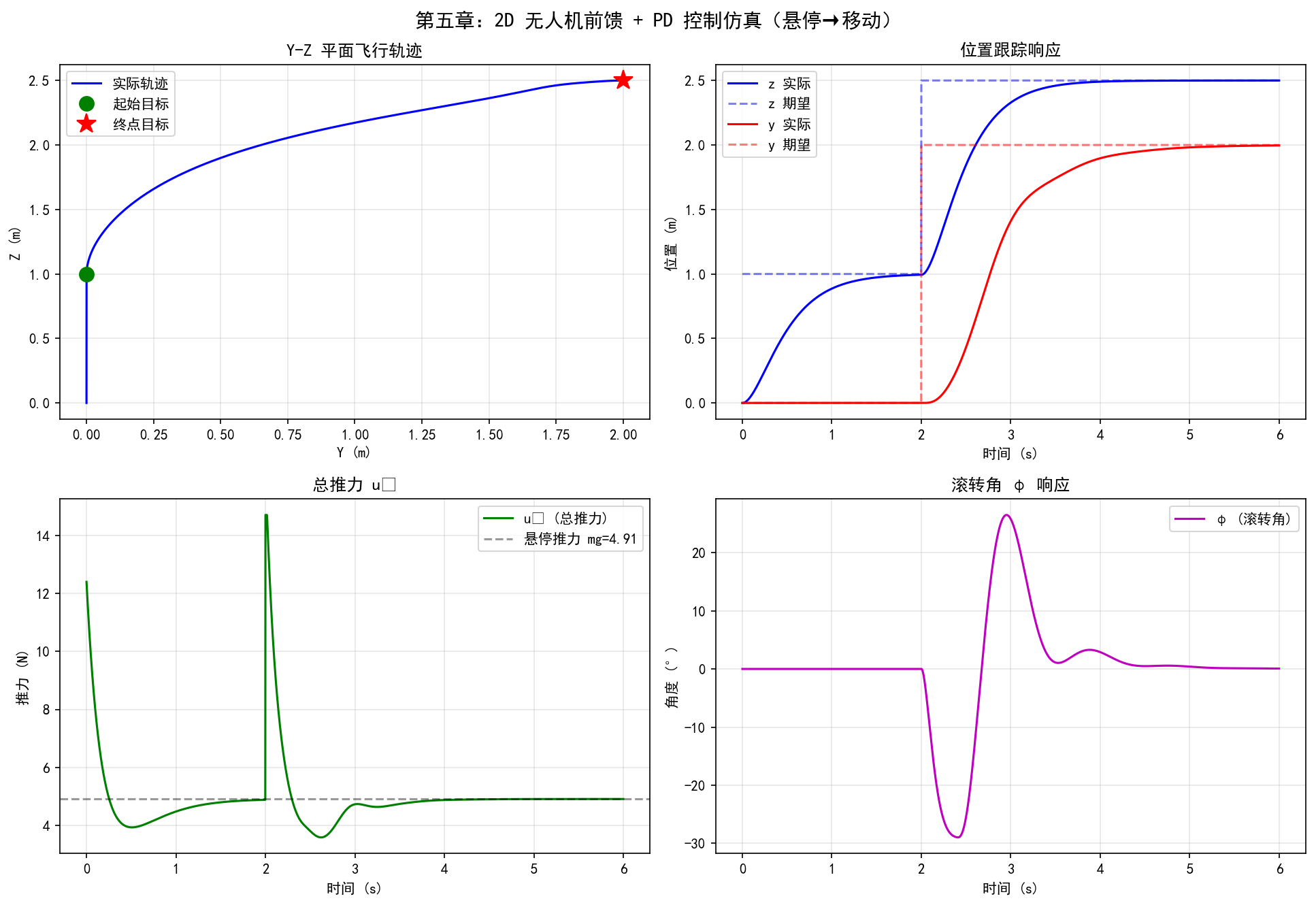
Model-based Control — Simulation of 2D UAV Feedforward + PD Control in Y-Z Plane
-
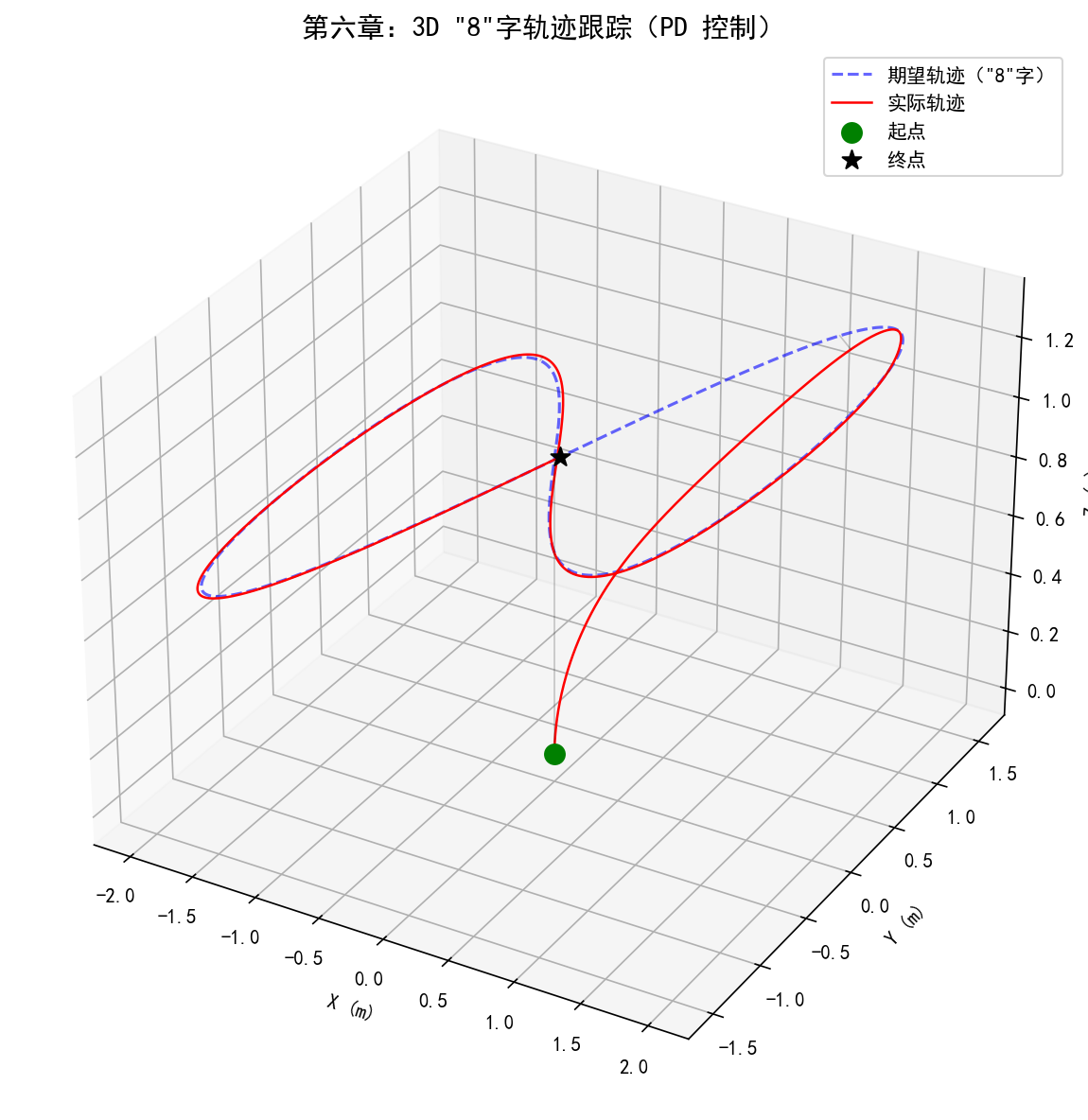
Three-dimensional trajectory tracking — 3D U-shaped trajectory tracking, expected vs actual comparison
-
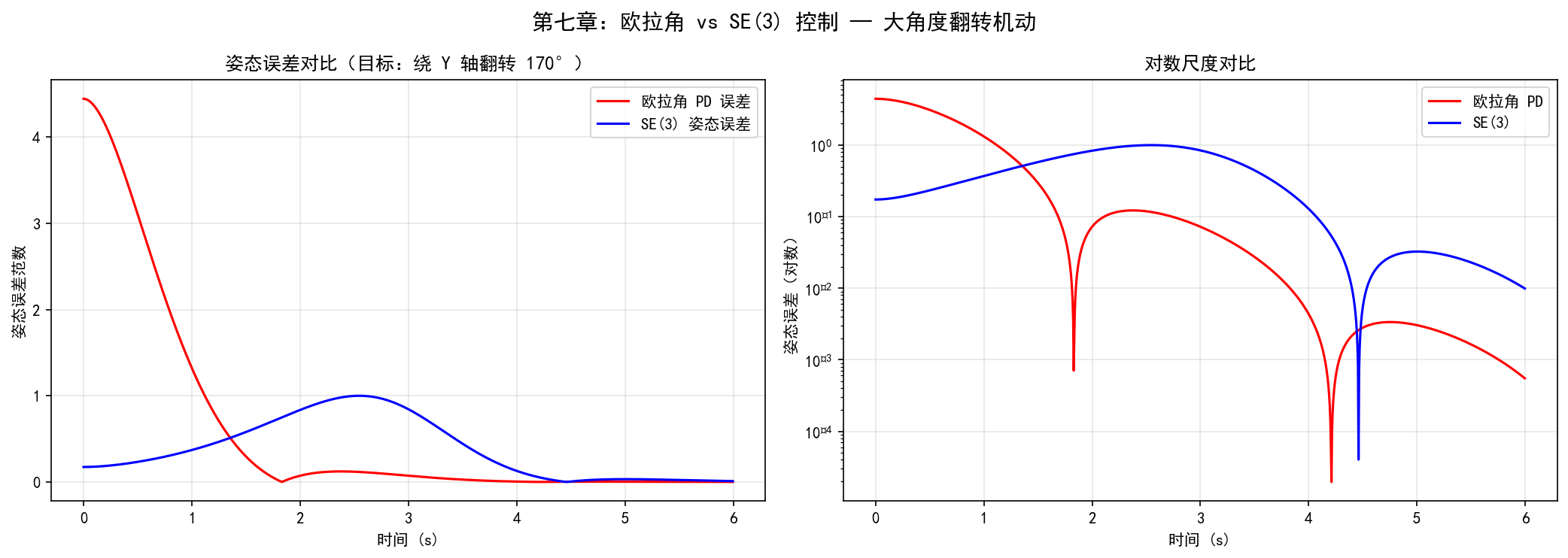
SE(3) Control — Large Angle Flip: Comparison of Euler Angle Control and SE(3) Control Error
-
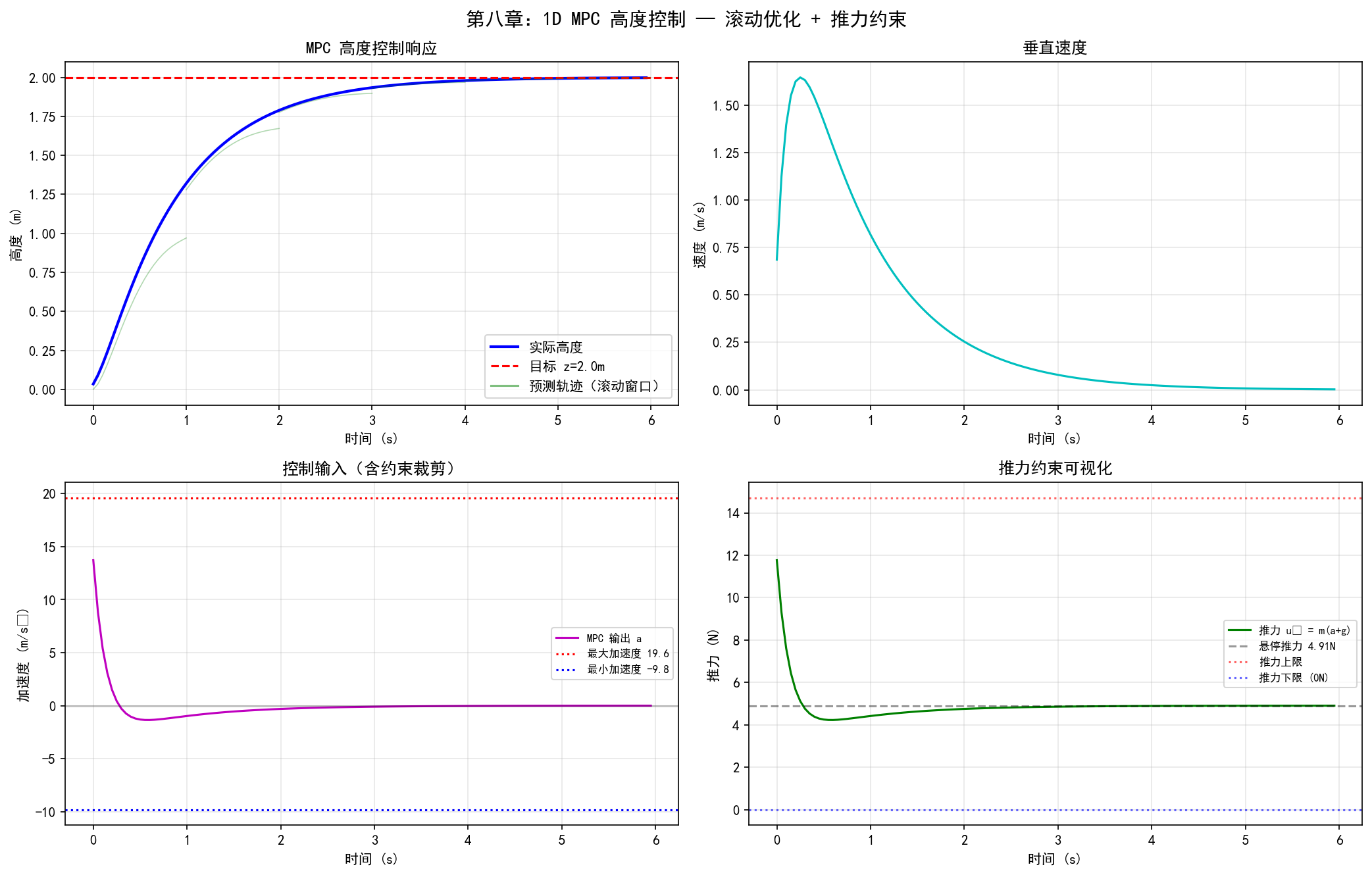
MPC Control — 1D Altitude Control MPC, showing the prediction interval and constraint handling
1. Coordinate System and Rotation Basics
Before studying the quadcopter drone, we need to understand coordinate system transformation and rotation matrix first. These are the mathematical foundations for describing the drone’s attitude.
1.1 Geometric Derivation of Two-Dimensional Coordinate Rotation
Consider a point on a plane
Method 1: Geometric Projection Method
Let the original coordinate system be
Write in matrix form:
Method 2: Polar Coordinate Method
The point
Write in matrix form:
Personal understanding: Method 2 involves rotating around the origin counterclockwise by
degrees. Therefore, the rotation matrix is the transpose of Method 1 (axis rotation).
1.2 Differences between the two rotation modes
Mode 1: Axis rotation (point remains fixed, coordinate system rotates)
When the original coordinate system remains unchanged and the axes rotate, find the coordinates of the point in the new coordinate system:
Mode 2: Point Rotation (Coordinate system unchanged, point rotated)
Personal understanding: From a different perspective—finding the coordinates of a point in a new coordinate system is equivalent to rotating the coordinate axes clockwise by
. You can imagine standing on the coordinate axis and rotating with it; the positions of the points around you will naturally change.
Personal understanding: The rotation matrices for both modes are transposes of each other. Mode 1 can be understood as “active coordinate system rotation”, while Mode 2 is “active point rotation”. In drones, we usually use Mode 1—we know how many degrees the body has rotated, and we want to find the representation of the same point in the new coordinate system.
1.3 3D Rotation Matrix
Promote 2D to 3D, and rotate around three axes respectively:
Rotate around the
Rotate around the
Rotate around the
1.4 UAV Coordinate System Transformation
Personal understanding: In the drone scenario, it is a case of “coordinate axis rotation” — the body coordinate system rotates relative to the world coordinate system. We need to convert the vectors in the body frame into expressions in the world frame.
Then, the meaning of rotating from the own coordinate axis is
If
Personal understanding: In drone applications, the rotation matrix
usually represents the transformation from the body frame to the world frame, that is . Its inverse transformation (world→body) is , because the rotation matrix is an orthogonal matrix, .
Python Validation
pythonimport numpy as np
import matplotlib.pyplot as plt
from mpl_toolkits.mplot3d import Axes3D

plt.rcParams['font.sans-serif'] = ['SimHei']  # Windows 自带黑体
plt.rcParams['axes.unicode_minus'] = False    # 解决负号显示为方框的问题

# ========== 可视化无人机"+"十字形绕 Z/Y/X 轴旋转 ==========

# --- 构造无人机"+"形状(4 个臂端 + 中心) ---
L = 1.0  # 臂长
drone = np.array([
    [ L, 0, 0],  # 右臂端
    [-L, 0, 0],  # 左臂端
    [ 0, L, 0],  # 前臂端
    [ 0,-L, 0],  # 后臂端
    [ 0, 0, 0],  # 中心
]).T  # 3×5 矩阵,每列一个点

# --- 三维旋转矩阵 ---
def Rz(psi):
    """绕 Z 轴旋转(偏航角 ψ)"""
    c, s = np.cos(psi), np.sin(psi)
    return np.array([[c, -s, 0], [s, c, 0], [0, 0, 1]])

def Ry(theta):
    """绕 Y 轴旋转(俯仰角 θ)"""
    c, s = np.cos(theta), np.sin(theta)
    return np.array([[c, 0, s], [0, 1, 0], [-s, 0, c]])

def Rx(phi):
    """绕 X 轴旋转(滚转角 φ)"""
    c, s = np.cos(phi), np.sin(phi)
    return np.array([[1, 0, 0], [0, c, -s], [0, s, c]])

angle = np.radians(45)  # 旋转 45°

# --- 绘制 4 个子图:原始 + 3 种旋转 ---
titles = ['原始姿态', f'绕 Z 轴旋转 {int(np.degrees(angle))}°(偏航)',
          f'绕 Y 轴旋转 {int(np.degrees(angle))}°(俯仰)',
          f'绕 X 轴旋转 {int(np.degrees(angle))}°(滚转)']
rotations = [np.eye(3), Rz(angle), Ry(angle), Rx(angle)]

fig = plt.figure(figsize=(14, 10))
for i, (R, title) in enumerate(zip(rotations, titles)):
    ax = fig.add_subplot(2, 2, i + 1, projection='3d')
    pts = R @ drone  # 旋转后的点坐标

    # 画两条臂(十字形)
    ax.plot([pts[0,0], pts[0,1]], [pts[1,0], pts[1,1]],
            [pts[2,0], pts[2,1]], 'b-o', lw=3, label='臂 1')
    ax.plot([pts[0,2], pts[0,3]], [pts[1,2], pts[1,3]],
            [pts[2,2], pts[2,3]], 'r-o', lw=3, label='臂 2')
    # 标注中心
    ax.scatter(*pts[:, 4], color='k', s=80, zorder=5)

    # 画旋转后的机体坐标轴
    axis_len = 0.6
    for j, (color, lbl) in enumerate(zip(['r','g','b'], ['Xb','Yb','Zb'])):
        axis_vec = R @ (axis_len * np.eye(3)[:, j])
        ax.quiver(0, 0, 0, *axis_vec, color=color, arrow_length_ratio=0.15)

    ax.set_xlim(-1.5, 1.5); ax.set_ylim(-1.5, 1.5); ax.set_zlim(-1.5, 1.5)
    ax.set_xlabel('X'); ax.set_ylabel('Y'); ax.set_zlabel('Z')
    ax.set_title(title)

plt.suptitle('无人机"+"十字形的三维旋转演示', fontsize=14)
plt.tight_layout()
import os; os.makedirs('assets', exist_ok=True)
plt.savefig('assets/control1.png', dpi=150, bbox_inches='tight')
plt.show()
Execution result:
II. Dynamics Modeling of the Four-rotor Vehicle
2.1 Motor Model
The four-rotor aircraft is powered by four motors, and its model is as follows:
Motor speed model (first-order inertia link):
Personal understanding: The motor speed model is provided by the manufacturer, and closed loop control is already implemented internally. We don’t need to worry about its internal implementation during modeling; we can use it directly. The coefficient
can be calibrated through actual measurements.
Thrust generated by a single motor:
Counter-torque generated by a single motor:
Here,
Personal understanding: Thrust and torque are proportional to the square of the speed, which is a fundamental conclusion in aerodynamics. In actual systems,
and are calibrated through bench tests. The motor model has a first-order inertial element; the larger , the faster the motor response. In controller design, it is usually assumed that the motor response is fast enough to ignore this dynamics.
2.2 Z-X-Y Euler angles and rotation matrix
Use the Z-X-Y order of Euler angles to represent rotation (first yaw
Expanded (resulting in
2.3 Relationship between Angular Velocity and Euler Angle Derivatives
The relationship between the body angular velocity
Personal understanding: This transformation matrix exhibits a singularity (Gimbal Lock) at
, which is an inherent flaw in the Euler angle representation. For small angular movements (such as near hovering), the matrix approximates to an identity matrix, meaning the angular velocity is approximately equal to the derivative of the Euler angles.
2.4 Newton’s Equation (Translational Dynamics)
Personal understanding: The Newton-Euler equation is formulated in an inertial coordinate system and describes the motion of a drone under the action of resultant force and resultant torque.
Newton’s equation describes the translation of the center of mass:
Personal understanding: The
on the left side of the equal sign represents the center of mass acceleration multiplied by mass; the first item on the right is gravity (vertically downward), and the second item is the rotation matrix that converts the total thrust along the axis direction of the body into the world coordinate system (note that the thrust direction always lies along the positive direction of the axis). Air resistance is ignored here.
Where
2.5 Euler’s Equation (Rotational Dynamics)
The right side is defined as control moment inputs:
Personal understanding: The Euler equations are established in the body frame, because the moment of inertia matrix
is a constant diagonal matrix in the body frame, which avoids the complexity due to posture changes.
Personal understanding: The
item is a Coriolis torque/gyro effect term. It can be ignored near hover (when angular velocity is low), providing a basis for subsequent linearization. generates roll/pitch moments through differential thrust, while generates yaw moments through differential counter-torque.
2.6 Summary of the Dynamics Model
| No. | Name | Description |
|---|---|---|
| ① | Motor model | |
| ② | Euler’s equation | Rotational dynamics |
| ③ | Angular velocity conversion | Conversion between Euler angular velocity and derivatives of Euler angles |
| ④ | Rotation matrix | Z-X-Y Euler angle representation |
| ⑤ | Newton’s equation | Translational dynamics |
2.7 Example of the Plane State Equation
Taking the motion in the plane (Y-Z plane) as an example, the state vector
Personal understanding: This is the nonlinear state equation in two-dimensional conditions. It can be seen that the acceleration in the
direction depends on (it needs to be tilted first to move horizontally), the acceleration in the direction depends on (the vertical component of the thrust), and is directly controlled by the torque . This reflects the “underdriven” nature of the quadcopter—only 4 inputs are used to control 6 degrees of freedom.
Python Validation
pythonimport numpy as np
import matplotlib.pyplot as plt
from mpl_toolkits.mplot3d import Axes3D
plt.rcParams['font.sans-serif'] = ['SimHei']  # Windows 自带黑体
plt.rcParams['axes.unicode_minus'] = False    # 解决负号显示为方框的问题

# ========== 四旋翼电机模型:推力/力矩计算与可视化 ==========

# --- 电机参数 ---
kF = 6.11e-8   # 推力系数 (N/(rad/s)^2)
kM = 1.5e-9    # 力矩系数 (N·m/(rad/s)^2)
L  = 0.175     # 臂长 (m)

# --- 四个电机转速 (rad/s),模拟非对称飞行 ---
omega = np.array([4000, 4200, 3800, 4100])  # ω1, ω2, ω3, ω4

# --- 计算各电机推力和反扭矩 ---
F = kF * omega**2     # 各电机推力
M = kM * omega**2     # 各电机反扭矩

# --- 计算总推力和控制力矩 ---
u1 = np.sum(F)                       # 总推力
u2 = L * (F[1] - F[3])              # 滚转力矩
u3 = L * (F[2] - F[0])              # 俯仰力矩
u4 = M[0] - M[1] + M[2] - M[3]     # 偏航力矩

print(f"各电机推力: F = {F} N")
print(f"总推力 u1 = {u1:.4f} N")
print(f"滚转力矩 u2 = {u2:.6f} N·m")
print(f"俯仰力矩 u3 = {u3:.6f} N·m")
print(f"偏航力矩 u4 = {u4:.8f} N·m")

# --- 可视化:俯视图(电机位置 + 推力)和 3D 推力箭头 ---
fig = plt.figure(figsize=(14, 5))

# 子图 1:俯视图,四个电机位置和推力大小
ax1 = fig.add_subplot(1, 2, 1)
motor_pos = np.array([[0, L], [-L, 0], [0, -L], [L, 0]])  # 电机 1前 2左 3后 4右
colors = ['#e74c3c', '#3498db', '#2ecc71', '#f39c12']
for i in range(4):
    circle = plt.Circle(motor_pos[i], 0.04, color=colors[i], zorder=5)
    ax1.add_patch(circle)
    ax1.annotate(f'M{i+1}\nω={omega[i]}\nF={F[i]:.3f}N',
                 motor_pos[i], textcoords="offset points",
                 xytext=(15, 10), fontsize=8, color=colors[i])
# 画机体十字
ax1.plot([motor_pos[1,0], motor_pos[3,0]],
         [motor_pos[1,1], motor_pos[3,1]], 'k-', lw=2)
ax1.plot([motor_pos[0,0], motor_pos[2,0]],
         [motor_pos[0,1], motor_pos[2,1]], 'k-', lw=2)
ax1.set_xlim(-0.35, 0.35); ax1.set_ylim(-0.35, 0.35)
ax1.set_aspect('equal'); ax1.grid(True, alpha=0.3)
ax1.set_title('俯视图:电机分布与推力'); ax1.set_xlabel('Y (m)'); ax1.set_ylabel('X (m)')

# 子图 2:3D 视图,显示推力箭头
ax2 = fig.add_subplot(1, 2, 2, projection='3d')
for i in range(4):
    x, y = motor_pos[i]
    # 各电机推力箭头(沿 Z 轴向上)
    scale = F[i] / np.max(F) * 0.3  # 归一化显示
    ax2.quiver(x, y, 0, 0, 0, scale, color=colors[i],
               arrow_length_ratio=0.2, lw=2, label=f'M{i+1}: {F[i]:.3f}N')
    ax2.scatter(x, y, 0, color=colors[i], s=60)
# 总推力箭头(从中心出发)
ax2.quiver(0, 0, 0, 0, 0, 0.4, color='k', arrow_length_ratio=0.15,
           lw=3, label=f'总推力 u1={u1:.3f}N')
ax2.set_xlabel('Y'); ax2.set_ylabel('X'); ax2.set_zlabel('Z(推力方向)')
ax2.set_title('3D 视图:推力矢量'); ax2.legend(fontsize=7, loc='upper left')

plt.suptitle('四旋翼电机模型可视化', fontsize=14)
plt.tight_layout()
import os; os.makedirs('assets', exist_ok=True)
plt.savefig('assets/control2.png', dpi=150, bbox_inches='tight')
plt.show()
Execution result:
III. Differential Flatness
3.1 Definition and Significance of Differential Flatness
Personal understanding: Differential flatness serves as a bridge between trajectory planning and control—with differential flatness, planning only requires designing a flat output trajectory, and all states and inputs can be derived automatically. Combined with SE(3) control, very precise pose tracking can be achieved.
Differential Flatness refers to the following: If all states and inputs of a system can be represented by a set of Flat Outputs and their finite derivatives, then the system is differential flat.
Personal understanding: The four-rotor has a 12-dimensional trajectory and 4-dimensional inputs, but the flat output is only 4-dimensional (
). The significance of differential flatness is that if all the system’s states and inputs can be expressed by a set of “flat outputs” and their finite derivatives, then the high-dimensional control problem can be simplified to a trajectory design problem for these 4 flat outputs.
3.2 Selection of Flat Output
For a four-rotor drone, select flat output as:
It defines a sufficiently wide set of trajectories:
Personal understanding: The flat output
defines a trajectory on —that is, a complete rigid body motion trajectory that includes both position ( ) and orientation ( ). The transformation from the world coordinate system to the body coordinate system can be fully determined by and its derivatives.
The complete state vector is:
Personal understanding: By selecting
and , it is possible to parse out roll, pitch, yaw, and angular velocity.
3.3 Derive all states from flat output
The core value of differential flatness is that, given
| Known Quantity | Derived Quantity | Required Derivative Order |
|---|---|---|
| Position |
Order 0 | |
| Velocity |
Order 1 | |
| Total thrust |
Order 2 | |
| Angular velocity |
Order 3 | |
| Angular acceleration |
Order 4 (snap) |
Personal understanding: This is why minimizing snap (the fourth derivative) is crucial in trajectory planning—snap is directly related to the magnitude of the control torque. If snap is too large, it means a large control torque is required, and the motor may become saturated.
3.4 Derivation of Pose Angles
Starting from Newton’s equation:
Derive the total thrust
Personal understanding: The total thrust
is equal to the modulus of the resultant force: . Physically, it means that the total thrust must overcome gravity simultaneously and provide the required acceleration.
Thus, the axis direction of the body
Here,
Build the desired rotation matrix
In the direction determined by the yaw angle
Personal understanding: The approach to constructing the rotation matrix is as follows—first determine the thrust direction
, and then determine the auxiliary direction based on the yaw angle . is obtained through the cross product , and it is perpendicular to the plane formed by and . Finally, completes the right-handed coordinate system.
Extract Euler angles
Extract each Euler angle from the rotation matrix:
Personal understanding: Therefore,
is entirely determined by the second derivative (acceleration) of the flat output , without the need for higher derivatives.
3.5 Derivation of Angular Velocities p, q, r
Personal understanding: Next, to derive the angular velocity
, we need to take another time derivative of Newton’s equation (from acceleration to jerk).
Take the time derivative (jerk) of Newton’s equation:
Personal understanding:
is a fixed unit vector in the world coordinate system, which does not change over time, so .
Since
Personal understanding: When differentiating
, use the product rule: is the rate of change of thrust magnitude, and is the rate of change of thrust direction. According to rigid body kinematics, the rate of change of the direction vector can be expressed as the cross product of angular velocity: .
Using kinematic relationships
Remove the component in the direction of
Define auxiliary vector:
Personal understanding:
is a auxiliary vector calculated from the known jerk and thrust. It contains the component information of in the plane perpendicular to , from which and can be extracted.
Extract the components p, q, and r
Angular velocity decomposed under the machine system:
Personal understanding: Note that
is vector decomposition. Utilizing the orthogonality of , each component can be extracted by dot product.
We know
Dot product with the unit vector of each axis using
For the
Personal understanding: Due to orthogonality
, , the angular velocity component in the direction cannot be obtained from (a quantity perpendicular to ), and must be calculated separately using the yaw rate .
Personal understanding: The
component is directly related to the yaw rate . This indicates that the yaw angle is one of the independent flat outputs. requires jerk (third-order derivative) to be calculated, while only needs —this also reflects the decoupling of the yaw axis.
Python Validation
pythonimport numpy as np
import matplotlib.pyplot as plt
plt.rcParams['font.sans-serif'] = ['SimHei']  # Windows 自带黑体
plt.rcParams['axes.unicode_minus'] = False    # 解决负号显示为方框的问题
# ========== 微分平坦性验证:从圆形轨迹推导姿态角和推力 ==========

# --- 物理参数 ---
m = 0.5    # 无人机质量 (kg)
g = 9.81   # 重力加速度 (m/s^2)

# --- 定义圆形轨迹(平坦输出 σ = [x, y, z, ψ]) ---
T_total = 10.0              # 总时间 (s)
dt = 0.01
t = np.arange(0, T_total, dt)
omega_c = 2 * np.pi / T_total  # 圆轨迹角频率

# 位置轨迹:水平圆 + 缓慢上升 + 偏航跟随速度方向
radius = 2.0
x = radius * np.cos(omega_c * t)
y = radius * np.sin(omega_c * t)
z = 0.5 * t                                # 螺旋上升
psi = np.arctan2(np.gradient(y, dt), np.gradient(x, dt))  # 偏航角跟随速度方向

# --- 计算各阶导数 ---
ddx = np.gradient(np.gradient(x, dt), dt)  # x 的二阶导数(加速度)
ddy = np.gradient(np.gradient(y, dt), dt)  # y 的二阶导数
ddz = np.gradient(np.gradient(z, dt), dt)  # z 的二阶导数

# --- 由微分平坦性推导总推力 u1 ---
u1 = m * np.sqrt(ddx**2 + ddy**2 + (ddz + g)**2)

# --- 由加速度推导姿态角 φ (roll) 和 θ (pitch) ---
# 机体 z 轴方向(单位推力方向)
tx = ddx / (ddz + g + 1e-10)
ty = ddy / (ddz + g + 1e-10)

# 通过旋转矩阵关系推导欧拉角
phi   = np.arcsin(np.clip(tx * np.sin(psi) - ty * np.cos(psi), -1, 1))  # 滚转角
theta = np.arctan2(tx * np.cos(psi) + ty * np.sin(psi),
                   1 + ddz / g)  # 俯仰角

# --- 绘制结果 ---
fig = plt.figure(figsize=(15, 10))

# 子图 1:三维轨迹
ax1 = fig.add_subplot(2, 2, 1, projection='3d')
ax1.plot(x, y, z, 'b-', lw=1.5)
# 每隔一段标注无人机位置和朝向
step = len(t) // 8
for i in range(0, len(t), step):
    ax1.scatter(x[i], y[i], z[i], c='r', s=40, zorder=5)
    dx_arrow = 0.3 * np.cos(psi[i])
    dy_arrow = 0.3 * np.sin(psi[i])
    ax1.quiver(x[i], y[i], z[i], dx_arrow, dy_arrow, 0,
               color='r', arrow_length_ratio=0.3)
ax1.set_xlabel('X (m)'); ax1.set_ylabel('Y (m)'); ax1.set_zlabel('Z (m)')
ax1.set_title('螺旋上升轨迹 σ(t)')

# 子图 2:总推力 u1
ax2 = fig.add_subplot(2, 2, 2)
ax2.plot(t, u1, 'g-', lw=1.5)
ax2.axhline(y=m*g, color='k', ls='--', alpha=0.5, label=f'悬停推力 mg={m*g:.2f}N')
ax2.set_xlabel('时间 (s)'); ax2.set_ylabel('u₁ (N)')
ax2.set_title('总推力 u₁(由二阶导数推出)'); ax2.legend(); ax2.grid(True, alpha=0.3)

# 子图 3:滚转角 φ
ax3 = fig.add_subplot(2, 2, 3)
ax3.plot(t, np.degrees(phi), 'r-', lw=1.5, label='φ (roll)')
ax3.set_xlabel('时间 (s)'); ax3.set_ylabel('角度 (°)')
ax3.set_title('滚转角 φ(由 σ̈ 推出)'); ax3.legend(); ax3.grid(True, alpha=0.3)

# 子图 4:俯仰角 θ
ax4 = fig.add_subplot(2, 2, 4)
ax4.plot(t, np.degrees(theta), 'b-', lw=1.5, label='θ (pitch)')
ax4.set_xlabel('时间 (s)'); ax4.set_ylabel('角度 (°)')
ax4.set_title('俯仰角 θ(由 σ̈ 推出)'); ax4.legend(); ax4.grid(True, alpha=0.3)

plt.suptitle('微分平坦性验证:从轨迹 [x,y,z,ψ] 推导姿态与推力', fontsize=14)
plt.tight_layout()
import os; os.makedirs('assets', exist_ok=True)
plt.savefig('assets/control3.png', dpi=150, bbox_inches='tight')
plt.show()
Execution result:
IV. Basics of PID Control
4.1 The Impact of PID Parameters on System Response
The three parameters of the PID controller
| Parameter | Rise Time | Overshoot | Settling Time | Steady-state Error |
|------|----------------|----------------|--------------------------|
|
4.2 Step Response Characteristics
Key indicators of step response:
- Rise Time (Rise time): The time it takes for the response to rise from the initial value to the steady-state value
- Overshoot (Overshoot): The maximum deviation where the response exceeds the steady-state value
- Settling Time (Settling time): The time it takes for the response to enter and remain within the range of the steady-state value
(or ) - Steady-state Error (Steady-state error): The difference between the response value and the expected value at steady state
Personal understanding: There are two common standards for Settling Time: the time required to enter the
range or the range. In engineering, the standard is more commonly used.
Personal understanding:
reduces the rise time but increases overshoot; increases damping and reduces overshoot; eliminates steady-state error but may cause oscillations. In quadcopter control, it is crucial to properly adjust these three parameters—usually start by adjusting to ensure response speed, then adjust to suppress overshoot, and finally add an appropriate amount of to eliminate steady-state error.
Python Validation
pythonimport numpy as np
import matplotlib.pyplot as plt
plt.rcParams['font.sans-serif'] = ['SimHei']  # Windows 自带黑体
plt.rcParams['axes.unicode_minus'] = False    # 解决负号显示为方框的问题
# ========== PID 参数调节对二阶系统阶跃响应的影响 ==========
# 被控对象:无人机高度方向简化模型  m * z̈ = u - mg
# 等效二阶系统:ë + (Kd/m)*ė + (Kp/m)*e = -(Ki/m)*∫e dt

def simulate_pid(Kp, Kd, Ki, dt=0.001, T=5.0):
    """仿真 PID 控制的二阶系统阶跃响应"""
    steps = int(T / dt)
    z = 0.0       # 当前位置(高度)
    dz = 0.0      # 当前速度
    z_des = 1.0   # 期望高度(阶跃输入)
    m = 0.5       # 无人机质量
    g = 9.81      # 重力加速度
    integral = 0.0  # 积分项

    z_hist = np.zeros(steps)
    for i in range(steps):
        e = z_des - z           # 位置误差
        de = -dz                # 速度误差(期望速度为 0)
        integral += e * dt      # 误差积分

        # PID 控制律:u = mg + Kp*e + Kd*ė + Ki*∫e
        u = m * g + Kp * e + Kd * de + Ki * integral

        # 动力学:m * z̈ = u - mg
        ddz = (u - m * g) / m
        dz += ddz * dt
        z += dz * dt
        z_hist[i] = z
    return z_hist

dt = 0.001; T = 5.0
t = np.arange(0, T, dt)

# --- 子图 1:改变 Kp(固定 Kd=2, Ki=0) ---
fig, axes = plt.subplots(1, 3, figsize=(16, 4.5))

ax = axes[0]
for Kp in [1, 5, 15, 30]:
    z_hist = simulate_pid(Kp=Kp, Kd=2.0, Ki=0.0, dt=dt, T=T)
    ax.plot(t, z_hist, label=f'Kp={Kp}')
ax.axhline(y=1.0, color='k', ls='--', alpha=0.4, label='目标')
ax.set_title('改变 Kp(Kd=2, Ki=0)')
ax.set_xlabel('时间 (s)'); ax.set_ylabel('高度 z (m)')
ax.legend(fontsize=8); ax.grid(True, alpha=0.3)
ax.set_ylim(-0.1, 1.8)

# --- 子图 2:改变 Kd(固定 Kp=15, Ki=0) ---
ax = axes[1]
for Kd in [0, 1, 3, 8]:
    z_hist = simulate_pid(Kp=15.0, Kd=Kd, Ki=0.0, dt=dt, T=T)
    ax.plot(t, z_hist, label=f'Kd={Kd}')
ax.axhline(y=1.0, color='k', ls='--', alpha=0.4, label='目标')
ax.set_title('改变 Kd(Kp=15, Ki=0)')
ax.set_xlabel('时间 (s)'); ax.set_ylabel('高度 z (m)')
ax.legend(fontsize=8); ax.grid(True, alpha=0.3)
ax.set_ylim(-0.1, 1.8)

# --- 子图 3:改变 Ki(固定 Kp=10, Kd=3) ---
ax = axes[2]
for Ki in [0, 2, 8, 20]:
    z_hist = simulate_pid(Kp=10.0, Kd=3.0, Ki=Ki, dt=dt, T=T)
    ax.plot(t, z_hist, label=f'Ki={Ki}')
ax.axhline(y=1.0, color='k', ls='--', alpha=0.4, label='目标')
ax.set_title('改变 Ki(Kp=10, Kd=3)')
ax.set_xlabel('时间 (s)'); ax.set_ylabel('高度 z (m)')
ax.legend(fontsize=8); ax.grid(True, alpha=0.3)
ax.set_ylim(-0.1, 1.8)

plt.suptitle('PID 参数对无人机高度阶跃响应的影响', fontsize=14)
plt.tight_layout()
import os; os.makedirs('assets', exist_ok=True)
plt.savefig('assets/control4.png', dpi=150, bbox_inches='tight')
plt.show()
Execution result:
5. Model-based Control
5.1 Second-Order System Model
A common second-order system model:
Here,
5.2 PD Control
PD control law:
Among them,
Personal understanding: Pure PD control does not utilize model information—it cannot fully compensate for system dynamics. With sensor noise and model errors, tracking error will inevitably occur. This is why model-based feedforward control is introduced.
5.3 Model-based Control Law (Feedforward + PD Feedback)
Personal understanding: The structure of this control law = feedforward term (
, using the model to cancel known dynamics) + PD feedback term ( , correcting modeling errors and disturbances).
Personal understanding: Compared to pure PD control, model-based control laws include two feedforward compensations:
and . The feedforward terms use model knowledge to actively counteract known dynamics, while PD feedback is responsible for correcting modeling errors. represents the model estimate—the more accurate the estimate, the less the burden on the feedback term.
5.4 Model-based Control Steps
- Obtain the dynamics of the target system
- Specific sub-models
Servo-based control:
- Use a PID or PD controller with differentiation to converge the error to 0
- Independent subsystem model
Personal understanding: Both PID and LQR require a linearized model as a prerequisite. The nonlinear system is linearized at operating points (such as hovering points), and controllers are designed for each linearized subsystem separately.
5.5 Control Block Diagram (2D Case)
ydes, zdes    ┌──────────┐     ┌──────┐     ┌──────────┐   u₂   ┌─────┐
ẏdes, żdes ──>│ 位置控制  │────>│ φ_c  │────>│ 姿态控制  │──────>│ UAV │
              └──────────┘     └──────┘     └──────────┘       └─────┘
                   ↑               u₁                             │
                   └──── y, z, ẏ, ż ──────── φ, φ̇ ──────────────┘
5.6 Equilibrium Conditions and Linearization
Balance condition (hover state):
Linearized dynamics model (near the hover point):
Personal understanding: After linearization,
and are directly coupled ( ), is independently controlled by , and is independently controlled by . Thus, the original 6-dimensional nonlinear system becomes two independent linear subsystems: (1) Z-axis height control, and (2) position-pose control coupled with Y- .
5.7 Z-axis Direction Position Control
PD control law:
Substitute model
5.8 Y-axis Direction Position Control
Outer Loop——PD Position Control Law:
Using the model
Inner Loop——PD Attitude Control:
Personal understanding: The Y-axis position control is a typical cascade control structure—the outer loop position controller outputs the desired roll angle
, and the inner loop attitude controller tracks this desired angle. The inner loop frequency must be higher than that of the outer loop (usually 5~10 times) to ensure proper time scale separation.
Python Validation
pythonimport numpy as np
import matplotlib.pyplot as plt
plt.rcParams['font.sans-serif'] = ['SimHei']  # Windows 自带黑体
plt.rcParams['axes.unicode_minus'] = False    # 解决负号显示为方框的问题
# ========== 2D 无人机(Y-Z 平面)前馈 + PD 控制仿真 ==========

# --- 物理参数 ---
m = 0.5          # 质量 (kg)
g = 9.81         # 重力加速度 (m/s^2)
Ixx = 0.002      # 绕 x 轴转动惯量 (kg·m^2)
dt = 0.002       # 仿真步长 (s)
T_sim = 6.0      # 总仿真时间
N = int(T_sim / dt)

# --- PD 增益 ---
kp_z, kd_z = 15.0, 8.0       # Z 轴位置 PD
kp_y, kd_y = 8.0, 6.0        # Y 轴位置 PD
kp_phi, kd_phi = 150.0, 20.0 # 姿态角 PD

# --- 期望轨迹:悬停 2s 后移动到目标位置 ---
y_des = np.where(np.arange(N) * dt < 2.0, 0.0, 2.0)
z_des = np.where(np.arange(N) * dt < 2.0, 1.0, 2.5)

# --- 状态初始化 [y, z, phi, dy, dz, dphi] ---
state = np.array([0.0, 0.0, 0.0, 0.0, 0.0, 0.0])
hist_y, hist_z, hist_u1, hist_u2, hist_phi = [], [], [], [], []

for i in range(N):
    y, z, phi, dy, dz, dphi = state

    # 外环:Z 轴 PD + 重力前馈
    ddz_c = kp_z * (z_des[i] - z) + kd_z * (0 - dz)
    u1 = m * (g + ddz_c) / (np.cos(phi) + 1e-6)  # 前馈:mg/cos(φ)
    u1 = np.clip(u1, 0, 3 * m * g)  # 推力限幅

    # 外环:Y 轴 PD → 期望滚转角
    ddy_c = kp_y * (y_des[i] - y) + kd_y * (0 - dy)
    phi_c = -ddy_c / g  # 由线性化关系 ÿ = -g·φ
    phi_c = np.clip(phi_c, -0.5, 0.5)  # 限制期望角度

    # 内环:姿态 PD
    u2 = Ixx * (kp_phi * (phi_c - phi) + kd_phi * (0 - dphi))

    # 非线性动力学更新
    ddy = -(u1 / m) * np.sin(phi)
    ddz = (u1 / m) * np.cos(phi) - g
    ddphi = u2 / Ixx

    state += np.array([dy, dz, dphi, ddy, ddz, ddphi]) * dt

    hist_y.append(y); hist_z.append(z)
    hist_u1.append(u1); hist_u2.append(u2); hist_phi.append(phi)

t_arr = np.arange(N) * dt

# --- 绘图:2 行 2 列 ---
fig, axes = plt.subplots(2, 2, figsize=(13, 9))

# Y-Z 轨迹
axes[0, 0].plot(hist_y, hist_z, 'b-', lw=1.5, label='实际轨迹')
axes[0, 0].plot(y_des[0], z_des[0], 'go', ms=10, label='起始目标')
axes[0, 0].plot(y_des[-1], z_des[-1], 'r*', ms=14, label='终点目标')
axes[0, 0].set_xlabel('Y (m)'); axes[0, 0].set_ylabel('Z (m)')
axes[0, 0].set_title('Y-Z 平面飞行轨迹'); axes[0, 0].legend(); axes[0, 0].grid(True, alpha=0.3)

# 高度与水平位置响应
axes[0, 1].plot(t_arr, hist_z, 'b-', label='z 实际')
axes[0, 1].plot(t_arr, z_des, 'b--', alpha=0.5, label='z 期望')
axes[0, 1].plot(t_arr, hist_y, 'r-', label='y 实际')
axes[0, 1].plot(t_arr, y_des, 'r--', alpha=0.5, label='y 期望')
axes[0, 1].set_xlabel('时间 (s)'); axes[0, 1].set_ylabel('位置 (m)')
axes[0, 1].set_title('位置跟踪响应'); axes[0, 1].legend(); axes[0, 1].grid(True, alpha=0.3)

# 控制输入
axes[1, 0].plot(t_arr, hist_u1, 'g-', label='u₁ (总推力)')
axes[1, 0].axhline(y=m * g, color='k', ls='--', alpha=0.4, label=f'悬停推力 mg={m*g:.2f}')
axes[1, 0].set_xlabel('时间 (s)'); axes[1, 0].set_ylabel('推力 (N)')
axes[1, 0].set_title('总推力 u₁'); axes[1, 0].legend(); axes[1, 0].grid(True, alpha=0.3)

# 滚转角
axes[1, 1].plot(t_arr, np.degrees(hist_phi), 'm-', label='φ (滚转角)')
axes[1, 1].set_xlabel('时间 (s)'); axes[1, 1].set_ylabel('角度 (°)')
axes[1, 1].set_title('滚转角 φ 响应'); axes[1, 1].legend(); axes[1, 1].grid(True, alpha=0.3)

plt.suptitle('第五章:2D 无人机前馈 + PD 控制仿真(悬停→移动)', fontsize=14)
plt.tight_layout()
import os; os.makedirs('assets', exist_ok=True)
plt.savefig('assets/control5.png', dpi=150, bbox_inches='tight')
plt.show()
Execution result:
VI. Three-Dimensional Trajectory Tracking Control
6.1 Basic Framework for Trajectory Tracking
Provide the desired trajectory
Definition error:
Control law:
6.2 3D Control Diagram
p_des  ┌────────────┐   ┌──────────┐        ┌──────────┐  u₂,u₃,u₄  ┌─────┐
ṗ_des ─>│ 轨迹跟踪    │──>│ 位置控制  │──u₁──>│ 姿态控制  │──────────>│ UAV │
       └────────────┘   └──────────┘  φc,θc  └──────────┘           └─────┘
            ↑                                                          │
            └─── p, ṗ ──────────────── φ,θ,ψ, ωx,ωy,ωz ─────────────┘
6.3 Dynamic Equations in the Body Coordinate System
Newton’s Equation:
Euler’s Equation:
Angular velocity recovery:
6.4 ZXY Rotation Euler Angle Expansion
Where
Personal understanding: This angular velocity conversion matrix maps the Euler angle derivatives (defined in each intermediate rotation coordinate system) to the angular velocity components in the spacecraft coordinate system.
6.5 Euler Angle Differential Equations
Inverse relationship of Euler angle differentiation (to solve
6.6 Hover Point Linearization
Linearize near the hover points (
Personal understanding: Note that
is not zero (i.e., the yaw angle is not zero). The accelerations in the directions of and both depend on and simultaneously. This is the coupling caused by the yaw angle. When occurs, it simplifies to , , which is consistent with the 2D situation in Chapter 5.
6.7 Position Controller (PID)
Total thrust:
Expected attitude angle (considering yaw angle
Personal understanding: The position controller only outputs the desired
and thrust . The yaw angle is tracked by a separate yaw controller according to the expected value , and does not participate in the external position loop.
6.8 Pose Controller (PID)
Control Moment:
Personal understanding: The second term
in the torque control law is a feedforward compensation term used to counteract the gyroscopic effect. It can be ignored near hover, but must be included during rapid maneuvering.
Python Validation
pythonimport numpy as np
import matplotlib.pyplot as plt
from mpl_toolkits.mplot3d import Axes3D
plt.rcParams['font.sans-serif'] = ['SimHei']  # Windows 自带黑体
plt.rcParams['axes.unicode_minus'] = False    # 解决负号显示为方框的问题
# ========== 3D "8"字轨迹跟踪仿真 ==========

# --- 物理参数 ---
m = 0.5; g = 9.81; dt = 0.005; T_sim = 12.0
N = int(T_sim / dt)
t = np.arange(N) * dt
Kp = np.diag([6.0, 6.0, 10.0])    # 位置 PD 增益
Kd = np.diag([4.0, 4.0, 6.0])
kp_att, kd_att = 80.0, 15.0       # 姿态 PD 增益
Ixx = Iyy = 0.002; Izz = 0.004

# --- 期望 "8" 字轨迹 ---
omega_t = 2 * np.pi / T_sim
x_des = 2.0 * np.sin(omega_t * t)
y_des = 1.5 * np.sin(2 * omega_t * t)
z_des = 1.0 + 0.3 * np.sin(omega_t * t)

# 期望速度、加速度(解析求导)
dx_des = 2.0 * omega_t * np.cos(omega_t * t)
dy_des = 1.5 * 2 * omega_t * np.cos(2 * omega_t * t)
dz_des = 0.3 * omega_t * np.cos(omega_t * t)
ddx_des = -2.0 * omega_t**2 * np.sin(omega_t * t)
ddy_des = -1.5 * (2*omega_t)**2 * np.sin(2 * omega_t * t)
ddz_des = -0.3 * omega_t**2 * np.sin(omega_t * t)

# --- 状态初始化 ---
pos = np.array([0.0, 0.0, 0.0])   # 位置
vel = np.array([0.0, 0.0, 0.0])   # 速度
phi, theta, psi = 0.0, 0.0, 0.0   # 欧拉角
dphi, dtheta, dpsi = 0.0, 0.0, 0.0

hist_pos = np.zeros((N, 3))
for i in range(N):
    p_des = np.array([x_des[i], y_des[i], z_des[i]])
    v_des = np.array([dx_des[i], dy_des[i], dz_des[i]])
    a_des = np.array([ddx_des[i], ddy_des[i], ddz_des[i]])

    # 位置 PD 控制 → 期望加速度
    ep = p_des - pos; ev = v_des - vel
    acc_cmd = a_des + Kp @ ep + Kd @ ev

    # 总推力(前馈 + PD)
    u1 = m * np.sqrt(acc_cmd[0]**2 + acc_cmd[1]**2 + (acc_cmd[2] + g)**2)
    u1 = np.clip(u1, 0.1, 4 * m * g)

    # 期望姿态角(考虑 ψ≈0 简化)
    phi_c = np.clip((acc_cmd[0]*np.sin(psi) - acc_cmd[1]*np.cos(psi)) / g, -0.5, 0.5)
    theta_c = np.clip((acc_cmd[0]*np.cos(psi) + acc_cmd[1]*np.sin(psi)) / g, -0.5, 0.5)

    # 姿态 PD 控制
    u2 = Ixx * (kp_att * (phi_c - phi) + kd_att * (0 - dphi))
    u3 = Iyy * (kp_att * (theta_c - theta) + kd_att * (0 - dtheta))

    # 简化 3D 动力学更新
    cphi, sphi = np.cos(phi), np.sin(phi)
    cth, sth = np.cos(theta), np.sin(theta)
    cpsi, spsi = np.cos(psi), np.sin(psi)
    ax = (u1/m) * (cpsi*sth*cphi + spsi*sphi)
    ay = (u1/m) * (spsi*sth*cphi - cpsi*sphi)
    az = (u1/m) * cphi*cth - g

    vel += np.array([ax, ay, az]) * dt
    pos += vel * dt
    dphi += (u2 / Ixx) * dt; phi += dphi * dt
    dtheta += (u3 / Iyy) * dt; theta += dtheta * dt

    hist_pos[i] = pos

# --- 绘图:3D 轨迹对比 ---
fig = plt.figure(figsize=(12, 8))
ax3d = fig.add_subplot(1, 1, 1, projection='3d')
ax3d.plot(x_des, y_des, z_des, 'b--', lw=1.5, alpha=0.6, label='期望轨迹("8"字)')
ax3d.plot(hist_pos[:, 0], hist_pos[:, 1], hist_pos[:, 2],
          'r-', lw=1.2, label='实际轨迹')

# 标注起点和终点
ax3d.scatter(*hist_pos[0], c='g', s=100, marker='o', zorder=5, label='起点')
ax3d.scatter(*hist_pos[-1], c='k', s=100, marker='*', zorder=5, label='终点')

# 每隔一段绘制位置标记
step = N // 10
for j in range(0, N, step):
    ax3d.plot([x_des[j], hist_pos[j, 0]], [y_des[j], hist_pos[j, 1]],
              [z_des[j], hist_pos[j, 2]], 'k-', alpha=0.2, lw=0.8)

ax3d.set_xlabel('X (m)'); ax3d.set_ylabel('Y (m)'); ax3d.set_zlabel('Z (m)')
ax3d.set_title('第六章:3D "8"字轨迹跟踪(PD 控制)', fontsize=14)
ax3d.legend(fontsize=10)
plt.tight_layout()
import os; os.makedirs('assets', exist_ok=True)
plt.savefig('assets/control6.png', dpi=150, bbox_inches='tight')
plt.show()
Execution result:
VII. SE(3) Control
Personal understanding: When the approximation error caused by Euler angle linearization is unacceptable (e.g., for large angular maneuvers), SE(3) control should be used—it defines the error directly on the rotation matrix without any linearization approximations, thus preserving precision.
7.1 Tracking Control on the SE(3) Group
SE(3) control directly defines the error on the special Euclidean group
Status Representation:
Here,
7.2 Error Definition
Position error:
Speed error:
7.3 Expected Force Calculation
Personal understanding: The desired force is projected onto the body
axis to obtain the total thrust scalar . The remaining force direction information is used to construct the desired posture. Thus, position control and posture control remain decoupled: the position loop outputs the desired force, and the posture loop tracks the desired posture.
Total thrust (projected onto the body
7.4 Construction of Expected Pose Matrix
Construct the desired rotation matrix from the direction of the desired force:
Personal understanding: Construct a complete rotation matrix from the desired force direction
. Note: During aggressive maneuvers with a large snap, the desired force direction may be close to horizontal. In this case, is nearly parallel to , and the cross product will degenerate, requiring singularity protection.
Construct the full rotation matrix based on the desired yaw angle
7.5 Pose Error and Angular Velocity Error
Posture error (using Vee mapping
Angular velocity error:
7.6 Control Moment
Personal understanding: The advantages of SE(3) control are: (1) it avoids joint lock, making it suitable for large-angle maneuvering; (2) the attitude error is defined at
, ensuring global convergence. The cost is that the implementation complexity is high, as direct manipulation of the rotation matrix is required. The method for constructing the desired attitude matrix is exactly the same as the derivation in Chapter 3 on differential flatness.
Python Validation
pythonimport numpy as np
import matplotlib.pyplot as plt
plt.rcParams['font.sans-serif'] = ['SimHei']
plt.rcParams['axes.unicode_minus'] = False
# ========== 对比:欧拉角控制 vs SE(3) 控制在大角度翻转中的表现 ==========

def vee(M):
    """反对称矩阵 → 向量"""
    return np.array([M[2,1], M[0,2], M[1,0]])

def Ry(a):
    """绕 Y 轴旋转矩阵"""
    c, s = np.cos(a), np.sin(a)
    return np.array([[c,0,s],[0,1,0],[-s,0,c]])

# --- 仿真参数(使用单位惯量简化,聚焦控制差异) ---
dt = 0.005; T_sim = 6.0; N = int(T_sim / dt)
t = np.arange(N) * dt
I_mat = np.diag([1.0, 1.0, 1.0])  # 单位惯量

# 目标:绕 Y 轴翻转 170°(接近 pitch ±90° 万向节锁区域)
flip_angle = np.deg2rad(170)
R_des = Ry(flip_angle)

# --- 方法 1:欧拉角 PD 控制 ---
euler = np.zeros(3)   # [phi, theta, psi]
deuler = np.zeros(3)
kp_e, kd_e = 4.0, 3.0

# 从 R_des 提取目标欧拉角(ZYX 顺序)
theta_des = np.arctan2(-R_des[2,0], np.sqrt(R_des[0,0]**2 + R_des[1,0]**2))
phi_des = np.arctan2(R_des[2,1], R_des[2,2])
psi_des = np.arctan2(R_des[1,0], R_des[0,0])
euler_des = np.array([phi_des, theta_des, psi_des])

err_euler = np.zeros(N)
for i in range(N):
    e_ang = euler_des - euler
    err_euler[i] = np.linalg.norm(e_ang)
    tau = kp_e * e_ang + kd_e * (-deuler)
    deuler += tau * dt
    euler += deuler * dt

# --- 方法 2:SE(3) 控制 ---
R_cur = np.eye(3)
omega = np.zeros(3)
kR, kw = 4.0, 3.0
err_se3 = np.zeros(N)
for i in range(N):
    eR_mat = R_des.T @ R_cur - R_cur.T @ R_des
    eR = 0.5 * vee(eR_mat)
    err_se3[i] = np.linalg.norm(eR)
    tau_se3 = -kR * eR - kw * omega
    omega += tau_se3 * dt
    # Rodrigues 公式更新旋转矩阵
    wx = omega * dt
    ang = np.linalg.norm(wx)
    if ang > 1e-12:
        K = np.array([[0,-wx[2],wx[1]],[wx[2],0,-wx[0]],[-wx[1],wx[0],0]]) / ang
        dR = np.eye(3) + np.sin(ang)*K + (1-np.cos(ang))*(K@K)
    else:
        dR = np.eye(3)
    R_cur = R_cur @ dR

# --- 绘图对比 ---
fig, axes = plt.subplots(1, 2, figsize=(14, 5))
axes[0].plot(t, err_euler, 'r-', lw=1.5, label='欧拉角 PD 误差')
axes[0].plot(t, err_se3, 'b-', lw=1.5, label='SE(3) 姿态误差')
axes[0].set_xlabel('时间 (s)'); axes[0].set_ylabel('姿态误差范数')
axes[0].set_title('姿态误差对比(目标:绕 Y 轴翻转 170°)')
axes[0].legend(); axes[0].grid(True, alpha=0.3)

axes[1].semilogy(t, np.clip(err_euler, 1e-10, None), 'r-', lw=1.5, label='欧拉角 PD')
axes[1].semilogy(t, np.clip(err_se3, 1e-10, None), 'b-', lw=1.5, label='SE(3)')
axes[1].set_xlabel('时间 (s)'); axes[1].set_ylabel('姿态误差(对数)')
axes[1].set_title('对数尺度对比'); axes[1].legend(); axes[1].grid(True, alpha=0.3)

plt.suptitle('第七章:欧拉角 vs SE(3) 控制 — 大角度翻转机动', fontsize=14)
plt.tight_layout()
import os; os.makedirs('assets', exist_ok=True)
plt.savefig('assets/control7.png', dpi=150, bbox_inches='tight')
plt.show()
Execution result:
VIII. MPC Control
8.1 The Relationship between Planning and Control
Personal understanding: Planning is the Control in the outer loop, and Control is the Planning in the inner loop.
Personal understanding: Planning is the response of a model predictive system to inputs, which pre-plans action sequences; Control is responsible for compensating for the mismatch between the model and reality during actual execution (modeling errors, disturbances, etc.). The two are not opposing—MPC combines Planning and Control, performing both planning and control within a sliding time window.
Personal understanding: MPC combines trajectory planning and control—it requires a complete trajectory within the prediction interval. If only the existing P.V.A. (position, velocity, acceleration) reference trajectory needs to be tracked, it can be directly handled by a SE(3) controller without MPC. The value of MPC lies in its ability to handle nonlinear constraints and online replanning, but the cost is high computational complexity.
8.2 CMPC State Space Model
State Vector:
Input vector:
8.3 Optimization Problems
Constraints:
Personal understanding: Meaning of constraints—State constraints limit the upper and lower limits of speed (e.g.
), the input constraints limit the range of jerk, The constraint requires the position of each step. In a safe area Internal (i.e., collision avoidance constraints).
Personal understanding: The linearization model in CMPC expresses the dynamic relationships between states using discrete-time recursion (
), including the integration relations for position, velocity, and acceleration, as well as attitude dynamics. Both trajectory tracking objectives and safety constraints are handled within the unified optimization framework of CMPC.
Personal understanding: The core idea of MPC is to solve an optimization problem in a finite time domain at each moment, performing only the first step of control input, and then repeating this process (Receding Horizon). Its advantage is that constraints such as speed limits, position constraints, and collision constraints can be explicitly handled. However, it requires large computational resources, necessitating on-line solution of the optimization problem. MPC blurs the boundary between control and planning—it performs both local trajectory planning and control within each control cycle.
Python Validation
pythonimport numpy as np
import matplotlib.pyplot as plt

# ========== 简化 1D MPC 高度控制(滚动优化 + 推力约束) ==========
plt.rcParams['font.sans-serif'] = ['SimHei']  # Windows 自带黑体
plt.rcParams['axes.unicode_minus'] = False    # 解决负号显示为方框的问题
# --- 系统参数 ---
m = 0.5; g = 9.81; dt_ctrl = 0.05  # 控制周期 50ms
N_horizon = 20                       # 预测步长
T_sim = 6.0; N_sim = int(T_sim / dt_ctrl)
z_target = 2.0                       # 目标高度

# 推力约束(物理限制)
a_min = -g          # 最小加速度(自由落体,推力=0)
a_max = 2.0 * g     # 最大加速度(推力上限)

# MPC 代价权重
Q_z, Q_v, R_a = 10.0, 5.0, 0.1  # 位置、速度、控制代价

def solve_mpc(z0, v0, z_ref, N_h):
    """
    求解 1D MPC:手动构造二次规划并用 numpy 求解
    状态:[z, v],输入:a(加速度),离散模型:z+=v*dt, v+=a*dt
    """
    # 构造预测矩阵:X = Sx*x0 + Su*U
    Sx = np.zeros((2 * N_h, 2))  # 状态传播矩阵
    Su = np.zeros((2 * N_h, N_h))  # 输入影响矩阵

    A = np.array([[1, dt_ctrl], [0, 1]])
    B = np.array([[0.5 * dt_ctrl**2], [dt_ctrl]])

    # 逐步构造预测矩阵
    A_pow = np.eye(2)
    for k in range(N_h):
        A_pow = A_pow @ A
        Sx[2*k:2*k+2, :] = A_pow
        for j in range(k + 1):
            A_mid = np.linalg.matrix_power(A, k - j)
            Su[2*k:2*k+2, j] = (A_mid @ B).flatten()

    # 代价矩阵 Q_bar, R_bar
    Q_bar = np.zeros((2 * N_h, 2 * N_h))
    for k in range(N_h):
        Q_bar[2*k, 2*k] = Q_z      # 位置权重
        Q_bar[2*k+1, 2*k+1] = Q_v  # 速度权重
    R_bar = R_a * np.eye(N_h)

    # 参考轨迹向量
    X_ref = np.zeros(2 * N_h)
    for k in range(N_h):
        X_ref[2*k] = z_ref
        X_ref[2*k+1] = 0.0  # 期望速度为 0

    x0 = np.array([z0, v0])

    # 无约束最优解:U* = (Su'QSu + R)^{-1} Su'Q(Xref - Sx*x0)
    H = Su.T @ Q_bar @ Su + R_bar
    f = Su.T @ Q_bar @ (X_ref - Sx @ x0)
    U_star = np.linalg.solve(H, f)

    # 施加约束(简单裁剪)
    U_star = np.clip(U_star, a_min, a_max)
    return U_star

# --- 仿真主循环 ---
z, v = 0.0, 0.0  # 初始状态:地面静止
hist_z, hist_v, hist_a = [], [], []
hist_pred_z = []  # 记录每步的预测轨迹(用于可视化)

for i in range(N_sim):
    U_opt = solve_mpc(z, v, z_target, N_horizon)
    a_cmd = U_opt[0]  # 只执行第一步(滚动优化)

    # 记录预测轨迹
    if i % 20 == 0:
        pred_z = [z]
        pz, pv = z, v
        for k in range(N_horizon):
            ak = np.clip(U_opt[k], a_min, a_max)
            pv += ak * dt_ctrl
            pz += pv * dt_ctrl
            pred_z.append(pz)
        hist_pred_z.append((i * dt_ctrl, pred_z))

    # 状态更新
    v += a_cmd * dt_ctrl
    z += v * dt_ctrl
    hist_z.append(z); hist_v.append(v); hist_a.append(a_cmd)

t_arr = np.arange(N_sim) * dt_ctrl

# --- 绘图 ---
fig, axes = plt.subplots(2, 2, figsize=(14, 9))

# 高度响应 + 预测轨迹
ax = axes[0, 0]
ax.plot(t_arr, hist_z, 'b-', lw=2, label='实际高度')
ax.axhline(y=z_target, color='r', ls='--', lw=1.5, label=f'目标 z={z_target}m')
for (t0, pred) in hist_pred_z:
    t_pred = t0 + np.arange(len(pred)) * dt_ctrl
    ax.plot(t_pred, pred, 'g-', alpha=0.3, lw=0.8)
ax.plot([], [], 'g-', alpha=0.5, label='预测轨迹(滚动窗口)')
ax.set_xlabel('时间 (s)'); ax.set_ylabel('高度 (m)')
ax.set_title('MPC 高度控制响应'); ax.legend(); ax.grid(True, alpha=0.3)

# 速度
ax = axes[0, 1]
ax.plot(t_arr, hist_v, 'c-', lw=1.5)
ax.set_xlabel('时间 (s)'); ax.set_ylabel('速度 (m/s)')
ax.set_title('垂直速度'); ax.grid(True, alpha=0.3)

# 控制输入(加速度/推力)
ax = axes[1, 0]
ax.plot(t_arr, hist_a, 'm-', lw=1.5, label='MPC 输出 a')
ax.axhline(y=a_max, color='r', ls=':', label=f'最大加速度 {a_max:.1f}')
ax.axhline(y=a_min, color='b', ls=':', label=f'最小加速度 {a_min:.1f}')
ax.axhline(y=0, color='k', ls='-', alpha=0.2)
ax.set_xlabel('时间 (s)'); ax.set_ylabel('加速度 (m/s²)')
ax.set_title('控制输入(含约束裁剪)'); ax.legend(fontsize=8); ax.grid(True, alpha=0.3)

# 对应推力
ax = axes[1, 1]
thrust = [m * (a + g) for a in hist_a]
ax.plot(t_arr, thrust, 'g-', lw=1.5, label='推力 u₁ = m(a+g)')
ax.axhline(y=m * g, color='k', ls='--', alpha=0.4, label=f'悬停推力 {m*g:.2f}N')
ax.axhline(y=m * (a_max + g), color='r', ls=':', alpha=0.6, label='推力上限')
ax.axhline(y=0, color='b', ls=':', alpha=0.6, label='推力下限 (0N)')
ax.set_xlabel('时间 (s)'); ax.set_ylabel('推力 (N)')
ax.set_title('推力约束可视化'); ax.legend(fontsize=8); ax.grid(True, alpha=0.3)

plt.suptitle('第八章:1D MPC 高度控制 — 滚动优化 + 推力约束', fontsize=14)
plt.tight_layout()
import os; os.makedirs('assets', exist_ok=True)
plt.savefig('assets/control8.png', dpi=150, bbox_inches='tight')
plt.show()
Execution result:
Appendix: Control Section Symbol Table
| Symbol | Meaning |
|---|---|
| Drone mass | |
| Gravitational acceleration | |
| Moment of inertia matrix | |
| Moment of inertia about |
|
| Rotation matrix (body→world) | |
| Roll, pitch, and yaw angles | |
| Body angular velocity components | |
| Roll/Pitch/Yaw angular velocities | |
| Thrust of the |
|
| Counter-torque of the |
|
| Total thrust | |
| Control moment | |
| Distance from the motor to the center of mass | |
| Thrust/torque coefficient | |
| PID gain | |
| Unit vector on the Z axis of the body/world coordinate system | |
| Position/velocity tracking error | |
| Attitude/angular velocity error (SE(3)) | |
| Special Euclidean group | |
| Special orthogonal group | |
| Flat output |