
01-SAM Segmentation and Monocular Depth Estimation: From 2D Perception to 3D Understanding
In the context of embodied AI, it is not sufficient for robots to merely “see” objects (segmentation). They also need to know “where” the objects are (depth). This section will utilize Meta’s Segment Anything Model (SAM) and Monocular Depth Estimation to achieve 3D semantic perception of the scene.
1. Why it is necessary to combine SAM with deep estimation?
Simple segmentation or simple depth maps have limitations in robot interaction. The combination of both is key to achieving 3D Object Awareness.
1.1 Visual and Functional Comparison
| Mode | Visual Effect | Information the robot can obtain | Limitations |
|---|---|---|---|
| Only SAM (Segmentation) | Clear object contour | “There is a cup here” (2D area) | No distance sense. The robot does not know whether the cup is at the edge of the table or at the other end of the room, and cannot plan a grasping path. |
| Only Depth | Blurred color heatmap | “This area is close to me” | No object concept. The depth map edges are blurred, making it difficult for the robot to distinguish the boundaries between the “cup” and the “table,” leading to empty grasping. |
| SAM + Depth | Contour + Distance | “This well-defined cup, with the center 0.8 meters away from me” | Complementary enhancement. SAM provides precise edges (correcting the blur in the depth map), and the depth map provides spatial position. |
1.2 Evaluation Criteria (Metrics)
In the academic and engineering fields, we usually focus on the following metrics:
- Segmentation Quality:
- mIoU (mean Intersection over Union): SAM (ViT-H) typically achieves 90%+ IoU, indicating that the edges of the objects it detects closely match the real objects.
- Depth Accuracy:
- RMSE (Root Mean Square Error): Measures the deviation between predicted depth and actual depth.
- AbsRel (Absolute Relative Error): The lower, the better.
- Note: Single-eye depth estimation usually outputs Relative Depth (values between 0 and 1). In practical applications, it is necessary to align it to real-world scale (meters) using camera parameters or a known reference point.
II. Interactive Demo: Clicking Division and Range Measurement (Interactive Demo)
To provide a直观 experience of the “point and click” effect, we provide an interactive script. Function: Load image -> Click on objects with mouse -> Generate Mask in real time -> Combine depth maps to calculate the average distance of the object.
2.1 Script code (interactive_sam_depth.py) (Please complete the fourth point of environment configuration first)
Create a new file interactive_sam_depth.py and run it:
pythonimport numpy as np
import torch
import cv2
import matplotlib.pyplot as plt
from segment_anything import sam_model_registry, SamPredictor
from transformers import DPTImageProcessor, DPTForDepthEstimation
from PIL import Image
import os

# --- 配置 ---
# 请确保下载了权重文件: sam_vit_h_4b8939.pth
SAM_CHECKPOINT = "sam_vit_h_4b8939.pth"
MODEL_TYPE = "vit_h"
DEPTH_MODEL_NAME = "Intel/dpt-large"
IMAGE_PATH = "test_image.jpg"  # 替换为你的本地图片路径

device = "cuda" if torch.cuda.is_available() else "cpu"
print(f"Running on device: {device}")

# --- 1. 模型加载 ---
print("Loading Depth Model...")
depth_processor = DPTImageProcessor.from_pretrained(DEPTH_MODEL_NAME)
depth_model = DPTForDepthEstimation.from_pretrained(DEPTH_MODEL_NAME).to(device)
depth_model.eval()

print("Loading SAM Model...")
if not os.path.exists(SAM_CHECKPOINT):
    raise FileNotFoundError(f"SAM checkpoint not found at {SAM_CHECKPOINT}. Please download it first.")
sam = sam_model_registry[MODEL_TYPE](../../04-具身场景的计算机视觉、3D重建/checkpoint=SAM_CHECKPOINT)
sam.to(device=device)
predictor = SamPredictor(sam)

# --- 2. 核心处理函数 ---
def get_depth_map(image_pil):
    """生成全图的相对深度图"""
    inputs = depth_processor(images=image_pil, return_tensors="pt").to(device)
    with torch.no_grad():
        outputs = depth_model(**inputs)
        predicted_depth = outputs.predicted_depth

    # 插值到原图尺寸
    prediction = torch.nn.functional.interpolate(
        predicted_depth.unsqueeze(1),
        size=image_pil.size[::-1],
        mode="bicubic",
        align_corners=False,
    )
    return prediction.squeeze().cpu().numpy()

# --- 3. 交互逻辑 ---
def interactive_demo():
    # 读取图像
    if not os.path.exists(IMAGE_PATH):
        print(f"Error: Image {IMAGE_PATH} not found.")
        return

    image_cv = cv2.imread(IMAGE_PATH)
    image_cv = cv2.resize(image_cv, (1024, int(1024 * image_cv.shape[0] / image_cv.shape[1]))) # 调整大小以免屏幕放不下
    image_rgb = cv2.cvtColor(image_cv, cv2.COLOR_BGR2RGB)
    image_pil = Image.fromarray(image_rgb)

    # 预计算深度图
    print("Computing depth map...")
    depth_map = get_depth_map(image_pil)

    # 初始化 SAM
    print("Setting image for SAM...")
    predictor.set_image(image_rgb)

    # 状态变量
    input_point = []
    input_label = []
    current_mask = None

    print("\n--- 操作指南 ---")
    print("左键: 点击选择物体 (前景)")
    print("右键: 点击排除区域 (背景)")
    print("R键: 重置选择")
    print("Q键: 退出")

    def mouse_callback(event, x, y, flags, param):
        nonlocal input_point, input_label, current_mask

        if event == cv2.EVENT_LBUTTONDOWN:
            input_point.append([x, y])
            input_label.append(1) # 1 表示前景
        elif event == cv2.EVENT_RBUTTONDOWN:
            input_point.append([x, y])
            input_label.append(0) # 0 表示背景
        else:
            return

        # 调用 SAM 预测
        masks, scores, _ = predictor.predict(
            point_coords=np.array(input_point),
            point_labels=np.array(input_label),
            multimask_output=False
        )
        current_mask = masks[0]

        # 计算深度统计
        # 提取 Mask 区域对应的深度值
        masked_depth = depth_map[current_mask]
        if masked_depth.size > 0:
            avg_depth = np.mean(masked_depth)
            print(f"Object Depth -> Mean: {avg_depth:.4f} (Score: {scores[0]:.3f})")

    cv2.namedWindow("SAM + Depth Interaction", cv2.WINDOW_NORMAL)
    cv2.setMouseCallback("SAM + Depth Interaction", mouse_callback)

    while True:
        display_img = image_cv.copy()

        # 绘制点击点
        for pt, label in zip(input_point, input_label):
            color = (0, 255, 0) if label == 1 else (0, 0, 255)
            cv2.circle(display_img, tuple(pt), 5, color, -1)

        # 绘制 Mask 叠加
        if current_mask is not None:
            # 创建红色半透明遮罩
            colored_mask = np.zeros_like(display_img)
            colored_mask[current_mask] = [0, 0, 255] # BGR format
            display_img = cv2.addWeighted(display_img, 1, colored_mask, 0.5, 0)

            # 绘制轮廓
            contours, _ = cv2.findContours(current_mask.astype(np.uint8), cv2.RETR_EXTERNAL, cv2.CHAIN_APPROX_SIMPLE)
            cv2.drawContours(display_img, contours, -1, (255, 255, 255), 2)

        cv2.imshow("SAM + Depth Interaction", display_img)

        key = cv2.waitKey(50) & 0xFF
        if key == ord('q'):
            break
        elif key == ord('r'):
            input_point = []
            input_label = []
            current_mask = None
            print("Reset.")

    cv2.destroyAllWindows()

if __name__ == "__main__":
    interactive_demo()
III. Explanation of the Core Principle
3.1 Segment Anything Model (SAM)
SAM is the “Swiss Army Knife” in the field of computer vision.
- Image Encoder: Based on ViT-H (Vision Transformer Huge), it is responsible for extracting deep features from images. This is the most time-consuming part, but a single image only needs to be processed once.
- Prompt Encoder: Converts the user’s click, box selection, or language description into vectors.
- Mask Decoder: Extremely lightweight. It combines image features and prompt features to generate segmentation masks in millisecond time. This is why the interactive Demo above can respond in real time.
3.2 Monocular Depth Estimation
We use DPT (Dense Prediction Transformer).
- Principle: Since it is a monocular (one camera), the model cannot calculate depth through parallax like a binocular camera. DPT actually learns “context clues”:
- Obstruction relationship: Object A blocks Object B, so A is closer.
- Perspective relationship: The distant end of a road converges into a point.
- Relative size: For the same vehicle, the smaller one appears farther away.
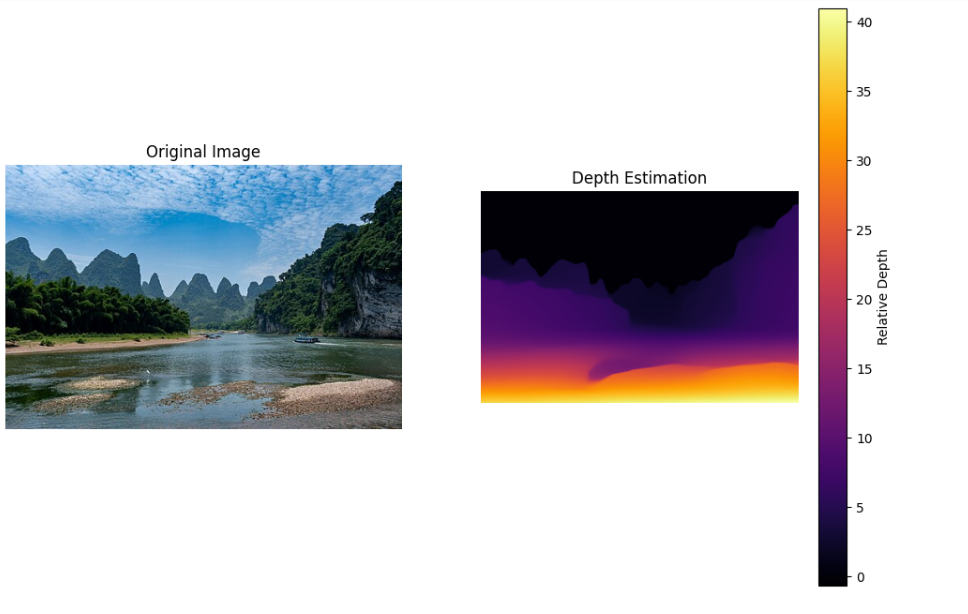
⚠️ Important Note: Regarding the counterintuitive phenomenon of depth map colors You may find that in the generated depth map, the closer objects have brighter colors (higher values), while the farther objects have darker colors (lower values).
- This is because the model outputs “Inverse Depth” (
). - Sky/remote mountains: At infinite distance,
, so it is black (0). - Nearby objects: At very small distances, the small denominator results in high values, so it is bright yellow.
- Memory tip: “The closer and brighter, the farther and darker.”
IV. Environment Configuration
To run the above code, you need to install the PyTorch, Transformers, and SAM libraries.
- Download the SAM model weights (ViT-H)
bash# 文件大小约为 2.4 GB
wget 'https://dl.fbaipublicfiles.com/segment_anything/sam_vit_h_4b8939.pth'
(https://dl.fbaipublicfiles.com/segment_anything/sam_vit_h_4b8939.pth)
- Install Python dependencies
bashpip install git+https://github.com/facebookresearch/segment-anything.git
(https://github.com/facebookresearch/segment-anything.git)
pip install transformers opencv-python matplotlib torch torchvision
5. Batch processing flow code (automatic processing script)
If a batch of images requires automatic generation of Mask and depth maps (without interactive clicking), use the following script. Optimization notes: The file save path has been fixed to ensure that results for “only depth”, “only SAM”, and “both” are saved separately without overwriting each other.
pythonimport torch
import numpy as np
from PIL import Image
import matplotlib.pyplot as plt
import os
import time

# --- 模型导入 ---
from transformers import DPTImageProcessor, DPTForDepthEstimation
from segment_anything import sam_model_registry, SamAutomaticMaskGenerator

device = "cuda" if torch.cuda.is_available() else "cpu"
print(f"使用设备: {device}")

# --- 辅助函数:显示并保存结果 ---
def save_visualization(image, mask_or_depth, mode="sam", output_name="output.png"):
    plt.figure(figsize=(12, 8))

    if mode == "depth":
        # 并排显示:原图 vs 深度图
        plt.subplot(1, 2, 1)
        plt.imshow(image)
        plt.title("Original Image")
        plt.axis('off')

        plt.subplot(1, 2, 2)
        plt.imshow(mask_or_depth, cmap="inferno")
        plt.colorbar(label="Relative Depth")
        plt.title("Depth Estimation")
        plt.axis('off')

    elif mode == "sam":
        # 叠加显示 SAM Mask
        plt.imshow(image)
        ax = plt.gca()
        ax.set_autoscale_on(False)

        # 将 Mask 按面积排序,大的在下,小的在上
        sorted_anns = sorted(mask_or_depth, key=(lambda x: x['area']), reverse=True)

        img_overlay = np.ones((sorted_anns[0]['segmentation'].shape[0], sorted_anns[0]['segmentation'].shape[1], 4))
        img_overlay[:,:,3] = 0 # 透明度初始化

        for ann in sorted_anns:
            m = ann['segmentation']
            color_mask = np.concatenate([np.random.random(3), [0.4]]) # 随机颜色 + 0.4 透明度
            img_overlay[m] = color_mask
        ax.imshow(img_overlay)
        plt.title("SAM Segmentation")
        plt.axis('off')

    plt.savefig(output_name, bbox_inches='tight')
    plt.close()
    print(f"结果已保存至: {output_name}")

# --- 主流程 ---
def main():
    # 1. 路径设置
    rgb_path = "image_d61af3.jpg" # 替换为图片
    sam_ckpt = "sam_vit_h_4b8939.pth"

    if not os.path.exists(rgb_path):
        print(f"错误: 找不到图片 {rgb_path}")
        return

    # 加载图片
    image_pil = Image.open(rgb_path).convert("RGB")
    image_np = np.array(image_pil)

    # ---------------------------------------------------------
    # 任务 1: 深度估计 (Depth Estimation)
    # ---------------------------------------------------------
    print("\n--- [1/2] 正在运行深度估计 ---")
    try:
        depth_processor = DPTImageProcessor.from_pretrained("Intel/dpt-large")
        depth_model = DPTForDepthEstimation.from_pretrained("Intel/dpt-large").to(device)

        inputs = depth_processor(images=image_pil, return_tensors="pt").to(device)
        with torch.no_grad():
            outputs = depth_model(**inputs)
            predicted_depth = outputs.predicted_depth

        # 插值还原尺寸
        prediction = torch.nn.functional.interpolate(
            predicted_depth.unsqueeze(1),
            size=image_pil.size[::-1],
            mode="bicubic",
            align_corners=False,
        ).squeeze().cpu().numpy()

        # 保存深度图结果
        save_visualization(image_np, prediction, mode="depth", output_name="result_01_depth.png")

    except Exception as e:
        print(f"深度估计失败: {e}")

    # ---------------------------------------------------------
    # 任务 2: SAM 全图分割 (Segment Anything)
    # ---------------------------------------------------------
    print("\n--- [2/2] 正在运行 SAM 分割 ---")
    if os.path.exists(sam_ckpt):
        try:
            sam = sam_model_registry["vit_h"](../../04-具身场景的计算机视觉、3D重建/checkpoint=sam_ckpt).to(device)
            mask_generator = SamAutomaticMaskGenerator(sam)
            masks = mask_generator.generate(image_np)

            # 保存 SAM 结果 (注意文件名不同,避免覆盖)
            save_visualization(image_np, masks, mode="sam", output_name="result_02_sam_seg.png")

        except Exception as e:
            print(f"SAM 分割失败: {e}")
    else:
        print(f"跳过 SAM: 未找到权重文件 {sam_ckpt}")

if __name__ == "__main__":
    main()