Part 1: The Principle of Attention Heatmap
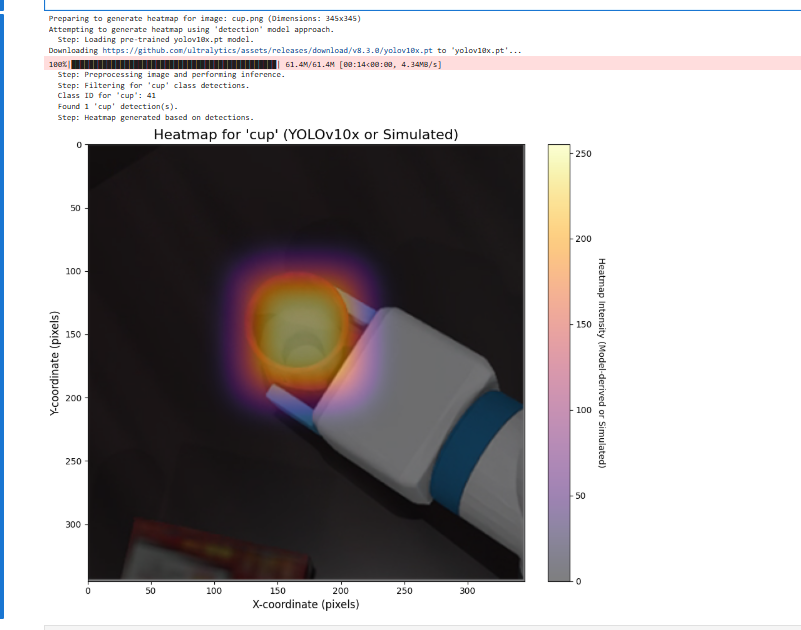
The “heatmap” generated by YOLO earlier is actually a “detection confidence map”, which shows which areas the model detects objects in and their confidence levels. However, the “attention heatmap” mentioned now, in academic terms, usually refers to Class Activation Mapping (CAM) or its improved version Grad-CAM. What it reveals is a deeper issue: In order to make a specific classification decision, which area of the image does the model’s “attention” focus on?
This is a powerful model interpretability (XAI) technique that allows us to “see through” the “thinking process” of neural networks.
1. Core idea: Where is the model “looking”?
Imagine looking at a picture and judging that “this is a cat.” The brain unconsciously focuses its attention on key features such as the cat’s ears, whiskers, eyes, and paws. The attention heatmap attempts to visualize the “focus point” of the neural network doing the same thing.
2. How it works (using Grad-CAM as an example; it is more general)
To understand its principle, we need to briefly review the structure of Convolutional Neural Networks (CNN):
-
Convolutional Layers: The first half of the network consists of multiple convolutional layers. These layers are responsible for extracting features from images, ranging from basic edges and colors to more advanced contours and components (such as eyes and wheels). The later convolutional layers extract more abstract and advanced features.
-
Feature Maps: The output of each convolutional layer is a set of “feature maps”. You can think of each feature map as a “detector” that specifically looks for certain features. For example, one feature map may activate all “circular” regions in the image, while another may activate all “sharp ears” regions.
-
Final Decision: Finally, the model combines all these advanced feature maps to make a final classification judgment (for example, “The probability that this image is a ‘cup’ is 98%”).
The “magic” of Grad-CAM is that it can calculate which feature maps contribute the most to the final decision of “the cup”.
Its steps can be simplified as follows:
-
Select the target layer: Usually, the last convolutional layer is chosen, as it contains the most rich advanced semantic information used for decision-making.
-
Calculate the gradient: The model performs one forward pass and obtains the prediction score for the “cup” class. Then, it calculates the gradient of this score relative to each pixel in the target layer we selected. This gradient intuitively shows: “If I slightly change the value of this pixel, how much will the ‘cup’ prediction score change?” The larger the gradient, the more important that pixel is for the final decision.
-
Calculate weights: Compute the average gradient of each feature map to obtain the “importance weight” of this feature map for the “cup” decision.
-
Generate heatmap: Add up all feature maps according to their respective “importance weights”. Important feature maps (such as “handle detector” and “circular cup mouth detector”) will have higher weights, while irrelevant feature maps will have very low weights. When combined, this creates highlights in the original image in areas related to the cup, which is the attention heatmap.
Summary: The Grad-CAM attention heatmap analyzes gradients to identify the feature regions that contribute most to the final classification result, and visualizes them, thereby revealing the “attention focus” of the model.
Part 2: The Principle of YOLOv10
The core goal of YOLOv10 is to achieve extreme end-to-end real-time performance while maintaining high accuracy. Its main innovation lies in solving a key bottleneck that traditional YOLO models rely on: NMS (Non-Maximum Suppression).
1. Pain point: Why is NMS a problem?
In previous YOLO versions, the model generates a large number of overlapping bounding boxes during inference. NMS is a post-processing step whose task is:
-
View all highly overlapping detection boxes for the same object.
-
Only keep the one with the highest confidence level, and delete the others.
Although this process is effective, it has two major drawbacks:
-
Computing overhead: NMS itself requires computation, which increases inference latency.
-
Non-end-to-end: It is an independent post-processing module, making the entire detection process not a “end-to-end” system (where input and output are processed in one step), which makes it difficult to deploy and optimize.
2. The core innovation of YOLOv10: Say goodbye to NMS
YOLOv10 uses the Consistent Dual Assignments policy to teach the model to suppress redundant detection boxes during training, thus eliminating the need for NMS during inference.
-
Dual allocation: During training, for a real object, traditional YOLO usually assigns only one or a few positive samples (prediction boxes). YOLOv10 uses two allocation policies simultaneously:
-
One-to-One Matching: It forces a branch to generate a optimal and high-quality prediction box for each object. The goal of this branch is to achieve the highest detection accuracy.
-
One-to-Many Matching: Allows another branch to generate multiple prediction boxes for each object, just like traditional YOLO, providing richer supervision signals and helping the model converge faster.
-
Consistency Supervision: The model is trained to ensure that the best prediction box produced by the “one-to-one” branch is as consistent as possible with the highest-scoring prediction box in the “one-to-many” branch.
In this way, the model learns to independently select the “best representative” during training, and only outputs high-quality boxes during inference. Thus, there is no need for NMS for filtering anymore.
3. Other Key Designs
In addition to being NMS-free, YOLOv10 also adopts a series of “efficiency-precision-driven design from the whole” approaches:
-
Lightweight Classification Head: It is found that in detection tasks, the difficulty of classification is much lower than that of localization. Therefore, the structure of the classification head is greatly simplified, reducing the computational load.
-
Spatial-Channel Decoupled Downsampling: By separating the processing of spatial resolution and channel number when reducing the feature map resolution, information can be preserved more effectively.
-
Large-Kernel Convolutions: Using larger convolution kernels in the deep layers of the network can effectively expand the field of view and improve model performance, while causing minimal overhead on modern computing devices.
Summary: YOLOv10 achieves end-to-end real-time object detection with lower latency than YOLOv8/v9, at the same accuracy, through an innovative NMS-free training policy and a series of sophisticated structural optimizations.
Okay, let’s continue to complete the comparison of this YOLO version.
Part Three: Comparison of Different YOLO Versions
The development history of the YOLO series is a story of the evolution of target detection, aiming for faster, stronger, and more user-friendly features.
| Version | Approx. Year | Core Idea / Main Contribution | Summary of Features |
|---|---|---|---|
| YOLOv1 - v3 | 2015 - 2018 | Foundational Era: Pioneering Single-Stage Detection | v1: Treats detection as a regression problem, offering extremely high speed but average accuracy. v2: Introduces Anchor Boxes, significantly improving accuracy and recall rate. v3: Introduces multi-scale prediction and the stronger Darknet-53 backbone, becoming a classic version. |
| YOLOv4 / v5 | 2020 | Optimization and Engineering Era | v4: Proposes “Bag of Freebies” and “Bag of Specials”, systematically integrating almost all effective tricks at that time; it is a “comprehensive collection”. v5: Introduced by the Ultralytics team, based on PyTorch, highly focused on engineering practices, usability, and deployment. It offers a full range of models from n to x, becoming the most widely used version. |
| YOLOv6 / v7 / YOLOX | 2021 - 2022 | Anchor-Free Era | These models began exploring and shifting to anchor-free design, simplifying the training process. YOLOX: Introduces SimOTA dynamic label assignment strategy. YOLOv6: Introduces the more efficient RepVGG structure. YOLOv7: Proposes the extended E-ELAN efficient layer aggregation network, achieving an excellent balance between accuracy and speed. |
| YOLOv8 | 2023 | New Benchmarks and Comprehensive Unification | Fully重构 based on v5 by Ultralytics, becoming a new industry benchmark. Also adopts anchor-free design and introduces the new C2f module, further enhancing performance. Most importantly, it unifies multiple tasks such as detection, segmentation, and pose estimation under one framework, making it extremely flexible and powerful. |
| YOLOv9 | 2024 | Information Bottleneck and Gradient Optimization | Addresses the problem of information loss in deep networks with a new concept. Core Contribution: Introduces Programmable Gradient Information (PGI) and the General Efficient Layer Aggregation Network (GELAN). PGI aims to solve the issue of information dilution during transmission in deep networks, enabling the model to learn more complete features. |
| YOLOv10 | 2024 | End-to-End Era Without NMS | Achieves true end-to-end real-time object detection; its core is the removal of the NMS post-processing step that has been relied on for a long time. Core Contribution: By using the “Consistency Dual Assignment” strategy during training, the model itself has the ability to suppress redundant boxes, thus eliminating the need for NMS during inference and significantly reducing latency. |
%pip install ultralytics opencv-python
pythonimport matplotlib.pyplot as plt
import numpy as np
from PIL import Image, ImageDraw # 用于图像处理和在占位符上绘制文本
import matplotlib.colors
import cv2 # OpenCV 用于高斯模糊

# 尝试导入YOLO模型库
try:
    from ultralytics import YOLO
    YOLO_AVAILABLE = True
except ImportError:
    print("Warning: 'ultralytics' library not found. YOLO model functionality will be unavailable, falling back to simulated heatmap.")
    print("Please install the required libraries with 'pip install ultralytics opencv-python'.")
    YOLO_AVAILABLE = False

# --- 辅助函数:生成模拟热力图 (用作占位符或回退) ---
def generate_simulated_heatmap(image_width, image_height, object_center_x, object_center_y, object_width, object_height, max_intensity=255, falloff_rate=0.0005):
    """
    Generates a simulated heatmap for an object.
    Intensity is highest at the object's center and falls off.
    This function serves as a placeholder for actual model output or as a fallback.
    """
    y, x = np.ogrid[:image_height, :image_width]
    std_x = object_width / 2
    std_y = object_height / 2
    std_x = max(std_x, 1) # Avoid division by zero
    std_y = max(std_y, 1) # Avoid division by zero

    dist_sq = (((x - object_center_x)**2) / (2 * std_x**2)) + \
              (((y - object_center_y)**2) / (2 * std_y**2))
    heatmap = max_intensity * np.exp(-dist_sq * falloff_rate * 10)
    return np.clip(heatmap, 0, max_intensity)

# --- 函数:从真实模型获取热力图 ---
def get_heatmap_from_actual_model(image_np, model_type='detection', object_class_name='cup'):
    """
    Attempts to get a heatmap from a real model.
    Uses YOLOv10x if available for object detection and heatmap generation.
    Otherwise, falls back to a simulated heatmap.

    Args:
        image_np (numpy.ndarray): Input image as a NumPy array (H, W, C).
        model_type (str): Currently only 'detection' is supported.
        object_class_name (str): Target class name for detection (e.g., 'cup').

    Returns:
        numpy.ndarray: Generated heatmap (2D array).
    """
    print(f"Attempting to generate heatmap using '{model_type}' model approach.")
    image_height, image_width = image_np.shape[:2]

    if model_type == 'detection' and YOLO_AVAILABLE:
        try:
            model_name = 'yolov10x.pt' # 尝试YOLOv10x, 这是YOLOv10系列中较大的模型
            # model_name = 'yolov9c.pt' # 可以改回YOLOv9c或其他模型进行测试
            # model_name = 'yolov8s.pt'
            print(f"  Step: Loading pre-trained {model_name} model.")
            model = YOLO(model_name)
            print("  Step: Preprocessing image and performing inference.")
            # 可以调整推理参数,例如置信度阈值 conf
            results = model(image_np, verbose=False, conf=0.25) # verbose=False, 增加conf参数示例

            heatmap = np.zeros((image_height, image_width), dtype=np.float32)
            detections_found = 0

            print(f"  Step: Filtering for '{object_class_name}' class detections.")
            target_cls_id = -1
            if hasattr(model, 'names') and isinstance(model.names, dict):
                for cls_id, name_val in model.names.items(): # Renamed 'name' to 'name_val' to avoid conflict
                    if name_val == object_class_name:
                        target_cls_id = cls_id
                        break
            else:
                print(f"  Warning: Model class names (model.names) not available in the expected format. Cannot map '{object_class_name}' to class ID.")


            if target_cls_id == -1:
                print(f"  Warning: Class '{object_class_name}' not found in model's classes or model.names not accessible. Will display an empty heatmap.")
            else:
                print(f"  Class ID for '{object_class_name}': {target_cls_id}")

                for result in results:
                    for box in result.boxes:
                        cls = int(box.cls)
                        conf = float(box.conf)
                        if cls == target_cls_id:
                            detections_found += 1
                            x1, y1, x2, y2 = map(int, box.xyxy[0])
                            # 使用置信度作为热度值填充矩形
                            cv2.rectangle(heatmap, (x1, y1), (x2, y2), conf, thickness=cv2.FILLED)

                if detections_found > 0:
                    print(f"  Found {detections_found} '{object_class_name}' detection(s).")
                    # 调整高斯模糊的核大小,可以根据效果调整
                    # 较大的核会产生更模糊(弥散)的热力图
                    blur_kernel_size = (101, 101) # 可以尝试减小如 (51,51) 或增大
                    heatmap = cv2.GaussianBlur(heatmap, blur_kernel_size, 0)
                    if heatmap.max() > 0:
                        heatmap = (heatmap / heatmap.max()) * 255 # 归一化到0-255
                    print("  Step: Heatmap generated based on detections.")
                    return heatmap.astype(np.uint8)
                else:
                    print(f"  No '{object_class_name}' detections found with current settings. Will display an empty heatmap.")
                    return heatmap # Return empty heatmap

        except Exception as e:
            print(f"  Error during YOLO model operation: {e}")
            print("  Fallback: Using simulated heatmap.")
            # Fallthrough to simulated heatmap generation

    # ----- Fallback to simulated heatmap if model is unavailable or an error occurs -----
    print("  Fallback: Using simulated heatmap as a placeholder.")
    center_x_ratio = 0.47
    center_y_ratio = 0.45
    width_ratio = 0.20
    height_ratio = 0.30

    obj_center_x_abs = int(center_x_ratio * image_width)
    obj_center_y_abs = int(center_y_ratio * image_height)
    obj_width_abs = int(width_ratio * image_width)
    obj_height_abs = int(height_ratio * image_height)

    simulated_heatmap = generate_simulated_heatmap(
        image_width, image_height,
        obj_center_x_abs, obj_center_y_abs,
        obj_width_abs, obj_height_abs
    )
    return simulated_heatmap

def plot_image_with_heatmap(image_path, heatmap_data, title="Object Detection Heatmap", alpha=0.6, cmap_name='inferno'):
    """
    Overlays a heatmap on an image and displays it. All plot text is in English.
    """
    try:
        img = Image.open(image_path).convert('RGB')
    except FileNotFoundError:
        print(f"Error: Image file not found at {image_path}.")
        img = Image.new('RGB', (500, 500), color = (128, 128, 128))
        draw = ImageDraw.Draw(img)
        draw.text((50, 230), "Image not found.\nPlease use a valid path.", fill=(255,0,0))
        heatmap_data = np.zeros((500, 500))
        print("Displaying placeholder image and empty heatmap.")

    img_np = np.array(img)

    fig, ax = plt.subplots(1, 1, figsize=(10, 8))
    ax.imshow(img_np)

    if heatmap_data.max() > 0:
        if heatmap_data.shape[0] != img_np.shape[0] or heatmap_data.shape[1] != img_np.shape[1]:
            print(f"Warning: Heatmap dimensions ({heatmap_data.shape}) differ from image dimensions ({img_np.shape[:2]}). Resizing heatmap.")
            heatmap_pil = Image.fromarray(heatmap_data.astype(np.uint8))
            heatmap_resized_pil = heatmap_pil.resize((img_np.shape[1], img_np.shape[0]), Image.BICUBIC)
            heatmap_data_resized = np.array(heatmap_resized_pil)
            cax = ax.imshow(heatmap_data_resized, cmap=plt.get_cmap(cmap_name), alpha=alpha, extent=(0, img_np.shape[1], img_np.shape[0], 0))
        else:
            cax = ax.imshow(heatmap_data, cmap=plt.get_cmap(cmap_name), alpha=alpha, extent=(0, img_np.shape[1], img_np.shape[0], 0))

        cbar = fig.colorbar(cax, ax=ax, orientation='vertical', fraction=0.046, pad=0.04)
        cbar.set_label('Heatmap Intensity (Model-derived or Simulated)', rotation=270, labelpad=15)
    else:
        print("Heatmap is empty (no detections or model not run), not overlaying.")

    ax.set_title(title, fontsize=16)
    ax.set_xlabel("X-coordinate (pixels)", fontsize=12)
    ax.set_ylabel("Y-coordinate (pixels)", fontsize=12)
    ax.axis('on')
    plt.tight_layout()
    plt.show()

if __name__ == '__main__':
    # --- Configuration ---
    image_file_path = 'cup.png' # 默认使用提到识别有困难的俯视图图像
    # image_file_path = 'image_2d8ceb.png' # 之前可以识别的图像
    # image_file_path = 'image_2d208d.jpg' # 另一张测试图像

    target_object_name = 'cup'

    # --- 加载图像 ---
    try:
        img_for_model = Image.open(image_file_path).convert('RGB')
        img_np_for_model = np.array(img_for_model)
        img_height, img_width = img_np_for_model.shape[:2]
        print(f"Preparing to generate heatmap for image: {image_file_path} (Dimensions: {img_width}x{img_height})")
    except FileNotFoundError:
        print(f"Fatal Error: Image file '{image_file_path}' not found. Cannot proceed.")
        img_np_for_model = np.zeros((500, 500, 3), dtype=np.uint8)
        img_width, img_height = 500, 500


    # --- Generate Heatmap ---
    heatmap_output = get_heatmap_from_actual_model(
        img_np_for_model,
        model_type='detection',
        object_class_name=target_object_name
    )

    # --- Plot Image with Heatmap ---
    plot_title = f"Heatmap for '{target_object_name}' (YOLOv10x or Simulated)"
    plot_image_with_heatmap(
        image_path=image_file_path,
        heatmap_data=heatmap_output,
        title=plot_title,
        alpha=0.5,
        cmap_name='inferno'
    )

    if not YOLO_AVAILABLE:
        print("\nReminder: To use the actual YOLO model for heatmap generation, ensure 'ultralytics' and 'opencv-python' are installed.")
        print("You can install them via 'pip install ultralytics opencv-python'.")
        print("Currently displaying a simulated heatmap.")