
Habitat-sim Environment Setup and Dataset Introduction
Habitat is an embodied AI simulation platform open source by Meta AI, specifically designed for research on navigation, interaction, and decision-making of agents in indoor environments. It consists of two complementary components: Habitat-Sim (simulation engine) and Habitat-Lab (algorithm framework). The former handles underlying physical and visual simulation, while the latter is responsible for high-level task definition, algorithm development, and evaluation.
1. Introduction to Habitat-sim Features
1. High-fidelity Rendering
-
Supports physically based rendering to generate realistic RGB images, depth maps, and semantic segmentation maps.
-
Supports custom sensors (such as cameras, lidar, IMU), with configurable view angle, resolution, and frame rate.
2. Efficient Scene Loading
-
Native support for GLB/GLTF format, compatible with mainstream scene datasets (Matterport3D, Gibson, Replica, HM3D).
-
Optimized the memory usage and loading speed in large-scale scenarios, making it suitable for batch training.
3. Lightweight Physical Simulation
-
Supports rigid body physics and joint motion (such as robotic arm manipulation), meeting the interaction requirements between agents and scene objects.
-
Low latency and GPU acceleration; a single GPU can run thousands of parallel simulation environments simultaneously.
4. Cross-platform and Extensibility
-
Supports Linux/Windows, and is compatible with CUDA.
-
Provides C++ core + Python bindings, allowing customization of physical rules, sensors, or rendering logic.
II. Habitat-sim Environment Setup
Create a conda environment (Recommended on ubuntu22.04 or ubuntu24.04)
pythonconda create -n habitat python=3.9 cmake=3.14.0
conda activate habitat
When installing the habitat environment using conda, we can replace the following habitat-sim with a version format such as habitat-sim=0.2.5 according to the reproduction requirements of the paper or our own needs. habitat-sim=0.2.5 is recommended. This tutorial is written using version 0.2.5. If version 0.1 or another version is used, function call errors or dataset mismatch issues may occur.
If you want to reproduce the experiment for learning purposes, just run the first command in the list below. If you need to reproduce another paper, modify it according to the first command using the second command
- If you are running on your own computer or the server is nearby with a monitor, it is recommended to install habitat-sim with physical simulation.
pythonconda install habitat-sim=0.2.5 withbullet -c conda-forge -c aihabitat
conda install habitat-sim withbullet -c conda-forge -c aihabitat
- If running on your own computer or the server is nearby with a monitor, you can also install habitat-sim without physical simulation.
pythonconda install habitat-sim=0.2.5 -c conda-forge -c aihabitat
conda install habitat-sim -c conda-forge -c aihabitat
- When running on a rented server with a computer without a monitor, use the headless habitat-sim (with physical simulation installation).
pythonconda install habitat-sim=0.2.5 withbullet headless -c conda-forge -c aihabitat
conda install habitat-sim withbullet headless -c conda-forge -c aihabitat
- When running on a rented server with a computer without a monitor, use the headless habitat-sim (no physical simulation installation).
pythonconda install habitat-sim=0.2.5 -c conda-forge -c aihabitat
conda install habitat-sim -c conda-forge -c aihabitat
Given the high likelihood of renting servers, the test only requires using example.py. Before that, some 3d assets need to be downloaded, including a 3d scene and sample objects. A detailed introduction to the dataset scene will be provided in detail in Part 3. (The path/to in the command can be changed to data/ or replaced with a different path.)
Download 3D testing scenarios
pythonpython -m habitat_sim.utils.datasets_download --uids habitat_test_scenes --data-path /path/to/data/
Download example object
pythonpython -m habitat_sim.utils.datasets_download --uids habitat_example_objects --data-path /path/to/data/
example.py Test
pythonpython /path/to/habitat-sim/examples/example.py --scene /path/to/data/scene_datasets/habitat-test-scenes/skokloster-castle.glb
If there is a monitor, you can run the following code for testing.
pythonhabitat-viewer /path/to/data/scene_datasets/habitat-test-scenes/skokloster-castle.glb
#或者使用
python examples/viewer.py --scene /path/to/data/scene_datasets/habitat-test-scenes/skokloster-castle.glb
III. Introduction to the Habitat-sim Dataset Scenario
The dataset used in the tutorial can be downloaded without registration, and Part Three serves only as an introduction and a foundation for reproducing subsequent latest algorithms.
In subsequent advanced algorithm implementations, we often see references to dataset usage for the train and val scenarios of hm3d in some projects. For environments with habitat-sim=0.2.5 or 0.2.x versions, we typically use the HM3D v0.2 dataset. You can refer to this website to download the relevant dataset: https://github.com/matterport/habitat-matterport-3dresearch?tab=readme-ov-file。
Since the habitat requires authorization, we need to register and obtain it. The process is simple. Go to the following page: https://my.matterport.com/settings/account/devtools?organization=Msg6zBCkcPg, register and send your verification email address. Then, we can obtain our API from API Token Management under Developer Tools on this page.
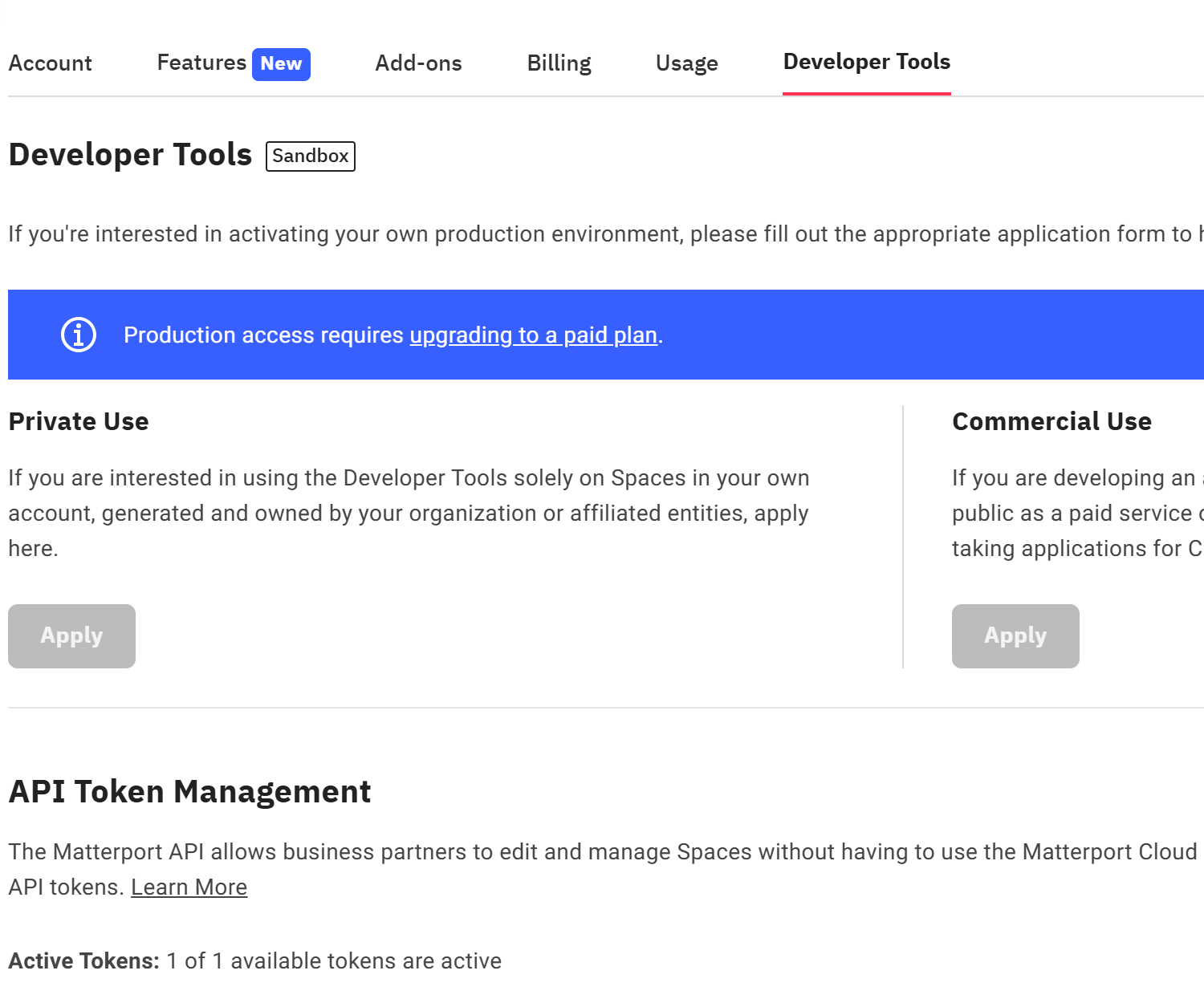
At this point, we can use the following command to obtain the dataset we need. For <api-token-id> and <api-token-secret>, fill in the API just obtained. (For now, do not download this dataset; just understand it. This dataset is not used in the tutorial and is only used for later reproduction of the paper reference)
pythonpython -m habitat_sim.utils.datasets_download --username <api-token-id> --password <api-token-secret> --uids hm3d_minival_v0.2
For the dataset_download.py file in the habitat-sim project, to download hm3d-train-habitat-v0.2 or other datasets via API, refer to the uids format in the file.
pythondata_groups.update(
{
        f"hm3d_val_{version}": [
            f"hm3d_val_habitat_{version}",
            f"hm3d_val_configs_{version}",
            f"hm3d_val_semantic_annots_{version}",
            f"hm3d_val_semantic_configs_{version}",
        ],
    }
)
data_groups.update(
    {
        f"hm3d_train_{version}": [
            f"hm3d_train_habitat_{version}",
            f"hm3d_train_configs_{version}",
            f"hm3d_train_semantic_annots_{version}",
            f"hm3d_train_semantic_configs_{version}",
        ],
    }
)
data_groups.update(
    {
        f"hm3d_minival_{version}": [
            f"hm3d_minival_habitat_{version}",
            f"hm3d_minival_configs_{version}",
            f"hm3d_minival_semantic_annots_{version}",
            f"hm3d_minival_semantic_configs_{version}",
        ]
    }
)
data_groups.update(
    {
        f"hm3d_semantics_{version}": [
            f"hm3d_example_semantic_annots_{version}",
            f"hm3d_example_semantic_configs_{version}",
            f"hm3d_val_semantic_annots_{version}",
            f"hm3d_val_semantic_configs_{version}",
            f"hm3d_train_semantic_annots_{version}",
            f"hm3d_train_semantic_configs_{version}",
            f"hm3d_minival_semantic_annots_{version}",
            f"hm3d_minival_semantic_configs_{version}",
        ]
    }
)
For example, you can use the following command to download hm3d-train-habitat-v0.2.
pythonpython -m habitat_sim.utils.datasets_download --username <api-token-id> --password <api-token-secret> --uids hm3d_train_habitat_v0.2
Other downloaded assets can also be found in the datasets_download.py file. For example, the habitat_test_scenes test environment and habitat_example_objects that were just downloaded are included. The code blocks in datasets_download.py are as follows:
python"habitat_test_scenes": {
    "source": "https://huggingface.co/datasets/ai-habitat/habitat_test_scenes.git",
    "link": data_path + "scene_datasets/habitat-test-scenes",
    "version": "main",
}
python"habitat_example_objects": {
    "source": "http://dl.fbaipublicfiles.com/habitat/objects_v0.2.zip",
    "package_name": "objects_v0.2.zip",
    "link": data_path + "objects/example_objects",
    "version": "0.2",
}