
git push
To https://github.com/datawhalechina/ai-hardware-robotics
! [rejected] main -> main (fetch first)
error: failed to push some refs to 'https://github.com/datawhalechina/ai-hardware-robotics'
hint: Updates were rejected because the remote contains work that you do not
hint: have locally. This is usually caused by another repository pushing to
hint: the same ref. If you want to integrate the remote changes, use
hint: 'git pull' before pushing again.
hint: See the 'Note about fast-forwards' in 'git push --help' for details.
- 现在远端的 main 比你本地的 origin/main 更新,所以 push 时被拒绝;你本地已经提交的那一个 commit 需要先把远端的新提交合并/变基进来。
- 建议顺序:
- git fetch origin:先把远端最新状态抓到本地。
- (可选)git log --oneline --graph --decorate origin/main…main 看看你新增的提交与远端提交的差异。
- git pull --rebase origin main(或 git pull):把远端的新提交整合到本地;若有冲突按提示解决后 git add <冲突文件>,再 git rebase --continue。
- 正常 git push。
- 如果你改用 git pull(默认 merge),也可以;只是会多出一个 merge commit。
- 处理完冲突并完成 rebase/merge 后再 push,就不会再被拒绝。
git pull时,遇到
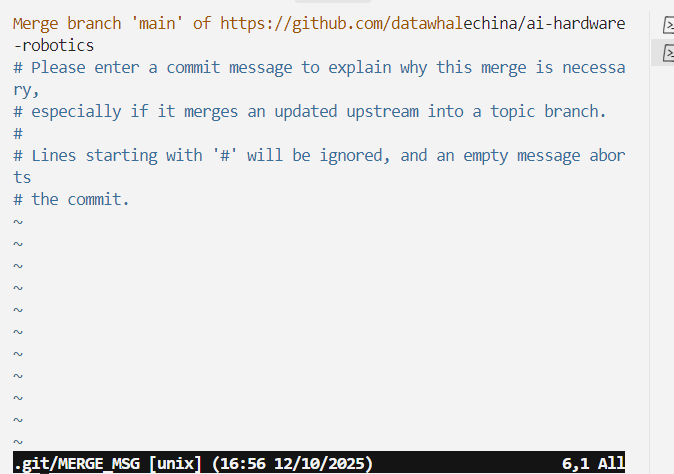
- 我们刚刚执行 git pull,Git 发现需要生成一个 merge commit,于是启动默认编辑器(当前是 Vim)让你填写这次合并的提交说明。窗口里显示的内容是默认的 merge message:Merge branch ‘main’ of https://github.com/datawhalechina/ai-hardware-robotics,后面的 # 开头的行只是注释,最终提交时会被忽略。
- 如果接受默认信息,不需要改什么:在 Vim 里按 Esc,然后输入 :wq 回车保存并退出。编辑器关闭后,Git 会创建这个 merge commit,git pull 就完成了。
- 如果想换用 rebase 避免 merge commit,可在这次操作完成或中止后使用 git pull --rebase origin main。当前窗口关掉后再根据需要选择。