
git push
To https://github.com/datawhalechina/ai-hardware-robotics
! [rejected] main -> main (fetch first)
error: failed to push some refs to 'https://github.com/datawhalechina/ai-hardware-robotics'
hint: Updates were rejected because the remote contains work that you do not
hint: have locally. This is usually caused by another repository pushing to
hint: the same ref. If you want to integrate the remote changes, use
hint: 'git pull' before pushing again.
hint: See the 'Note about fast-forwards' in 'git push --help' for details.
- Currently, the main branch on the remote is updated more frequently than the local origin/main branch, so the push is rejected. The commit you have already submitted locally needs to merge or incorporate the new commit from the remote first.
- Recommended order:
- git fetch origin: Get the latest state from the remote into your local repository.
- (Optional) git log --oneline --graph --decorate origin/main…main to check the differences between your new commits and those on the remote.
- git pull --rebase origin main (or git pull): Integrate the new commits from the remote into your local repository. If there are conflicts, follow the instructions to resolve them, then git add
, and finally git rebase --continue. - Then perform a normal git push.
- If you use git pull (default is merge), it’s also acceptable; however, an additional merge commit will be created.
- After resolving the conflicts and completing the rebase/merge, pushing will not be rejected anymore.
When running git pull, an error occurs.
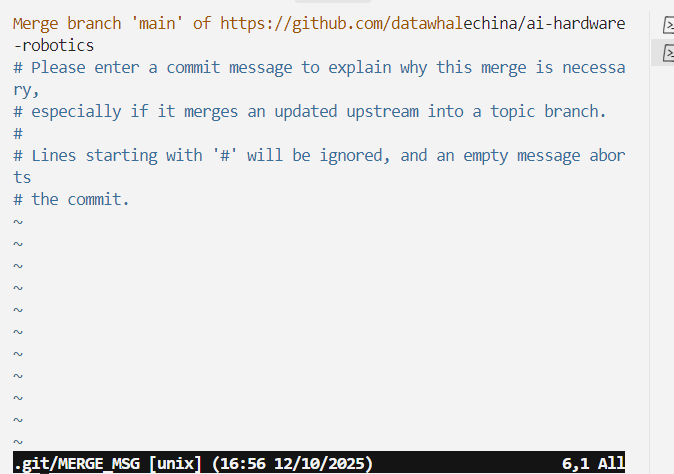
- We just performed a git pull. Git detected that a merge commit was needed, so it launched the default editor (currently Vim) for you to fill in the description of this merge commit. The content displayed in the window is the default merge message: “Merge branch ‘main’ of https://github.com/datawhalechina/ai-hardware-robotics,后面的”. The line starting with # is just a comment and will be ignored during the final commit.
- If you accept the default information, no changes are required: press Esc in Vim, then type :wq and press Enter to save and exit. After the editor closes, Git will create this merge commit, and the git pull is completed.
- If you want to use rebase instead of a merge commit, you can use git pull --rebase origin main after this operation is completed or aborted. Choose the appropriate method after closing the current window.