
(isaac) root@gpufree-container:~/gpufree-data/openpi# uv sync
warning: The `tool.uv.dev-dependencies` field (used in `packages/openpi-client/pyproject.toml`) is deprecated and will be removed in a future release; use `dependency-groups.dev` instead
Resolved 281 packages in 1m 04s
    Updated https://github.com/huggingface/lerobot (0cf8
      Built openpi-client @ file:///root/gpufree-data/op
      Built openpi @ file:///root/gpufree-data/openpi
      Built lerobot @ git+https://github.com/huggingface
      Built tree==0.2.4
      Built antlr4-python3-runtime==4.9.3
      Built evdev==1.9.2
  × Failed to build `av==14.4.0`
  ├─▶ The build backend returned an error
  ╰─▶ Call to
      `setuptools.build_meta:__legacy__.build_wheel`
      failed (exit status: 1)

      [stdout]

      Warning! You are installing from source.
      It is EXPECTED that it will fail. You are
      REQUIRED to use ffmpeg 7.
      You MUST have Cython, pkg-config, and a C
      compiler.

      pkg-config could not find libraries ['avformat',
      'avcodec', 'avdevice', 'avutil', 'avfilter',
      'swscale', 'swresample']

      [stderr]
      Package libavformat was not found in the
      pkg-config search path.
      Perhaps you should add the directory containing
      `libavformat.pc'
      to the PKG_CONFIG_PATH environment variable
      No package 'libavformat' found
      Package libavcodec was not found in the
      pkg-config search path.
      Perhaps you should add the directory containing
      `libavcodec.pc'
      to the PKG_CONFIG_PATH environment variable
      No package 'libavcodec' found
      Package libavdevice was not found in the
      pkg-config search path.
      Perhaps you should add the directory containing
      `libavdevice.pc'
      to the PKG_CONFIG_PATH environment variable
      No package 'libavdevice' found
      Package libavutil was not found in the
      pkg-config search path.
      Perhaps you should add the directory containing
      `libavutil.pc'
      to the PKG_CONFIG_PATH environment variable
      No package 'libavutil' found
      Package libavfilter was not found in the
      pkg-config search path.
      Perhaps you should add the directory containing
      `libavfilter.pc'
      to the PKG_CONFIG_PATH environment variable
      No package 'libavfilter' found
      Package libswscale was not found in the
      pkg-config search path.
      Perhaps you should add the directory containing
      `libswscale.pc'
      to the PKG_CONFIG_PATH environment variable
      No package 'libswscale' found
      Package libswresample was not found in the
      pkg-config search path.
      Perhaps you should add the directory containing
      `libswresample.pc'
      to the PKG_CONFIG_PATH environment variable
      No package 'libswresample' found

      hint: This usually indicates a problem with the
      package or the build environment.
  help: `av` (v14.4.0) was included because `openpi`
        (v0.1.0) depends on `lerobot` (v0.1.0) which
        depends on `av`
bashmkdir -p /root/gpufree-data/openpi/third_party && git clone https://github.com/huggingface/lerobot /root/gpufree-data/openpi/third_party/lerobot && cd /root/gpufree-data/openpi/third_party/lerobot && git checkout 0cf864870cf29f4738d3ade893e6fd13fbd7cdb5
- Clone and modify LeRobot: The specified version of LeRobot was cloned in the
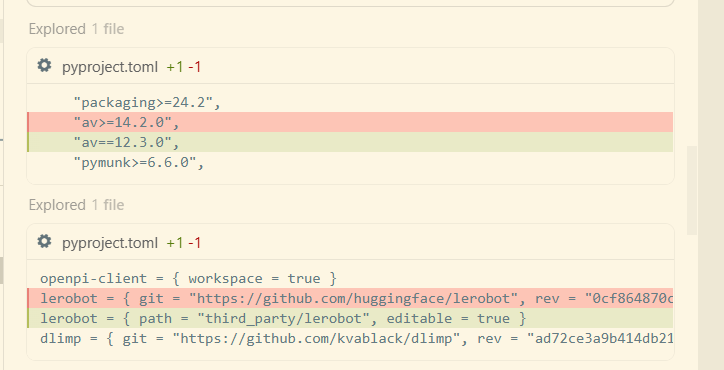
third_party/lerobotdirectory, andav>=14.2.0inpyproject.tomlwas changed to a more compatibleav==12.3.0(this version usually comes with a pre-compiled wheel and does not require FFmpeg 7). - Configure local dependencies:
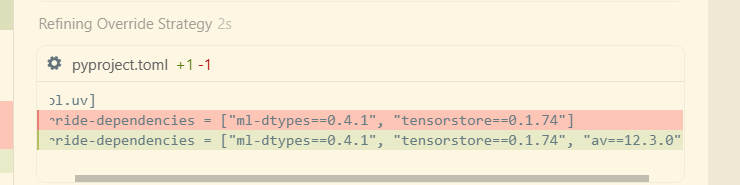
openpi/pyproject.tomlwas modified, the source oflerobotwas changed from a remote repository to a local path, andav==12.3.0was added with a forced override (override). - Successful environment synchronization: By executing
uv sync, all dependencies were successfully installed, and the issue ofavcompilation failure no longer occurred.
Current Status
The environment is ready. Regarding the command you mentioned, there is a small detail: the @gpufree-data/openpi at the end of the command seems to be a shell prompt that got misattached. It needs to be removed when actually running the command.
Complete command recommended for execution:
bashXLA_PYTHON_CLIENT_MEM_FRACTION=0.5 uv run scripts/serve_policy.py policy:checkpoint \
    --policy.config=pi0_fast_droid_jointpos_polaris \
    --policy.dir=gs://openpi-assets/checkpoints/pi0_fast_droid_jointpos
What happens after execution?
- Load configuration: Using
pi0_fast_droid_jointpos_polarisconfiguration, which is the π₀-FAST model for the DROID robotic arm joint control. - Download model:
uvwill automatically download model parameters and resources from Google Cloud Storage and cache them in~/.cache/openpi/openpi-assets/checkpoints/pi0_fast_droid_jointpos. - Start service: A WebSocket inference server is launched locally (default port 8000).
- VRAM control:
XLA_PYTHON_CLIENT_MEM_FRACTION=0.5ensures that the JAX preallocated VRAM does not exceed 50%, leaving enough space for Isaac Sim.
Note: uv still runs in its own created .venv virtual environment, and does not damage or modify your isaac conda environment.