
Linux Network Bandwidth and Connection Testing
Network issues should be categorized into three types of checks: process occupancy, end-to-end throughput, and external network connectivity. This page uses nethogs, iperf3, and curl to identify problems respectively.
View process bandwidth
bashsudo apt-get update
sudo apt-get install -y nethogs
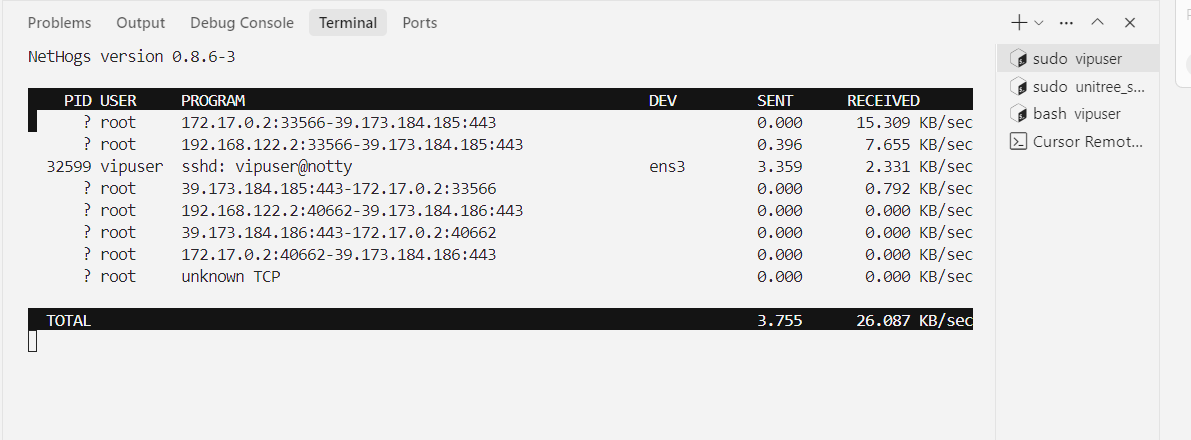
sudo nethogs
The interface will display the real-time upload and download speeds by process. Exit by q.
Test the throughput between two machines
Install iperf3 on both machines first:
bashsudo apt-get install -y iperf3
Server execution:
bashiperf3 -s
Client execution:
bashiperf3 -c <SERVER_IP> -P 4
Verification and Debugging
If the system has not installed curl, execute first:
bashsudo apt-get install -y curl
bashcurl -I --connect-timeout 10 https://github.com
ip route
iperf3 indicates the local network transmission capacity between two machines. curl checks the connection and response of a specified website. nethogs shows the bandwidth used by various processes on the local machine. These three types of results cannot be replaced by each other.
If the domain access fails but the IP works, check the DNS configuration. If iperf3 cannot connect, verify the server port and firewall rules. If only a single process uses all the bandwidth, go back to nethogs to identify the process and then adjust the concurrency level.