
python -V
3.10
python -c "import torch; print(f'Torch: {torch.__version__}'); print(f'CUDA: {torch.version.cuda}')"
Torch: 2.7.0+cu126
CUDA: 12.6

python -c "import torch; print(f'GLIBCXX_USE_CXX11_ABI={torch._C._GLIBCXX_USE_CXX11_ABI}')"
GLIBCXX_USE_CXX11_ABI=True
Based on the detected environment information:
- PyTorch version:
2.7.0+cu128(CUDA 12.8) - Python version:
3.10
The flash-attn version that needs to be downloaded is 2.7.4.post1.
1. Download link
Please visit the Flash Attention GitHub Releases page: https://github.com/Dao-AILab/flash-attention/releases/tag/v2.7.4.post1
2. Target File Name
In the Assets list under this page, please look for files that follow the following naming rules (for CUDA 12.8 and Torch 2.7):
File name prediction:
flash_attn-2.7.4.post1+cu128torch2.7cxx11abiTrue-cp310-cp310-linux_x86_64.whl
Note: If the version of cu128 cannot be found, it may be because the official pre-compiled package for CUDA 12.8 has not been released yet. In this case, you can try to find a version closest to the cu12x series, but if there is no match, an error will occur. If this version is necessary and no pre-compiled package exists, the only option is to compile from source code (which takes a long time).
3. Installation method
Upload the downloaded .whl file to the server, and then run:
bashpip install flash_attn-2.7.4.post1+cu128torch2.7cxx11abiTrue-cp310-cp310-linux_x86_64.whl
4. Verification
After installation, you can use the following command to verify whether it is available:
bashpython -c "import flash_attn; print(flash_attn.__version__)"
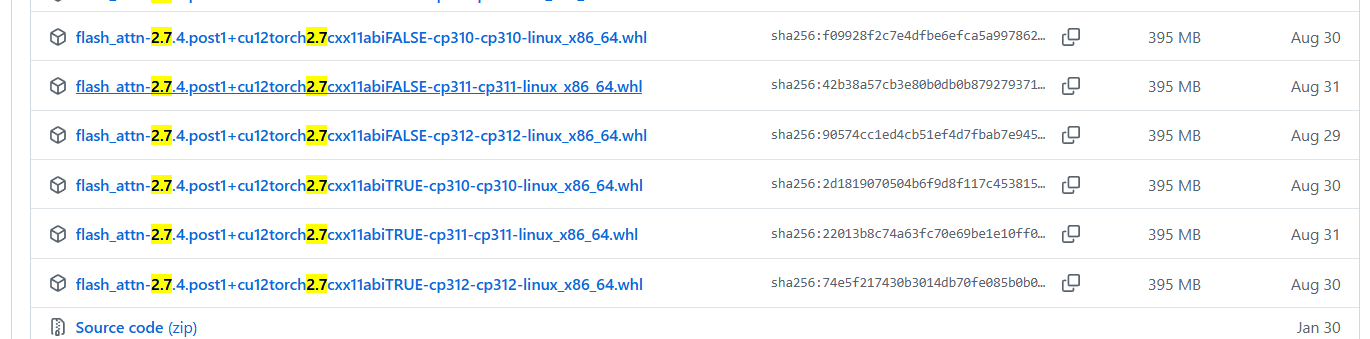
Download this file instead.
flash_attn-2.7.4.post1+cu12torch2.7cxx11abiTRUE-cp310-cp310-linux_x86_64.whl