
(isaac) root@gpufree-container:~/gpufree-data/openpi# uv sync
warning: The `tool.uv.dev-dependencies` field (used in `packages/openpi-client/pyproject.toml`) is deprecated and will be removed in a future release; use `dependency-groups.dev` instead
Resolved 281 packages in 1m 04s
    Updated https://github.com/huggingface/lerobot (0cf8
      Built openpi-client @ file:///root/gpufree-data/op
      Built openpi @ file:///root/gpufree-data/openpi
      Built lerobot @ git+https://github.com/huggingface
      Built tree==0.2.4
      Built antlr4-python3-runtime==4.9.3
      Built evdev==1.9.2
  × Failed to build `av==14.4.0`
  ├─▶ The build backend returned an error
  ╰─▶ Call to
      `setuptools.build_meta:__legacy__.build_wheel`
      failed (exit status: 1)

      [stdout]

      Warning! You are installing from source.
      It is EXPECTED that it will fail. You are
      REQUIRED to use ffmpeg 7.
      You MUST have Cython, pkg-config, and a C
      compiler.

      pkg-config could not find libraries ['avformat',
      'avcodec', 'avdevice', 'avutil', 'avfilter',
      'swscale', 'swresample']

      [stderr]
      Package libavformat was not found in the
      pkg-config search path.
      Perhaps you should add the directory containing
      `libavformat.pc'
      to the PKG_CONFIG_PATH environment variable
      No package 'libavformat' found
      Package libavcodec was not found in the
      pkg-config search path.
      Perhaps you should add the directory containing
      `libavcodec.pc'
      to the PKG_CONFIG_PATH environment variable
      No package 'libavcodec' found
      Package libavdevice was not found in the
      pkg-config search path.
      Perhaps you should add the directory containing
      `libavdevice.pc'
      to the PKG_CONFIG_PATH environment variable
      No package 'libavdevice' found
      Package libavutil was not found in the
      pkg-config search path.
      Perhaps you should add the directory containing
      `libavutil.pc'
      to the PKG_CONFIG_PATH environment variable
      No package 'libavutil' found
      Package libavfilter was not found in the
      pkg-config search path.
      Perhaps you should add the directory containing
      `libavfilter.pc'
      to the PKG_CONFIG_PATH environment variable
      No package 'libavfilter' found
      Package libswscale was not found in the
      pkg-config search path.
      Perhaps you should add the directory containing
      `libswscale.pc'
      to the PKG_CONFIG_PATH environment variable
      No package 'libswscale' found
      Package libswresample was not found in the
      pkg-config search path.
      Perhaps you should add the directory containing
      `libswresample.pc'
      to the PKG_CONFIG_PATH environment variable
      No package 'libswresample' found

      hint: This usually indicates a problem with the
      package or the build environment.
  help: `av` (v14.4.0) was included because `openpi`
        (v0.1.0) depends on `lerobot` (v0.1.0) which
        depends on `av`
bashmkdir -p /root/gpufree-data/openpi/third_party && git clone https://github.com/huggingface/lerobot /root/gpufree-data/openpi/third_party/lerobot && cd /root/gpufree-data/openpi/third_party/lerobot && git checkout 0cf864870cf29f4738d3ade893e6fd13fbd7cdb5
- 克隆并修改 LeRobot:在
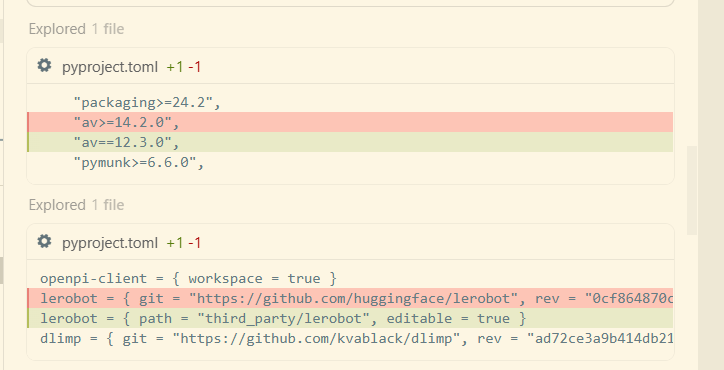
third_party/lerobot目录下克隆了指定版本的 LeRobot,并将其pyproject.toml中的av>=14.2.0修改为更具兼容性的av==12.3.0(这个版本通常有预编译的 wheel,不需要 FFmpeg 7)。 - 配置本地依赖:修改了
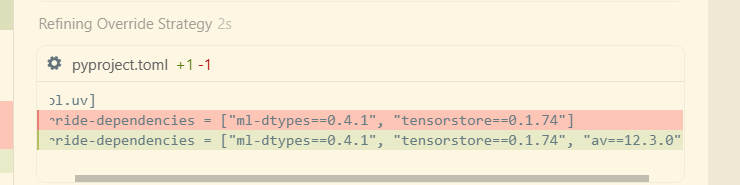
openpi/pyproject.toml,将lerobot的来源从远程仓库改为本地路径,并添加了av==12.3.0的强制覆盖(override)。 - 成功同步环境:执行
uv sync已成功安装所有依赖,没有再出现av编译失败的问题。
现在的状态
环境已经就绪。关于您提到的命令,有一个小细节:命令末尾的 @gpufree-data/openpi 看起来是 shell 提示符(Prompt)被误粘进来了,实际运行命令时需要去掉它。
建议运行的完整命令:
bashXLA_PYTHON_CLIENT_MEM_FRACTION=0.5 uv run scripts/serve_policy.py policy:checkpoint \
    --policy.config=pi0_fast_droid_jointpos_polaris \
    --policy.dir=gs://openpi-assets/checkpoints/pi0_fast_droid_jointpos
执行后会发生什么?
- 加载配置:使用
pi0_fast_droid_jointpos_polaris配置,这是针对 DROID 机械臂联合位置控制的 π₀-FAST 模型。 - 下载模型:
uv会自动从 Google Cloud 存储下载模型参数和资源,并缓存到~/.cache/openpi/openpi-assets/checkpoints/pi0_fast_droid_jointpos。 - 启动服务:在本地启动一个 WebSocket 推理服务器(默认 8000 端口)。
- 显存控制:
XLA_PYTHON_CLIENT_MEM_FRACTION=0.5会确保 JAX 预分配显存不超过 50%,为 Isaac Sim 留出足够的空间。
注意:uv 依然是在它自己创建的 .venv 虚拟环境中运行,完全不会破坏或修改您的 isaac conda 环境。