
AGILE Reproduction Experience: Video Diagnosis, Evaluation Boundaries, and Asset Management
The key to reproduction of AGILE is to connect task registration, scene loading, policy input/output, and evaluation metrics individually. This chapter focuses on T1 speed tracking, G1 speed and altitude control, and G1 grasping and placement scenarios, explaining how to diagnose videos without modification, select weight files, and clean up model copies while maintaining reproducibility. The installation commands and complete videos can be found in the main tutorial .
1. First, determine what each experiment needs to be verified.
| Experiment | Input and Execution Method | Evidence Obtained | What Further Evaluation Is Needed |
|---|---|---|---|
| T1 Speed Tracking | Pre-trained policy and speed command | Policy loading, simulation progression, and short video recording | Multi-round speed error and fall statistics |
| G1 Speed and Altitude Control | Complete checkpoint of cyclic student policy | Policy loading, simulation progression, and short video recording | Altitude error, speed error, and stability statistics |
| G1 Grabbing and Placement Scenario | Sine motion driving | Scene, reference trajectory, and action chain are operational | Upper limb policy for task matching, success criteria, and multi-round evaluation |
Table 1: The evidence range of the three experiments. The ability to run scenarios, the policy’s ability to reason, and the success of tasks are three distinct acceptance criteria. The short videos do not provide grasping success rates, nor do they prove that the policy has been retrained.
The WBC-AGILE version examined for reproduction in June 2026 is 7259792cf10803aab814d101134d493d24c8f22f. The pre-trained directory for this version provides motion control weights, but does not include the upper limb grasping checkpoints corresponding to G1-PickPlace-Tracking-v0. This conclusion is limited to the checked version; whether subsequent versions will be provided should be checked in the official pre-training policy document and file list.
2. When the video is not moving, investigate along the action chain
A debugging task was used when grasping the recording scenario initially. The debugging configuration in the source code agile/rl_env/tasks/pick_place/g1/g1_pick_place_tracking_env_cfg.py removes the original upper and lower limb joint movements, and adds joint control actions via a graphical interface. When running without an interface, there is no interactive input, so the recorded footage may be nearly static.
During troubleshooting, first check the configuration that takes effect after the task is completed, then examine the code generated by the action: confirm whether the simulation steps are increasing, whether the action changes over time, and whether the action items are still connected to the joints. Finally, compare the pose of the object with that of the end point. Comparing only two images is not sufficient to prove the task is completed, as shadows, cameras, or markers moving can also cause pixel variations.
scripts/play.py uses generate_sinusoidal_actions() to generate a sine motion. After switching to the non-debugging G1-PickPlace-Tracking-v0, the original action chain and scenario can be verified, but it still does not execute the trained upper limb grasping policy. The full policy evaluation should start from scripts/eval.py, and the checkpoint for the matching task should be explicitly loaded.
Video 1: Validation of G1 grasping and placement scenario driven by sinusoidal motion. The robot, scene, and reference trajectory are displayed; this video does not provide evidence of a successful closed loop grasping.
Source: This project is generated locally. For the execution command, see Section 9 of main tutorial .
3. Even though the weight suffixes are the same, the loading interfaces may differ.
.pt file can be a training checkpoint or a policy for TorchScript[scripted model format] export. The training checkpoint restores the network and related states from the training framework; the policy provides inference through the deployment interface. When selecting a file, it is necessary to verify the task, network structure, observation order, action scale, and cyclic hidden state interface simultaneously.
For the verification of the G1 cycle student policy this time, unitree_g1_velocity_height_recurrent_student_checkpoint.pt is used. The export policy in the same directory cannot be replaced with the same load path just because the extension is the same. After changing the weights, a short run in a single environment should be completed first, and then the tracking metrics should be checked; even if the tensor dimensions match, it does not guarantee that the joint order and normalization semantics are consistent.
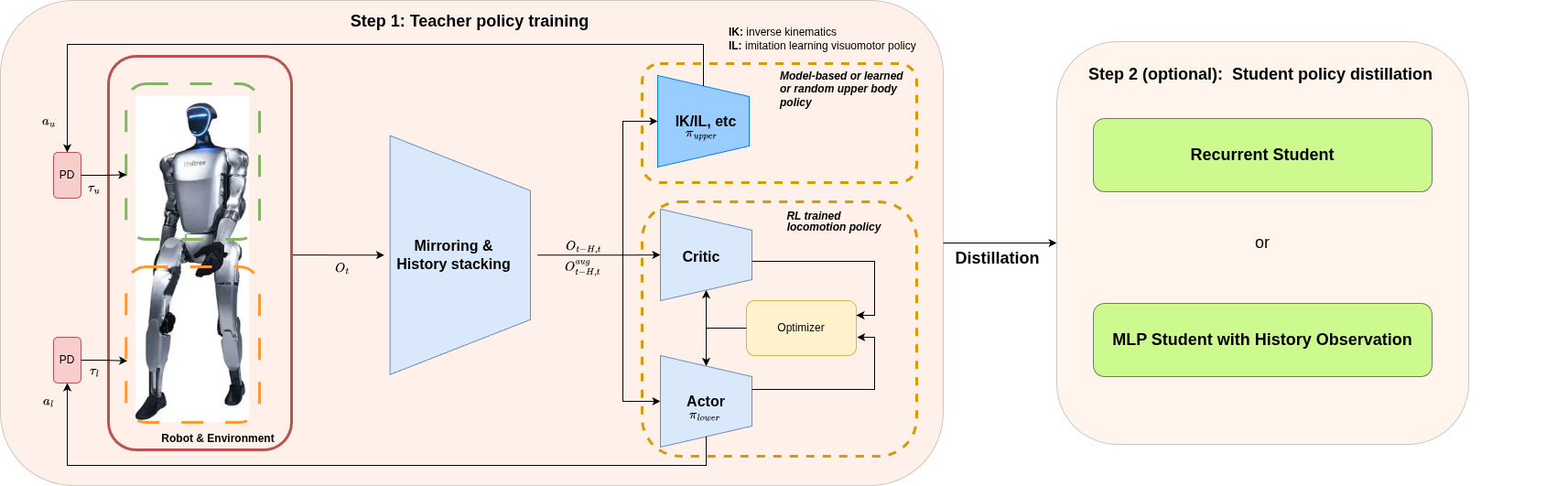
Figure 1: Division of labor between lower and upper limb policies. The lower limb movement policy and the upper limb manipulation policy require respective matching input and output interfaces; the existing walking weight cannot compensate for the upper limb weight in grasping tasks.
Source: Official WBC-AGILE diagram .
4. Fixed version and separate large file directories
The environment combination is Isaac Sim 5.1 and Isaac Lab 2.3.2. These are two different projects, and version numbers cannot be swapped. For reproduction, the existing available environment is copied, and project dependencies are installed in the copy; new environments, download caches, and batch outputs should be stored on a data disk with sufficient capacity.
Here is an example of the directory convention. First, change the data root directory to the actual mounted data disk, then enter the main tutorial to perform the installation; setting the variables does not create an environment.
bashexport DATA_ROOT=/path/to/data-disk
export WORKSPACE="$DATA_ROOT/projects/agile"
export AGILE_ROOT="$WORKSPACE/WBC-AGILE"
export ISAACLAB_PATH="$WORKSPACE/IsaacLab"
export AGILE_ENV="$DATA_ROOT/envs/agile-wbc-isaac51-py311"
export AGILE_PY="$AGILE_ENV/bin/python"
export PIP_CACHE_DIR="$DATA_ROOT/cache/pip"
export HF_HOME="$DATA_ROOT/cache/huggingface"
Record the source code version, execution commands, and key outputs. This is more convenient for review than saving a compressed package of the entire environment. The pre-trained files should also retain the official URL, corresponding source code version, size, and SHA-256 [secure hash algorithm digest]. Check the file content after downloading.
5. Models are restored as needed, and the tutorial retains lightweight evidence
The official models that can be re-downloaded can clear the local copy. When using Git LFS, the repository and the working directory both contain weights and local object caches. Deleting only one of them may not release the expected space. Before cleaning up, ensure that the local files remain unchanged, the official files are available for download, the content summaries are the same, and there are no ongoing training or inference processes using it.
Keep the large file pointer in the source code, so that the summary and size of the original weight can be continued to record. The following command is executed in the cloned AGILE directory. Only the policy file is restored, without additional download of the official video:
bashcd "$AGILE_ROOT"
git lfs pull --include="agile/data/policy/**" --exclude=""
git lfs ls-files
After restoration, the weight file should change from a pointer of over a hundred bytes to an actual model. Restoration should be completed before starting the main tutorial’s inference command. Special attention should be paid to grasping scenarios, as they may also rely on lower limb movement policy.
The self-trained weights, unique collected data, and evaluation trajectory need to be archived first, and then the local files should be deleted. When publishing to the Hugging Face repository on Datawhale, a usage license, task configuration, source, file list, and summary should be included. After verifying the remote files, they can be cleaned up. There are no newly trained grasping weights or independent collected datasets to publish this time; existing official weights can be restored as needed from the upstream.
The tutorial retains necessary illustrations, short videos, and source descriptions. Shared simulation resources, data from other projects, and existing environments should be managed according to their respective usage relationships. Do not assume that a large directory belongs to the current project just because of its size.
6. How the complete grasping evaluation is verified
After obtaining the policy for matching tasks with upper limbs, first confirm that the policy output actually drives the upper limb joints, and then record proximity, contact, grasping, handling, release, and stable placement separately. The success criteria should include the distance from the object to the target area, the release state, the duration of stability, and whether the robot falls, along with clear rules for timeout and reset upon failure.
The final report should include the number of evaluation rounds, random seeds, initial object distribution, number of successes, success rate, and reasons for failures. A single successful video is suitable for demonstrating behavior, while multi-round statistics are used to assess the reliability of the policy. Moving across rooms also requires positioning navigation, obstacle avoidance, and task planning—these components fall outside the scope of this local scenario validation.
Reference: official source code , pre-training policy document , data recording document .