
AGILE Humanoid Robot Loco-Manipulation: Reproduction from Paper Task to Isaac Sim 5.1
Related reading: reproduction of Experience reproduction: video diagnosis, evaluation boundaries, and asset management .
This chapter will guide you through learning AGILE: A Generic Isaac-Lab-based Engine for humanoid loco-manipulation learning, an open-source project by the NVIDIA Isaac team. The corresponding paper is AGILE: A Comprehensive Workflow for Humanoid Loco-Manipulation Learning. The official repository is nvidia-isaac/WBC-AGILE, and the paper can be accessed at arXiv:2603.20147.
This chapter does not present AGILE as a system that has already achieved indoor general housework robots. On the contrary, it is important to clearly define its boundaries: AGILE is more like a reinforcement learning workflow tailored for humanoid robots. It integrates task configuration, PPO training, teacher-student distillation, policy export, evaluation reports, and MuJoCo review into a single project. The tasks demonstrated in the paper include speed tracking, altitude control, standing-up recovery, motion imitation, and pick-and-place in limited scenarios. It does not directly address long-distance indoor navigation, open vocabulary object recognition, full-body obstacle avoidance, or room-to-room transportation.
After completing this chapter, you can finish three things:
- Understand which humanoid robot tasks the AGILE paper actually validates, and why these tasks are simpler than “complete indoor mobility manipulation”;
- Recreate the AGILE warehouse in the Isaac Sim 5.1 / Isaac Lab 2.3.2 environment, and complete short video verifications for T1 speed tracking, G1 speed and altitude control, and G1 grasping and placement scenarios;
- Examine the source code to clearly understand how an AGILE task consists of scene, command, action, observation, reward, termination, event, and agent config.
1. What Problem Does AGILE Actually Solve
Humanoid robot reinforcement learning often stays at the level of “how many steps a certain policy can take in simulation”. When it comes to reproduction and real-world deployment, the challenges usually lie not in the PPO formula itself, but in these engineering details:
- The task configuration is scattered across multiple layers of inheritance, making it difficult to determine exactly what the reward, termination, and action scale are;
- Actors can peek at the simulation true values during training, but when deployed on real machines, they only get IMU, joint encoders, and actions from the previous moment;
- After checkpoint export, there is a lack of clear observation / action descriptors, which easily lead to dimension, order, and normalization errors when switching to MuJoCo or real-machine interfaces;
- By only watching random rollout videos, it is hard to determine whether the policy actually tracks speed, altitude, steering, and stability metrics;
- In the same project, there are locomotion, stand-up, motion imitation, and manipulation features simultaneously, making it easy to confuse “framework support” with “the problem has been fully solved in the paper”.
The value of AGILE lies in organizing these components into a revisable assembly line. It does not provide just a network structure, but a set of engineering templates that cover from task definition to evaluation output.
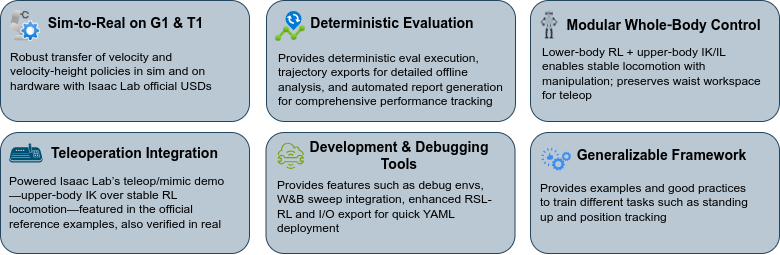
Figure 1: Overview of the performance of AGILE official tasks. This figure presents representative tasks on Booster T1 and Unitree G1 together, allowing everyone to form an intuitive impression first: the paper covers skills such as speed tracking, standing up, speed altitude control, remote manipulation, and dance imitation, rather than a complete indoor navigation grasping system.
Source: NVIDIA Isaac WBC-AGILE official repository `docs/figures/agile_highlights.png`.
II. What tasks were actually performed in the paper
The tasks of the paper can be divided into five groups. It is recommended that you pay special attention to the “task boundaries,” as the name AGILE contains “loco-manipulation,” but it is not a ready-made open scenario mobile operating system.
| Task Category | Robot | Control Objective | Task Complexity Boundaries |
|---|---|---|---|
| Velocity tracking | Booster T1 / Unitree G1 | Grasping vx, vy, yaw_rate velocity commands |
Lower limb motion control, no visual navigation required |
| Velocity-height tracking | Unitree G1 | Simultaneously tracking velocity and body height | Teacher-student distillation, primarily controlling lower limbs |
| Stand-up | Booster T1 / Unitree G1 | Recovering from a fall to standing position | Whole-body control, but not a movement manipulation task |
| Motion imitation | Unitree G1 | Imitating reference movements, such as dance | Depends on reference motion data; no autonomous planning |
| Pick-and-place / VLA data generation | Unitree G1 | Grasping and placing objects in a fixed scene | Freezing lower limb locomotion, tracking upper limb trajectory or used for VLA data generation |
So, if someone asks, “Can we directly implement indoor navigation and then grasp a table and move it to another room?”, the answer is: The original repository cannot do this directly. AGILE provides the underlying locomotion, local manipulation, distillation, and evaluation frameworks. A complete indoor movement manipulation system still requires additional components such as semantic maps, positioning navigation, object detection, 6D pose estimation, grasping planning, full-body obstacle avoidance, and a long-term state machine.
In the following part of this chapter, this boundary will be explained in more detail: AGILE can serve as a core case study in humanoid robot RL courses, but do not misinterpret the official demo as “the universal household robotization has already occurred”.
III. The Relationship between Official Videos and Local Recreation Videos
The AGILE official repository contains multiple GIFs, which are materials showing the results of papers/projects published by the author. In this chapter, we download several of these GIFs to our local machine assets/official_videos/ for learners to compare. The videos rendered locally are stored in assets/local_videos/ to prove that the replication environment, asset chain, and scripts can run successfully on the current Isaac Sim 5.1 stack.
The meanings of the two types of videos are different:
- Official videos demonstrate the skill effects that the paper/project aims to achieve;
- Local smoke-test videos show that the environment setup, policy loading, rendering, and short rollout on this machine work properly;
- The smoke test does not indicate that the policy has been retrained and converged, nor does it mean it can be directly used with a real robot.

Video 1: Booster T1 velocity tracking – Official simulation results. This video demonstrates how T1 tracks velocity commands in simulation, which is a fundamental capability for the AGILE locomotion task. Source: NVIDIA Isaac WBC-AGILE official repository `docs/videos/booster_t1_vel_sim2sim.gif`. |

Video 2: Booster T1 velocity tracking – Official real robot results. This video illustrates the sim-to-real goal emphasized in the paper; do not confuse it with the local short videos in this chapter. Source: NVIDIA Isaac WBC-AGILE official repository `docs/videos/booster_t1_vel_sim2real.gif`. |

Video 3: Unitree G1 velocity-height – Official simulation results. This shows that G1 tracks both movement speed and body height simultaneously, using a teacher-student approach to improve deployment feasibility. Source: NVIDIA Isaac WBC-AGILE official repository `docs/videos/unitree_g1_vel_height_sim2sim.gif`. |

Video 4: Unitree G1 velocity-height – Official real robot results. This video corresponds to the G1 speed and height control experiments in the paper. Source: NVIDIA Isaac WBC-AGILE official repository `docs/videos/unitree_g1_vel_height_sim2real.gif`. |

Video 5: Unitree G1 pick-and-place official demonstration. This video shows the grasping and placement effects in a fixed desk scenario. Note that it is more similar to local scene manipulation and data generation, and is not equivalent to open indoor long-distance navigation grasping.
Source: NVIDIA Isaac WBC-AGILE official repository `docs/videos/g1_apple_grasp_black_sort_bin_multi_objects_no_marker_reduced.gif`.
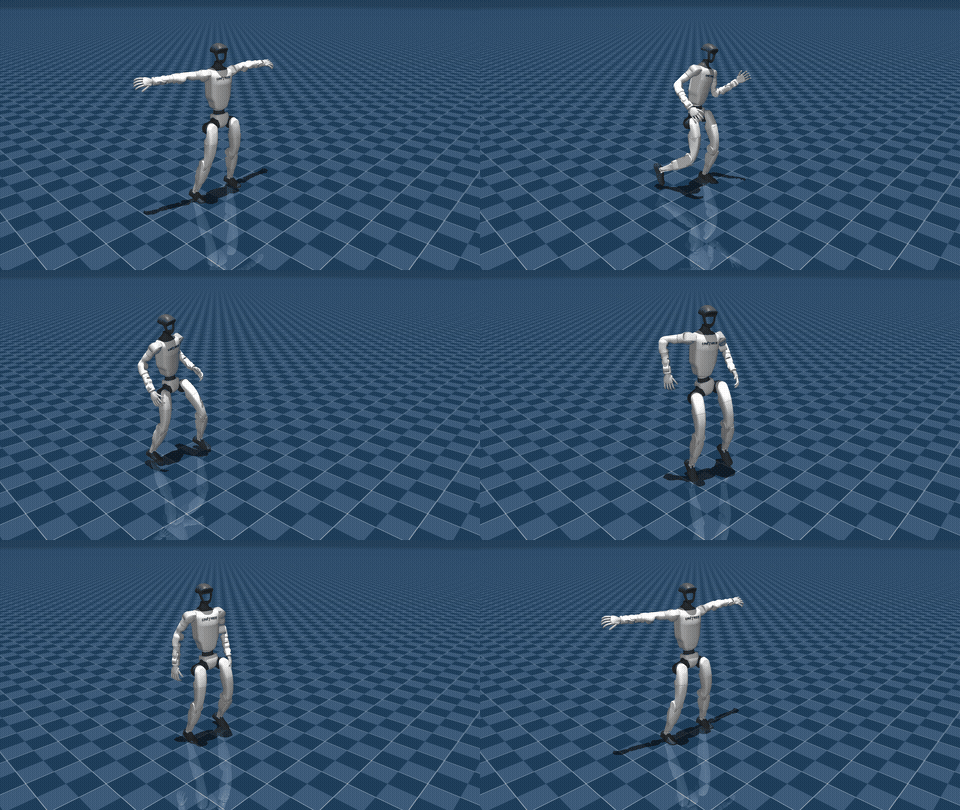
Video 6: Unitree G1 motion imitation official simulation demo. This video corresponds to the dancing/motion tracking tasks in the paper. The focus is on imitating reference movements, not on autonomously generating dances or indoor task planning.
Source: NVIDIA Isaac WBC-AGILE official repository `docs/videos/unitree_g1_dancing_sim.gif`.
IV. AGILE Engineering Pipeline
The overall structure of AGILE can be understood as “task configuration + reinforcement learning algorithm + evaluation and export + cross Simulation review”.
mermaidflowchart LR
  A["任务配置: scene / command / action / obs / reward / done / event"] --> B["Isaac Lab 并行环境"]
  B --> C["RSL-RL PPO 训练"]
  C --> D["Teacher policy 或普通 policy"]
  D --> E["Student distillation / recurrent student"]
  E --> F["Isaac Lab 评估与报告"]
  F --> G["导出 JIT / ONNX / IO descriptor"]
  G --> H["Sim2MuJoCo 复核或部署接口"]
An important change in AGILE for Isaac Lab is that it does not encourage writing tasks as deep inheritance chains, but instead ensures that each *_env_cfg.py is as self-contained as possible. In this way, when learners open a file, they can see the scene, observation, action, reward, termination, and curriculum of that task.
The core directory can be read as follows:
| Path | Learning Focus |
|---|---|
agile/rl_env/tasks/ |
Complete MDP configuration and gym registration entry for each task |
agile/rl_env/mdp/ |
Shared observation, reward, action, event, and termination functions |
agile/rl_env/assets/robots/ |
Names of robot joints for G1 and T1, action scale, USD configuration, and actuator configuration |
agile/rl_env/rsl_rl/ |
AGILE adaptation to RSL-RL wrapper and config |
agile/algorithms/rsl_rl/ |
Implementations of algorithms such as PPO, distillation, and recurrent policy after fork |
agile/sim2mujoco/ |
Moving the policy to MuJoCo for review via IO descriptor |
scripts/train.py |
Training entry, responsible for loading task config, creating environment, and creating runner |
scripts/eval.py |
Evaluation and export entry, supporting video, trajectory, report, and IO descriptor |
scripts/play.py |
Environment verification entry without loading the policy, suitable for smoke test and debug videos |
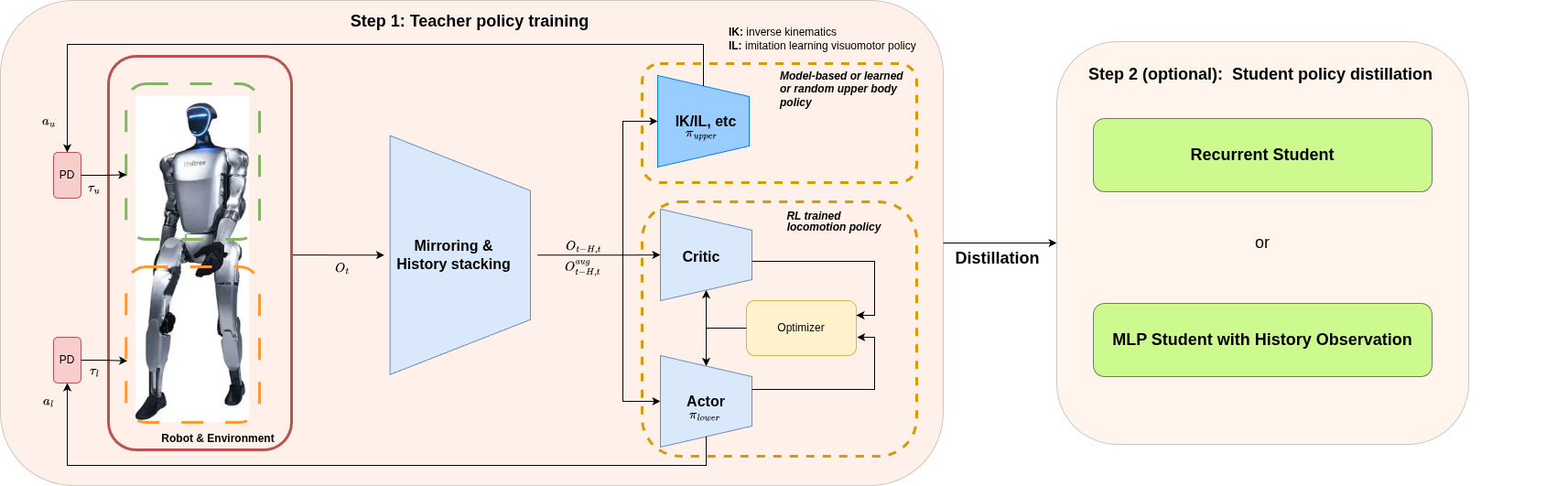
Figure 2: Simplified diagram of the AGILE upper and lower body policy decoupling. This official diagram illustrates a crucial design in pick-place: the lower body uses a frozen locomotion policy to remain stable, while the upper body is independently learned or manipulated to follow its trajectory. This layered approach can serve as a reference for manipulation operations, but it is important to note that it is not a complete indoor navigation grasping system.
Source: NVIDIA Isaac WBC-AGILE official repository `docs/figures/separate_upper_lower_body_policy_diagram.png`.
5. How task configuration is implemented in code
Taking the locomotion task as an example, an AGILE task config usually includes the following types of configurations.
1. Scene: Robots, Terrain, and Sensors
SceneCfg will define the terrain, robot USD, contact sensor, ray caster, and lighting. For example, the T1 velocity task will create rough terrain, place booster_t1.T1_DELAYED_DC_CFG in the scene, and attach a contact force sensor and a height measurement ray caster.
This step addresses the issue of “in which world the robot is trained”. For those working on reinforcement learning for robots, the scene is not just decoration; it determines contact, friction, terrain, sensors, and the initial state.
2. Commands: What targets the policy should track
The commands for the velocity task are usually:
textlin_vel_x, lin_vel_y, ang_vel_z
The velocity-height task will have an additional fuselage height command:
textlin_vel_x, lin_vel_y, ang_vel_z, base_height
These commands are not network outputs, but targets obtained from environmental sampling. The task of the policy is to generate joint movements based on the current proprioception and command output.
3. Actions: How policy outputs become joint targets
AGILE commonly uses joint position actions. The policy outputs a normalized action vector, and the environment converts the target joint positions based on joint name, action scale, default offset, and clip range. The most prone to errors are joint order and action scale. Therefore, AGILE will export an IO descriptor later to help align the values during MuJoCo or deployment.
4. Observations: actors, critics, teachers, and students see different information
AGILE many tasks use asymmetric actor-critic or teacher-student designs. Take G1 velocity-height as an example:
- The teacher/critic can use privileged information from the simulation, such as terrain height scan;
- The student policy uses only information closer to real-machine availability, such as IMU-related metrics, joint position velocity, and actions and commands from the previous moment;
- The recurrent student compensates for missing privileged observations through LSTM memory.
This design is consistent with many legged locomotion systems: during training, it utilizes simulation truth values, and when deployed, it converges to available sensors.
5. Rewards and Terminations: Turning task goals into optimized signals
The rewards for the locomotion task generally include:
- Line speed and angular velocity tracking;
- Base height / flat orientation;
- Joint torque, speed, acceleration, and motion change penalty;
- Foot slip, foot posture, foot spacing, and collision penalty;
- Joint limit and torque limit penalty.
Termination is responsible for ending an episode due to falling, illegal contact, excessive posture, abnormal foot/knee distance, or timeout. AGILE also extends the good/bad termination shaping, allowing the reasons for termination to affect PPO learning.
6. Events:domain randomization
AGILE’s sim-to-real goal relies heavily on event randomization. Common randomizations include:
- Rigid body friction, recovery coefficient;
- actuator stiffness / damping;
- joint friction / armature;
- body mass and COM;
- external forces and external torque disturbances;
- root pose and joint pose during reset.
These randomizations are not aimed at making the simulation more “attractive”, but rather to force the policy to learn more robust control rules for changes in physical parameters.
VI. Teacher-Student: Why G1 velocity-height Needs Distillation
The G1 velocity-height task is the most valuable learning case in AGILE. It is not simply training a MLP; instead, it first trains a teacher model, and then distills the teacher into a deployable student model.
The advantage of the teacher is that it can view privileged observations, such as the terrain height scan underfoot. It makes it easier to learn how to adjust the lower limbs based on terrain and height commands in simulation. The problem is that these information may not be reliably available on real robots.
The student input is closer to the observable on a real machine. AGILE provides two types of student:
- recurrent student: uses LSTM/GRU to remember implicit states from history;
- history student: stacks multiple frames of history and inputs it into MLP.
During simulation, the student outputs the actions performed by the teacher. In this way, during final deployment, the student can inherit the control behavior of the teacher without directly accessing simulation privileges. This approach is commonly used when building one’s own robot in the future: the teacher uses simulation information to learn tasks, while the student stores the policy into the real machine’s observable space.
VII. Why the Pick-and-Place is Not a Complete Indoor Movement Operation
AGILE’s pick-and-place mechanism is ideal for teaching, as it demonstrates how “lower limb locomotion + upper limb manipulation” can be modularly combined. However, the task boundaries must also be clearly stated.
G1 pick-place in AGILE does not involve autonomous navigation from any room to the table, identifying any object, and then planning full-body grasping and placement. It is more similar to:
- The scene already contains tables, target objects, and reference manipulation trajectories;
- The lower-body locomotion policy is frozen to maintain leg stability;
- The upper-body policy or debug action handles the manipulation of the right arm, hand, and waist;
- The task primarily focuses on verifying local manipulation, trajectory tracking, and data generation processes.
To expand it into indoor navigation grasping, we still need to continue:
- Indoor map or SLAM;
- Object detection and 6D pose;
- Waypoint navigation and approach pose planning;
- Station posture switching and full-body obstacle avoidance;
- Grabbing planning, placement planning, and failure recovery;
- High-level state machine or VLA/VLM task planning.
Therefore, this chapter positions AGILE as “humanoid robot RL underlying skills and engineering framework”, not a complete embodied household agent.
Complete grasping evaluation requires an additional checkpoint
The agile/data/policy/ pre-training policy included in the AGILE official repository mainly involves strategies related to velocity, velocity-height, and lower-body. During this replication, no G1-PickPlace-Tracking-v0 upper-body grasping RL checkpoint was found in either the repository or local training logs. The official data-recording documentation also writes G1-PickPlace-Tracking-v0-Record’s --checkpoint <path/to/rl/checkpoint.pt> as a prerequisite.
Therefore, a complete pick-place evaluation requires obtaining a trained pick-place checkpoint first. After obtaining the checkpoint, the evaluation can be performed in the following format:
bashcd "$AGILE_ROOT"
OMNI_KIT_ACCEPT_EULA=YES \
ISAACLAB_PATH="$ISAACLAB_PATH" \
"$AGILE_PY" scripts/eval.py \
  --task G1-PickPlace-Tracking-v0 \
  --num_envs 1 \
  --headless \
  --video \
  --video_length 300 \
  --num_steps 300 \
  --checkpoint /path/to/g1_pick_place_tracking_checkpoint.pt \
  --run_evaluation \
  --save_trajectories
Without this checkpoint, only a scene smoke test, trajectory visualization reference, or official GIF comparison can be performed; it cannot be claimed that the full grasping evaluation has been completed.
VIII. Preparation of Local Clone Environment
The rendering method used in this chapter is Isaac Sim 5.1 + Isaac Lab 2.3.2. To avoid contaminating the existing Isaac environment, it is recommended to create a new environment instead of directly pip install within the original one.
The following command uses variables to represent the path. Please modify it according to your machine:
bashexport WORKSPACE=/path/to/06Agile-Loco-Manipulation
export ISAACLAB_PATH=$WORKSPACE/IsaacLab
export AGILE_ROOT=$WORKSPACE/WBC-AGILE
export AGILE_ENV=/path/to/envs/agile-wbc-isaac51-py311
export AGILE_PY=$AGILE_ENV/bin/python
Checkpoint 1: Clone the repository and lock Isaac Lab
bashmkdir -p "$WORKSPACE"
cd "$WORKSPACE"

git clone https://github.com/nvidia-isaac/WBC-AGILE.git
git clone https://github.com/isaac-sim/IsaacLab.git

cd "$ISAACLAB_PATH"
git checkout v2.3.2
The AGILE README requires Isaac Lab v2.3.2 and Isaac Sim 5.1. Do not mix Isaac Lab 1.x, 2.0, or Isaac Sim 4.x in the same environment.
Checkpoint 2: Pulling Git LFS model assets
AGILE’s pre-training policy and official media use Git LFS. After cloning, you need to execute:
bashcd "$AGILE_ROOT"
git lfs install
git lfs pull
git lfs ls-files
If the .pt or .onnx file contains only a few hundred bytes, it indicates that what you have is a LFS pointer, not the actual weight.
Key policy files confirmed during the replication of this chapter include:
| File | Purpose |
|---|---|
agile/data/policy/velocity_t1/booster_t1_velocity_v0.pt |
Booster T1 speed tracking pre-training policy |
agile/data/policy/velocity_g1/unitree_g1_velocity_history.pt |
Unitree G1 velocity history policy |
agile/data/policy/velocity_height_g1/unitree_g1_velocity_height_teacher.pt |
G1 velocity-height teacher |
agile/data/policy/velocity_height_g1/unitree_g1_velocity_height_recurrent_student_checkpoint.pt |
G1 recurrent student full checkpoint |
agile/data/policy/velocity_height_g1/unitree_g1_velocity_height_recurrent_student.pt |
G1 recurrent student TorchScript export policy |
agile/data/policy/velocity_height_g1/unitree_g1_velocity_height_recurrent_student.onnx |
G1 recurrent student ONNX export policy |
Checkpoint 3: Install AGILE into the replication environment
The way of creating the environment varies depending on the machine. In this chapter, the method used is to “copy the existing Isaac 5.1 micromamba environment and then install AGILE into the copy”, which does not damage the original environment. Readers can also create a new environment using the official installation process.
bashcd "$AGILE_ROOT"
export ISAACLAB_PATH="$ISAACLAB_PATH"

"$AGILE_PY" -m pip install -e "$ISAACLAB_PATH/source/isaaclab"
"$AGILE_PY" -m pip install -e "$ISAACLAB_PATH/source/isaaclab_tasks"
"$AGILE_PY" -m pip install -e "$ISAACLAB_PATH/source/isaaclab_assets"
"$AGILE_PY" -m pip install -e .
If there are many extension cache warnings when starting Isaac, you can reinstall the extscache package corresponding to Isaac Sim 5.1. This package is quite large; it is recommended to download it to a shared cache directory first, verify the hash, and then install it into the replication environment. Do not try out solutions directly in the original Isaac environment.
9. Local smoke test: What did we succeed in?
This chapter generated three short videos locally. None of them are the final results after retraining, but rather a reproduction of the training process for verification:
- The T1 velocity pre-training policy can load and render short rollouts;
- The G1 velocity-height recurrent student full checkpoint can load and render short rollouts;
- The G1 pick-place tracking scenario can load and generate short videos for observing the scene, robot, reference trajectory marker, and action chain.
1. T1 velocity policy Short videos
bashcd "$AGILE_ROOT"
OMNI_KIT_ACCEPT_EULA=YES \
ISAACLAB_PATH="$ISAACLAB_PATH" \
"$AGILE_PY" scripts/eval.py \
  --task Velocity-T1-v0 \
  --num_envs 1 \
  --headless \
  --video \
  --video_length 180 \
  --num_steps 180 \
  --checkpoint agile/data/policy/velocity_t1/booster_t1_velocity_v0.pt
Video 7 Local Recreation: Booster T1 velocity policy smoke test. This video demonstrates that the Isaac Lab can be launched in a local environment, the T1 pre-trained policy can be loaded, scenarios can be created, and short rollouts can be recorded. It is not a retraining with convergence results.
Source: Generated from local replication in this chapter. For the command, see above.
2. G1 velocity-height recurrent student short video
The TorchScript .pt of the G1 recurrent student will trigger the recurrent fallback branch in eval.py, and may fail when loaded directly as a regular checkpoint. Therefore, this chapter uses a complete checkpoint for local short video verification:
bashcd "$AGILE_ROOT"
OMNI_KIT_ACCEPT_EULA=YES \
ISAACLAB_PATH="$ISAACLAB_PATH" \
"$AGILE_PY" scripts/eval.py \
  --task Velocity-Height-G1-Distillation-Recurrent-v0 \
  --num_envs 1 \
  --headless \
  --video \
  --video_length 120 \
  --num_steps 120 \
  --checkpoint agile/data/policy/velocity_height_g1/unitree_g1_velocity_height_recurrent_student_checkpoint.pt
Video 8: Local replication – Minimal operation verification of the policy for the Unitree G1 speed and altitude control loop. This video verifies that a complete checkpoint can be loaded and rendered in Isaac Sim 5.1 / Isaac Lab 2.3.2. The short video indicates that the reasoning chain is available, but it does not mean that retraining is completed.
Source: Generated from local replication in this chapter. For the command, see above.
3. Short Video of G1 pick-place tracking Scenario
A non-Debug G1-PickPlace-Tracking-v0 is used to grasp short videos here. This is not yet a final grasping policy evaluation, but a scene verification using the sinusoidal action of scripts/play.py; compared to the Debug configuration, it does not replace the original upper-body / lower-body actions with GUI actions, making it more suitable for headless video demonstrations.
bashcd "$AGILE_ROOT"
OMNI_KIT_ACCEPT_EULA=YES \
ISAACLAB_PATH="$ISAACLAB_PATH" \
"$AGILE_PY" scripts/play.py \
  --task G1-PickPlace-Tracking-v0 \
  --num_envs 1 \
  --headless \
  --video \
  --video_length 180 \
  --num_steps 180
Video 9 Local Recreation: G1 pick-place tracking scene smoke test. This video is used to learn about pick-place scene loading, reference trajectory visualization, and action chains, but it does not indicate that the pick-and-place policy has achieved a closed loop grasping. The actual grasping performance should still be evaluated by referring to the official demo or using a trained upper body policy.
Source: Generated from local replication in this chapter. See the command above.
Ten, Evaluation and Report: Don’t Just Watch the Video
The AGILE evaluation design is more comprehensive than simply recording videos. It supports two approaches:
- Isaac Lab evaluation: GPU parallel rollout, capable of saving Parquet trajectory, metrics, and HTML report;
- Sim2MuJoCo evaluation: CPU MuJoCo single-environment review, using the same YAML command schedule to assess the policy performance across simulations.
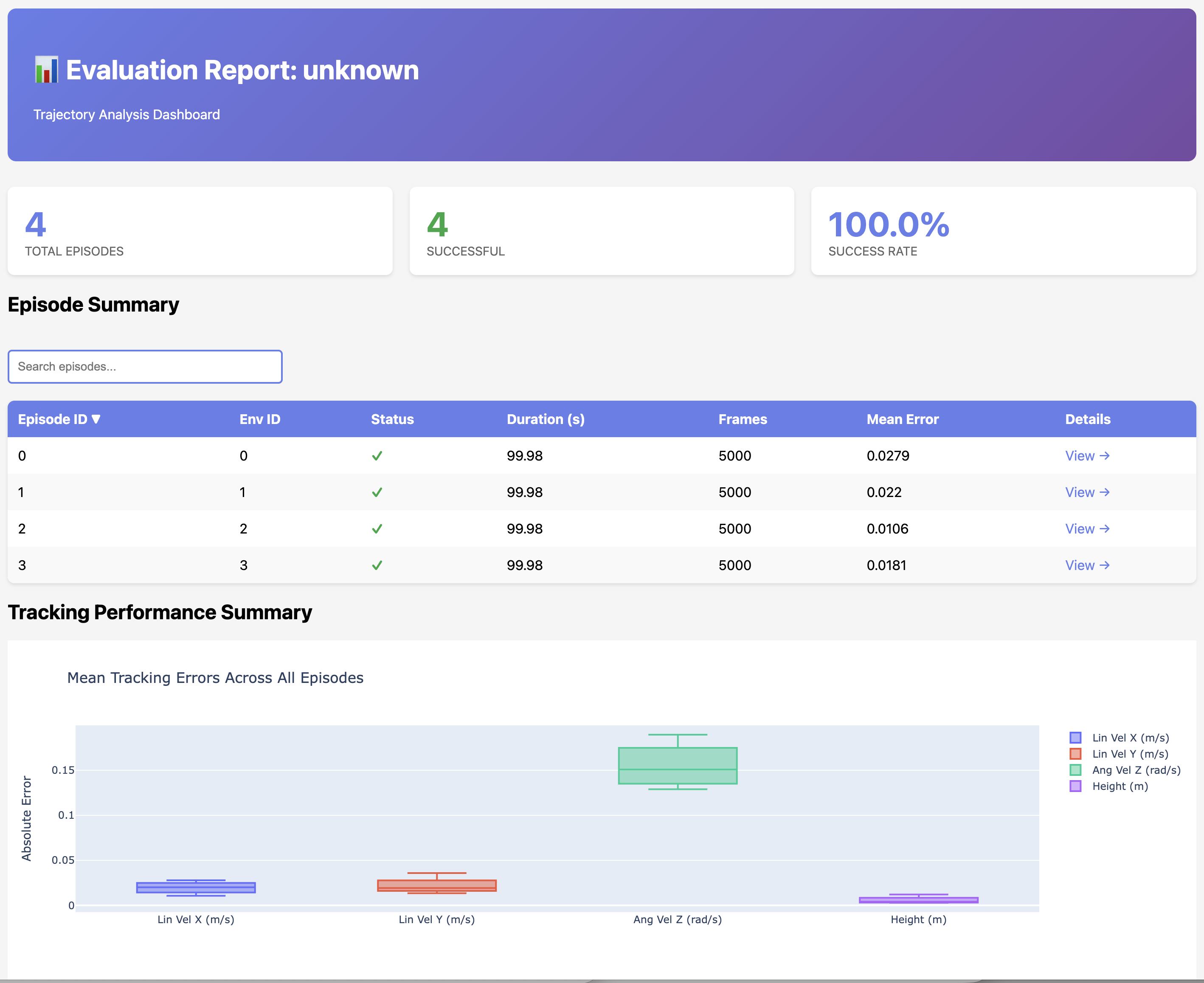
Figure 3: Overview of the AGILE official evaluation report. This figure presents the summary of metrics in the AGILE evaluation report. When studying, it is recommended to consider velocity tracking, height tracking, episode termination, and action smoothness metrics together, rather than judging the policy solely based on the video.
Source: NVIDIA Isaac WBC-AGILE official repository `docs/figures/evaluation_report_summary.png`.
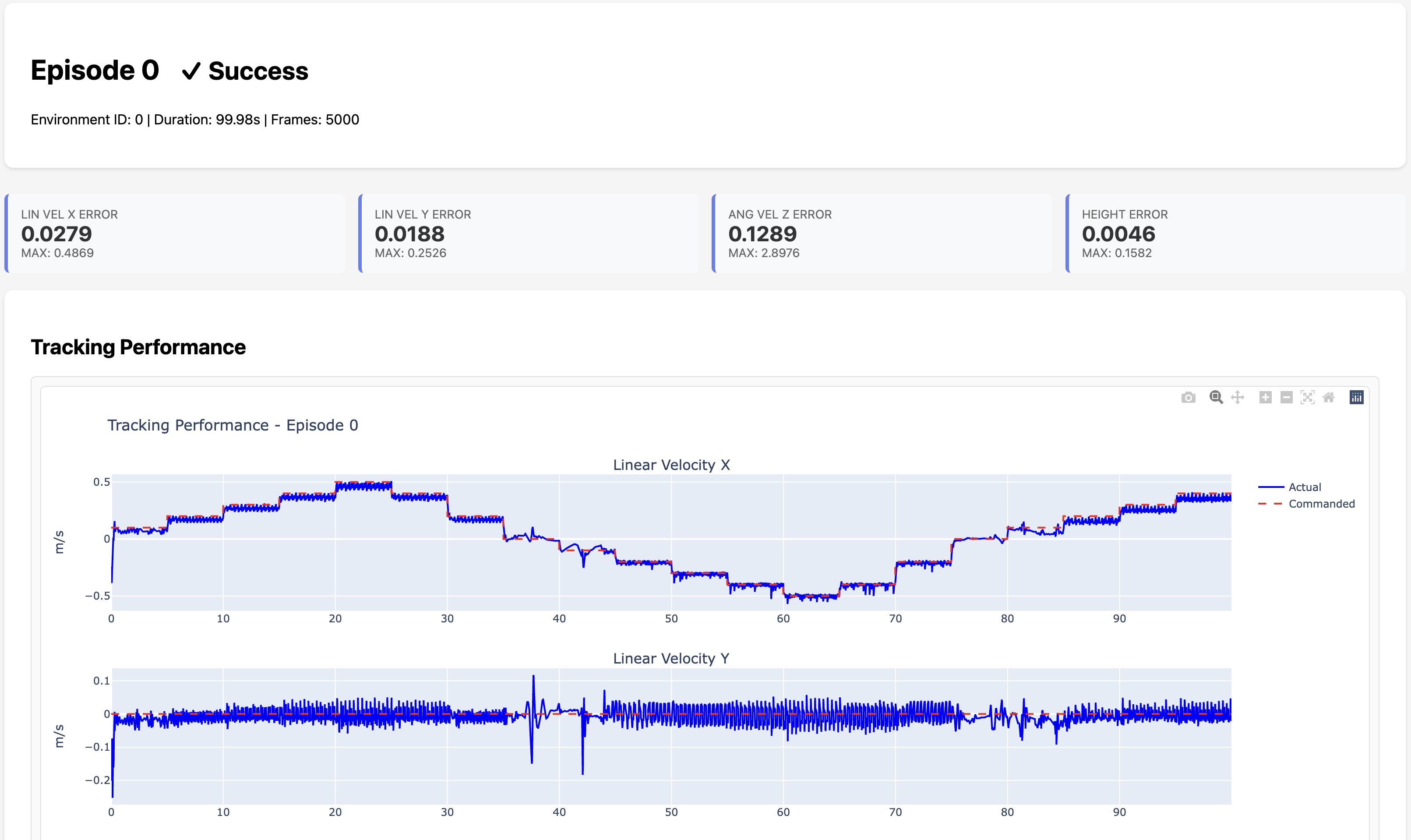
Figure 4: AGILE official evaluation report tracking curve. Such curves can help us check the error between the command and actual movement, such as whether the policy keeps up with changes in speed commands.
Source: NVIDIA Isaac WBC-AGILE official repository `docs/figures/evaluation_report_tracking.png`.
Typical Isaac Lab evaluation commands are as follows:
bashcd "$AGILE_ROOT"
OMNI_KIT_ACCEPT_EULA=YES \
ISAACLAB_PATH="$ISAACLAB_PATH" \
"$AGILE_PY" scripts/eval.py \
  --task Velocity-T1-v0 \
  --num_envs 32 \
  --checkpoint agile/data/policy/velocity_t1/booster_t1_velocity_v0.pt \
  --run_evaluation \
  --save_trajectories \
  --generate_report
If a deterministic sweep is to be performed, the eval config provided by AGILE can be used:
bash"$AGILE_PY" scripts/eval.py \
  --task Velocity-Height-G1-v0 \
  --num_envs 16 \
  --checkpoint /path/to/model.pt \
  --run_evaluation \
  --eval_config agile/algorithms/evaluation/configs/examples/x_velocity_sweep.yaml
XI. Sim2MuJoCo: Why Verify Across Simulators
AGILE also provides agile/sim2mujoco/, which is used to run the exported policy in MuJoCo. The key point is not that “MuJoCo is more realistic than Isaac”, but rather having an additional physical backend can help identify whether the policy overly relies on certain aspects of a simulation engine, such as contacts, joints, delays, or actuator implementations.
The basic process is:
- Export the policy and IO descriptor from the Isaac Lab checkpoint;
- Prepare the robot MJCF, such as the Unitree official
unitree_mujoco; - Run a short rollout in MuJoCo using the same command schedule;
- Save the trajectory parquet file and analyze it together with the Isaac Lab output.
Example command:
bashcd "$AGILE_ROOT"

"$AGILE_PY" scripts/export_IODescriptors.py \
  --task Velocity-G1-History-v0 \
  --output_dir /path/to/exported_policy

"$AGILE_PY" scripts/sim2mujoco_eval.py \
  --checkpoint /path/to/exported_policy/policy.pt \
  --config /path/to/exported_policy/config.yaml \
  --mjcf /path/to/unitree_mujoco/unitree_robots/g1/scene_29dof.xml \
  --eval-config agile/sim2mujoco/configs/x_velocity_sweep.yaml \
  --save-data \
  --no-viewer
If the simulation is clearly unstable, you can first try --pd-scale 0.3 to reduce the PD gain. This parameter is not the final solution, but it helps everyone determine whether the instability stems from differences in control gain and the simulator.
XII. Common Issues and Troubleshooting
1. Many extscache warnings appear when Isaac starts up
If the warning indicates a lack of isaacsim/extscache/.../extension.toml, it usually means that the Isaac Sim extension cache package is not fully installed. You can install the corresponding versions of isaacsim-extscache-kit, isaacsim-extscache-kit-sdk, and isaacsim-extscache-physics. These packages are large; it is recommended to download them, verify the hash, and then install them in a copy environment.
2. The Nucleus asset path is displayed as None/Isaac/...
When starting directly with SimulationApp, the asset root setting of the Isaac Lab app may not be loaded. It is recommended to use isaaclab.app.AppLauncher or the AGILE script entry point, so that ISAAC_NUCLEUS_DIR and ISAACLAB_NUCLEUS_DIR will point to the official S3 asset root directory of Isaac 5.1.
3. G1 recurrent TorchScript direct eval fails
In this chapter’s test, unitree_g1_velocity_height_recurrent_student.pt is recognized by eval.py as a recurrent TorchScript, and then a fallback to the regular checkpoint path is made, resulting in a loading failure. Use the complete checkpoint:
textagile/data/policy/velocity_height_g1/unitree_g1_velocity_height_recurrent_student_checkpoint.pt
The local short video smoke test can be completed.
4. The headless Pick-place Debug configuration appears inactive.
G1-PickPlace-Tracking-v0-Debug will actively disable the original upper_body_joint_pos and lower_body_joint_pos, replacing them with GUI joint control, GUI object pose control, and a reward visualizer. During headless recording, no one drags the GUI, and there are no inputs for object control, so the video shows near-stasis in the later part. In this chapter, the non-Debug G1-PickPlace-Tracking-v0 is used as the local scene video.
5. What can a smoke test prove
The smoke test can prove:
- The Python environment, Isaac Sim, Isaac Lab, and AGILE import links are available;
- Robot USD and Nucleus assets can be loaded;
- Pre-trained policies or checkpoints can be used in inference processes;
- Headless rendering can be used to record short videos.
Smoke test cannot prove:
- The re-training has reached convergence;
- The policy can be directly applied to a real robot;
- Pick-and-place has generalized in an open indoor environment;
- Indoor navigation, semantic perception, and long-term task planning have been completed.
XIII. How to Continue Expanding to Grasping Indoor Navigation
If the goal is “indoor navigation + grasping objects on a table + placing them elsewhere,” AGILE can serve as a foundational skill set, but an additional system layer is required.
A reasonable research approach is:
- First, reproduction
Velocity-G1-History-v0orVelocity-Height-G1-Distillation-Recurrent-v0to obtain a stable lower-body velocity command interface; - Then add a simple waypoint follower to convert the navigator output into
vx, vy, yaw_rate; - Reproduction
G1-PickPlace-Tracking-v0to understand how the frozen lower-body policy and upper-body action combine; - Generate object pose / grasp pose / place pose using a visual module or VLA;
- Organize
navigate -> approach -> stabilize -> reach -> grasp -> carry -> place -> recoverusing a state machine; - Add full-body collision detection, arm obstacle avoidance, and failure retry functionality.
In other words, AGILE is an excellent “humanoid robot RL foundation,” but complete indoor manipulation requires the collaboration of navigation, perception, planning, and task control.
Reference Materials and Source of Content
- Paper: Huihua Zhao et al., AGILE: A Comprehensive Workflow for Humanoid Loco-Manipulation Learning, arXiv:2603.20147.
- Official repository: nvidia-isaac/WBC-AGILE.
- Official documentation: NVIDIA Isaac WBC-AGILE Documentation.
- Isaac Lab: isaac-sim/IsaacLab, this chapter uses v2.3.2.
- The official images and GIFs for this chapter come from the WBC-AGILE repository
docs/figures/anddocs/videos/, and have been localized for educational purposes toassets/official_figures/andassets/official_videos/. - The local short videos in this chapter are generated by AGILE scripts in the Isaac Sim 5.1 / Isaac Lab 2.3.2 environment and saved in
assets/local_videos/.