
Open Duck Mini and Microduck: Walking from URDF Model to Dual-Body Reinforcement Learning
This section breaks down two generations of open-source bipedal robots named “Little Ducks”: Open Duck Mini v2 and Microduck. We do not consider them as two scripts in the same repository, but rather examine the entire chain: where the robot description files are downloaded, how the reinforcement learning environment is assembled, how PPO learns speed tracking, and why the checkpoint must go through the official export script to become an ONNX policy usable by a real robot.
After completing this section, everyone should be able to:
- Define the responsibilities for the four projects: Open Duck Mini v2, Open Duck Playground, Microduck, and Microduck RL;
- Only download the URDF of Open Duck Mini v2 and its STL mesh, and verify that all assets are complete;
- Run the smoke test for
64 个环境 x 5 次迭代on Microduck RL before starting formal training; - Play back the policy, record simulation videos, export ONNX with normalized observations, and let RDK X5 act as the policy brain to drive MuJoCo on an Ubuntu computer;
- Determine what additional engineering steps are needed for a policy that can “move in simulation” to achieve stable 50 Hz movement on a real robot.
1. First, clarify the four items
The “Open Duck” project has gone through multiple iterations in mechanical design, reference action generation, MuJoCo reinforcement learning, and operation on a new generation real robot. The names are similar, but the file formats and commands cannot be mixed together.
| Item | Role | Robot Description | How to Use During Learning |
|---|---|---|---|
| Open Duck Mini v2 | An open-source mechanical and embedded resource center measuring about 42 cm | robot.urdf and robot.xml, STL files stored in the same directory |
Learn URDF, mechanical structure, and early sim-to-real |
| Open Duck Reference Motion Generator | Generates gait reference motions using Placo | Contains URDF and mesh files for multiple generations of Duck | Generates polynomial_coefficients.pkl for imitation rewards |
| Open Duck Playground | MuJoCo Playground/JAX training pipeline for Open Duck Mini v2 | Uses MJCF from the repository | Reproduction of the walking policy of the older Duck |
| Microduck RL + Microduck | Training and real robot versions of a new generation duck measuring about 25 cm and weighing 800 g | The training pipeline uses MJCF; no URDF as the entry point | Learn the complete chain from mjlab + MuJoCo Warp + PPO + ONNX + 50 Hz runtime |
Key judgment: If your goal is to “download the URDF for mechanical structure research”, start with Open Duck Mini v2; if you aim to “run the current official reinforcement learning training”, start with Microduck RL. Directly replacing the URDF of Open Duck Mini v2 into Microduck RL will not succeed automatically, as the joint names, degrees of freedom, component masses, colliders, and the observation/action contracts for the policy are different.
II. Establish an intuitive understanding of the official effect first
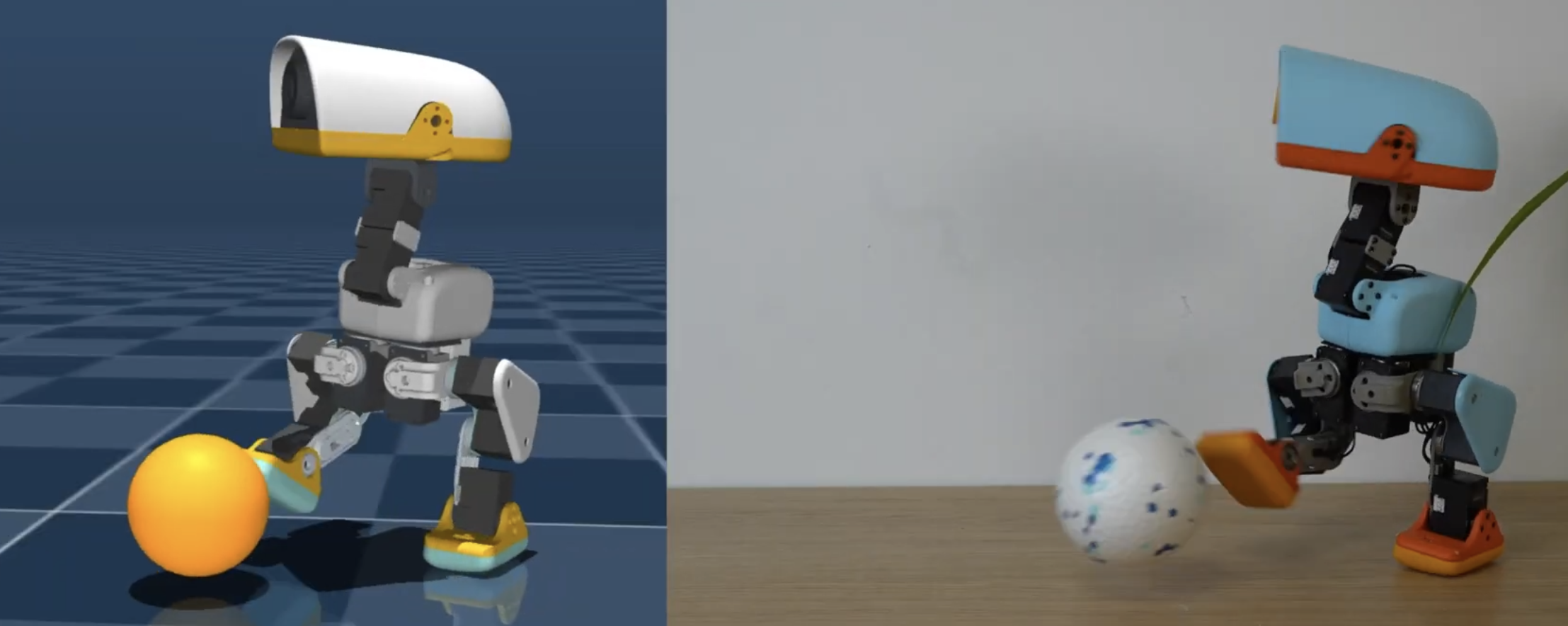
Figure 1: Overview of the Microduck RL official project. The new generation of projects does not train a single walking policy, but incorporates tasks such as speed tracking, standing up, sitting, grasping, kicking the ball, forward roll, and skating into a shared task registry. They share a 61-dimensional actor observation and 14-dimensional action contract, allowing the real robot to switch between walking, standing, and skill policies during operation.
Source: The top image on the `microduck_rl` repository README page by Pollen Robotics. The original project was released under the Apache-2.0 license.
Video 1: Microduck real robot walking clip. This material is taken from the real robot demonstration on the Microduck RL official project page. The tutorial extracts the first 20 seconds and converts it into a H.264 MP4 format that is easier to play in a browser. This shows the effects of the official policy, not the result of this tutorial being retrained locally.
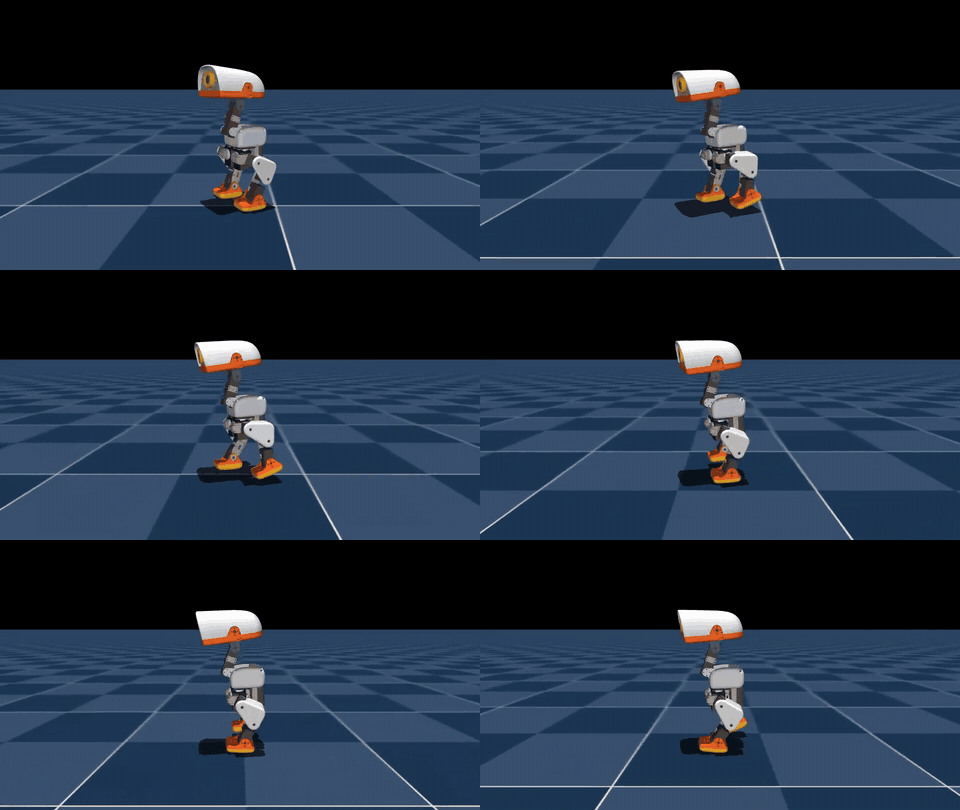
Video 2: The results of reinforcement learning on the 4096 environment completed in this tutorial. We started from the 29e887e version of microduck_rl, trained 6000 PPO iterations on Mjlab-Velocity-Flat-MicroDuck, and then played back with the final model_5999.pt using the fixed 0.4 m/s forward command. The recording excluded the external pushing events during the testing phase, but no post-processing was performed on the checkpoint, nor were any successful segments trimmed. The page displays a GIF generated from the same video; clicking on the image opens the original 960×540 H.264 video.
| Reproduction Experiment Items | Actual Values |
|---|---|
| Number of Parallel Environments | 4096 |
| Sampling Steps per Environment per Round | 24 |
| PPO Iterations | 6000 |
| Total Simulation Transitions | 589,824,000 |
| Training Time | 1 hour 27 minutes 41 seconds |
| Final Mean Reward / Mean Episode Length | 119.57 / 972.52 |
| Exported ONNX Contract | [1, 61] -> [1, 14] |
These values are used to indicate the source and reproduction scale of the videos presented in this section. They should not be ranked directly alongside other experiments based solely on the code version, random seed, and curriculum.
The complete stage weights, final ONNX, configuration, TensorBoard logs, and validation videos for this training have been published in Datawhale/Microduck-RL-4096x6000. The model repository also provides SHA256SUMS, which allows you to download the model and verify whether the files are complete.
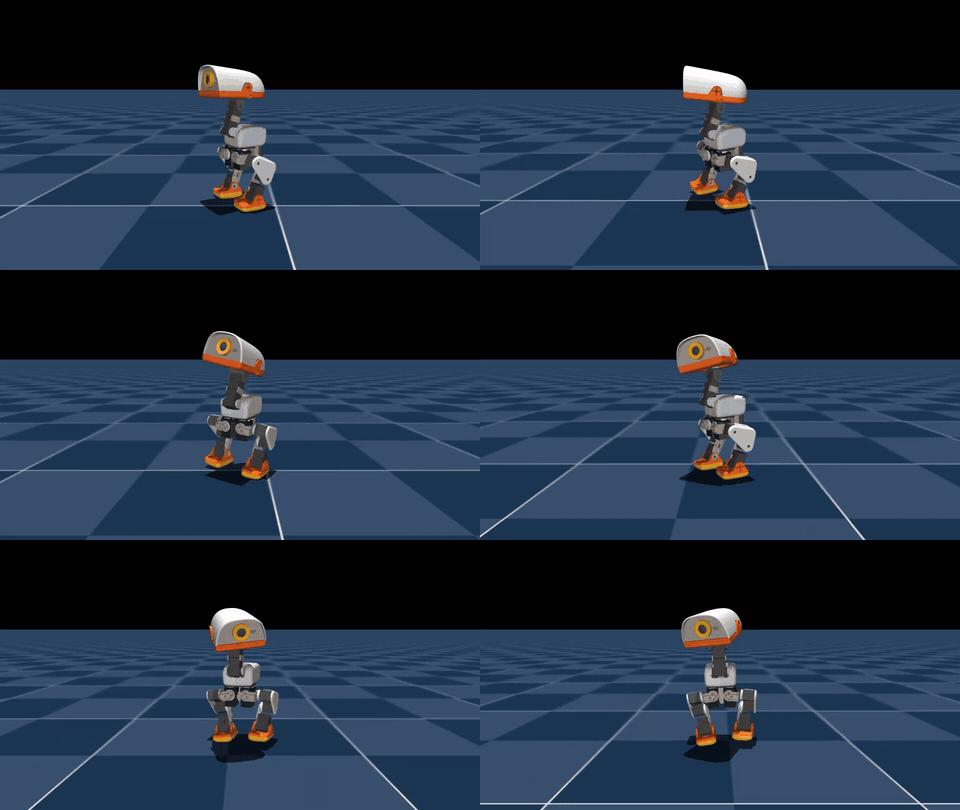
Video 3: The command choreography completed using the same walking policy for all tutorials. This is not a separate training dance checkpoint, but a vx / vy / yaw rate and four-dimensional head pose commands that change over time. The already trained 61-dimensional policy executes head nod, side movement, left/right turning, forward/backward steps, and arcs in real time. The entire 12-second video is from a continuous closed loop rollout, with no frame-by-frame modification of the robot’s posture. The page displays a compressed GIF; clicking on the image opens the original 960×540 H.264 video.
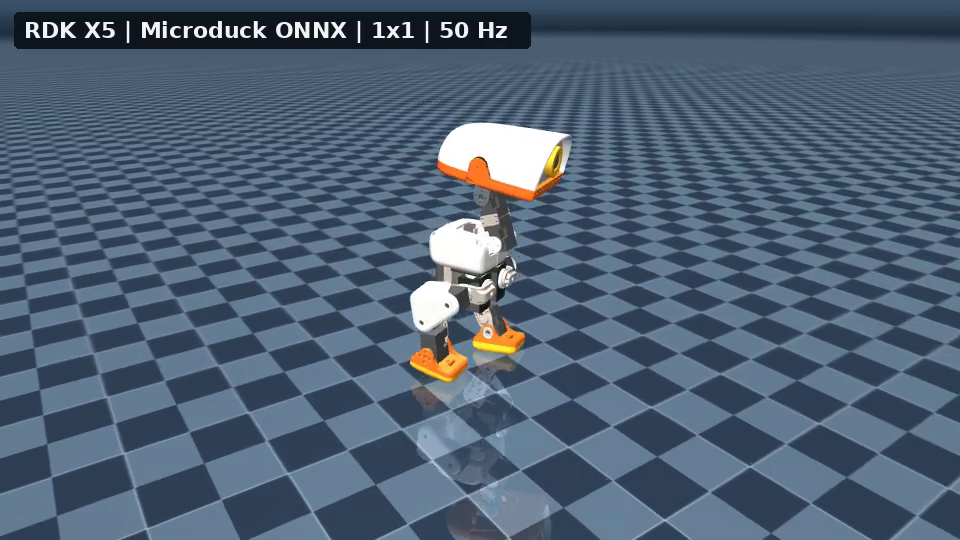
Video 4: RDK X5 policy enables single Microduck control. The Ubuntu computer is solely responsible for the MuJoCo physical simulation and image rendering; the 61-dimensional observations generated per 50 Hz control cycle are sent to the RDK via the local network. After executing microduck_policy_5999.onnx, the RDK returns a 14-dimensional action. This video represents a continuous 12-second, 600 control cycles, 360 frames, in a closed loop—not a pre-calculated action played out. Clicking on the image opens the original H.264 video at 960×540, 30 FPS.
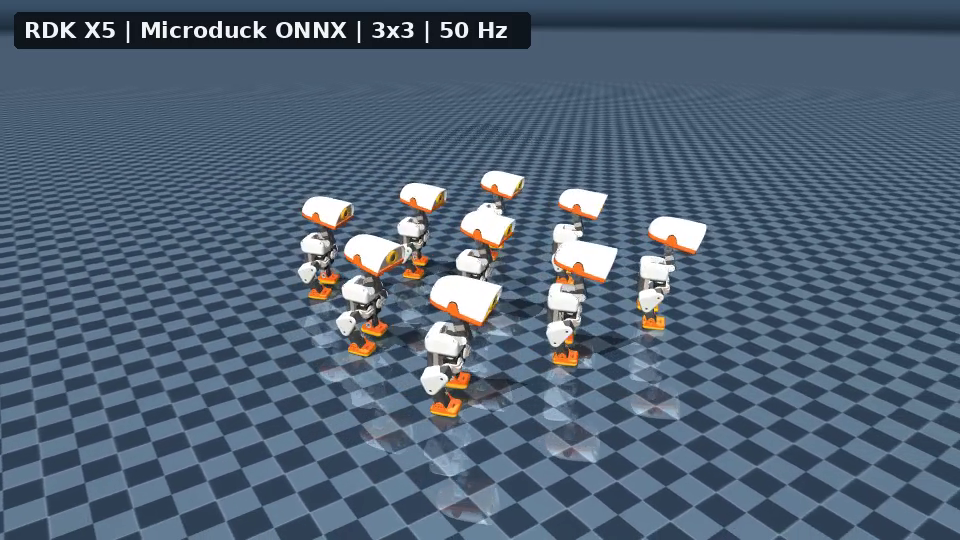
Video 5: RDK X5 policy brain controls a 3×3 Microduck array. Nine ducks are located in the same MuJoCo world, each with its own free radical seat, joint state, IMU observation, historical actions, and BAM M6 XL330 actuator state. The Ubuntu computer packages nine sets of observations into a single network request, RDK executes each set as ONNX and returns nine action sequences, which are then written back to the corresponding robots. It verifies batch edge inference and multi-instance visualization using a single policy, but it does not indicate that the nine robots have learned communication or multi-agent coordination.
Video 6: Official simulation footage of Open Duck Mini v2 walking. This video comes from the “Turning MuJoCo Playground” section of the Open Duck Mini v2 project. It corresponds to the older 42 cm robot, but not to the 14-degree-of-freedom policy contract of the new Microduck.
III. The Complete Training Process from the Architecture Diagram
mermaidflowchart LR
  A["MJCF 机器人 + 地形 + 接触"] --> B["mjlab / MuJoCo Warp<br/>数千个并行环境"]
  C["速度、头部姿态、身体姿态命令"] --> B
  B --> D["actor: 61 维部署可得观测"]
  B --> E["critic: actor 观测 + 仿真特权信息"]
  D --> F["PPO policy: 14 维关节目标"]
  E --> G["value function"]
  F --> B
  G --> H["PPO 更新"]
  B --> H
  H --> F
  F --> I["scripts/export.py<br/>烘入 observation normalizer"]
  I --> J["ONNX"]
  J --> K["CPU MuJoCo 部署前演练"]
  J --> L["Microduck robotd<br/>50 Hz 安全控制循环"]
Figure 2: Data flow of Microduck RL. This architecture consists of five essential modules that cannot be skipped.
1. Robot and actuator models
The main MJCF of Microduck RL is located at:
textsrc/mjlab_microduck/robot/microduck/
├── robot_walk.xml
├── robot_allcollisions.xml
├── robot_allcollisions_rollers.xml
├── robot_*_backlash.xml
└── scene*.xml
robot_walk.xml is used for speed tracking, reducing unnecessary contact between the torso and head; robot_allcollisions.xml retains body collisions for standing, sitting, grasping, and forward roll; the rollers version adds no drive wheels on the feet. In training, the motor is not treated as an ideal PD actuator, but instead a BAM Dynamixel XL330 actuator model is used, incorporating factors such as back EMF, Coulomb/static friction, load-related friction, and battery voltage.
2. Observation, Command, and Action Contracts
The actor input of the new policy is 61 dimensions, and the output is a 14-dimensional joint action. The command slots are fixed as follows:
texttwist 速度命令 3 维
+ head pose 命令 4 维
+ body pose 命令 6 维
= 13 维命令子向量
The remaining observations come from the IMU, joint position/speed, and historical actions. The actor does not use the base linear velocity that is difficult to obtain reliably with a real robot; the critic can additionally access this simulation true value during training. This is a typical asymmetric actor-critic architecture: the value network uses more complete information to accelerate learning, while the policy network remains viable for deployment.
3. Rewards are not a “move forward” item
The rewards and constraints of the main task Mjlab-Velocity-Flat-MicroDuck can be roughly divided into:
| Category | Representative Item | Function |
|---|---|---|
| Task Reward | linear/angular velocity tracking | Track vx, vy, yaw rate command |
| Posture Reward | upright, pose, head pose tracking | Avoid tipping over for speed while maintaining head control |
| Gait Reward | air time, foot clearance, swing height | Encourage feet to truly leave the ground and prevent sliding on the ground |
| Smoothness and Safety | action rate, self collision, foot slip | Suppress high-frequency jitter, self-collision, and excessive foot slipping |
| Curriculum Learning | standing fraction, head-pose range, reward weight | First learn basic gait, then gradually increase command range and intensity |
What is most worth learning here is not a specific weight, but the competition among the reward items. For example, the foot-slip penalty is too heavy, which suppresses the pivot motion required for the small robot to turn in place; the action-rate is too high from the first step, forcing the robot to stay still before it even learns how to walk. Therefore, the official configuration uses a curriculum approach, allowing smooth constraints and a wider command range to be introduced gradually in later stages.
4. Four-layer protection for Sim-to-real
Microduck RL does not rely on a perfectly accurate simulator, but it does four things simultaneously:
- Use BAM to reduce the gap in actuators between ideal motors and small servo motors;
- Perform domain randomization on mass/inertia, center of mass, friction, voltage, IMU installation deviation, encoder zero offset, and action latency;
- Provide a
Backlashtask variant that simulates gear backlash using a driven-free passive joint; - Before the real robot, reproduce the same observation/action contract and policy switching as runtime using
infer_policy.py.
IV. Recommended Main Line: Train the New Microduck Walking Policy
0. Environmental Prerequisites
Official project requirements:
- Linux x86_64 or officially adapted Linux ARM environment;
- Supports CUDA GPUs compatible with the current training stack, and training is performed via MuJoCo Warp. No specific graphics card model is required;
- Python
>=3.12,<3.13, created byuvusinguv.lock; - For formal training,Weights & Biases is used by default to save experiments and checkpoints.
First, check the GPU and basic tools:
bashnvidia-smi
git --version
curl --version
1. Clone and Install
Working directory: Any Linux workspace without spaces.
bashcurl -LsSf https://astral.sh/uv/install.sh | sh
source "$HOME/.local/bin/env"

git clone https://github.com/pollen-robotics/microduck_rl.git
cd microduck_rl
uv sync

# 正式训练前登录 W&B,用于记录曲线和 checkpoint
uv run wandb login
If the local environment is not convenient for the time being, you can also execute the same set of commands on a cloud development machine. For example, after creating a Linux development instance with free computing power, you can directly enter the Jupyter Terminal from the console or copy the SSH command to log in, without having to modify the training code of Microduck RL.
[!TIP] Recommended mirror for free computing power: Mujoco physics engine: Robot learning research and simulation to reality
This mirror is pre-configured with Ubuntu 22.04, CUDA 12.8, MuJoCo 3.4.1,
mujoco_warp, andmujoco_playground. It is suitable for observing simulation via remote desktop from a browser, or you can directly run the following commands using Jupyter or SSH. The Playground environment included in the mirror is not the locked environment of the Microduck RL project; therefore,git cloneanduv syncstill need to be executed. Do not skip the installation of the project’s own dependencies.
It is recommended to store projects, dependency caches, and training outputs on the data disk instead of the default system disk:
bashexport WORKSPACE=/root/gpufree-data/microduck
export UV_CACHE_DIR=/root/gpufree-data/.cache/uv

mkdir -p "$WORKSPACE" "$UV_CACHE_DIR"
cd "$WORKSPACE"

git clone https://github.com/pollen-robotics/microduck_rl.git
cd microduck_rl
uv sync
Next, continue to follow the same order of smoke test, formal training, and ONNX export as in this section. In this way, logs/, checkpoint, video recordings, and output.onnx will all be stored in the data disk directory and can be downloaded via the Jupyter file list. Before leaving for a while, shut down the instance in the console; once the results are downloaded and no longer needed, then decide whether to release the instance, to avoid confusing “shutting down” with “deleting data”.
When downloading the CUDA wheel for ARM devices such as DGX Spark/GB10 or Jetson for the first time, the official recommendation is to increase the uv timeout:
bashexport UV_HTTP_TIMEOUT=600
uv sync
Checkpoint 1: Do not train immediately. First, verify that the task registry and CPU unit tests are functioning properly.
bashuv run list-envs | grep MicroDuck
uv run --with pytest pytest tests/
Seeing tasks such as Mjlab-Velocity-Flat-MicroDuck and successful testing only proves that dependencies, registry, and configuration constraints are available, but does not indicate that GPU training can operate stably for a long time.
2. Five essential iterations of smoke test
The official maintainer explicitly recommends in AGENTS.md to run 64 parallel environments and perform 5 PPO iterations before long training:
bashuv run train Mjlab-Velocity-Flat-MicroDuck \
  --env.scene.num-envs 64 \
  --agent.max_iterations 5
Checkpoint 2: What this small test aims to prove is:
- MuJoCo Warp can create a parallel environment on CUDA;
- The dimensions of actor observation and action are consistent with the model;
- Each reward/termination/event can be processed once;
- Rollout does not produce NaN within a few steps;
- Checkpoints can be written to the
logs/directory.
It does not prove that the policy has learned to walk. It is normal for the actions during 5 iterations to remain close to randomness.
3. Formal Training
bashuv run train Mjlab-Velocity-Flat-MicroDuck \
  --env.scene.num-envs 4096
The experience provided in the official README is that an available gait can be seen in about 1–2 hours in a 4096 environment, but the actual convergence time depends on the GPU, current configuration, random seed, and curriculum. Do not treat this number as a hard guarantee.
The complete command used in this section of the video is as follows. WANDB_MODE=offline ensures that the training logs are written only locally, which is suitable for workstations where W&B is not connected temporarily. When cloud-based experiment tracking is required, remove this option and execute wandb login in advance.
bashWANDB_MODE=offline uv run train Mjlab-Velocity-Flat-MicroDuck \
  --env.scene.num-envs 4096 \
  --agent.max_iterations 6000 \
  --agent.save-interval 500 \
  --agent.run-name every-embodied-4096x6000
If the goal is to fully experience the entire process of “training, saving a checkpoint, exporting to ONNX, and replaying,” you can use the 64 environments used in the smoke test, but increase the number of iterations. Below is a practice configuration that is easier to start on a regular development machine or cloud instance:
bashuv run train Mjlab-Velocity-Flat-MicroDuck \
  --env.scene.num-envs 64 \
  --agent.max_iterations 10000
Here, 64 x 10000 represents the teaching configuration after reducing the parallel scale. It is not equivalent to directly using the results of five smoke tests as training outcomes, nor does it correspond to the training efficiency of the official 4096 environment configuration. During the first practice, you can stop actively after ensuring that the checkpoint is correctly written and the reward curve continues to change, then proceed to the export step. If a better gait is required, you can extend the training or increase the number of parallel environments.
At least the following should be monitored during a normal training:
| Metric | What to Look For | Common Misjudgments |
|---|---|---|
| mean reward | The long-term trend is upward, not every iteration | Only focusing on the total reward, ignoring how the policy exploits rewards |
| episode length | Interpreted together with the current curriculum stage and fall rate | The longer, the better |
| velocity tracking | Both linear and angular velocities improve | Treating forward movement as mastery of steering |
| penalty terms | The weighted penalty should be non-positive | The sign is reversed; the policy scores by self-collision and similar behaviors |
| Motion and posture videos | Whether it scratches the ground, jumps with the buttocks, presses the head against the ground, or high-frequency shaking | Only looking at the curve, ignoring physical behavior |
The official command form for recovery after interruption is:
bashuv run train Mjlab-Velocity-Flat-MicroDuck \
  --env.scene.num-envs 4096 \
  --agent.run-name resume \
  --agent.load-checkpoint model_29999.pt \
  --agent.resume True
Download the public weights of this tutorial
If you don’t want to redo 6,000 PPO iterations, you can download the weights used in this section from the Hugging Face model repository of Datawhale. The repository retains model_0.pt, the checkpoint for every 500 iterations, and the final model_5999.pt. It also includes the corresponding agent.yaml, env.yaml, training logs, and a 61-dimensional input in ONNX format.
bash# 安装或更新 Hugging Face CLI
python -m pip install -U huggingface_hub

# 下载最终 checkpoint
hf download Datawhale/Microduck-RL-4096x6000 \
  checkpoints/model_5999.pt \
  --local-dir Microduck-RL-4096x6000

# 下载全部阶段权重和复现材料
hf download Datawhale/Microduck-RL-4096x6000 \
  --local-dir Microduck-RL-4096x6000
After downloading, it is recommended to check the upstream submissions, observation contracts, and permission boundaries recorded in the model card . The final mean reward = 119.57 value during training is only the log value of that run and should not be used as a benchmark across random seeds.
4. Playback and recording of walking or dance videos
The official quickstart uses the W&B run path to locate the checkpoint:
bashuv run play Mjlab-Velocity-Flat-MicroDuck \
  --wandb-run-path <entity/project/run_id>
If the checkpoint is saved locally, it can be played back directly using --checkpoint-file:
bashuv run play Mjlab-Velocity-Flat-MicroDuck \
  --checkpoint-file logs/rsl_rl/velocity/<run-name>/model_<iteration>.pt
The official play command is suitable for interactive observation, but the Viser service will continue to run after recording a specified number of frames. To automatically generate a short, close-up tracking video with a limited duration on a desktopless Linux workstation, this tutorial provides record_microduck_policy.py:
bashexport EVERY_EMBODIED=/path/to/every-embodied

MUJOCO_GL=egl uv run python \
  "$EVERY_EMBODIED/05-具身场景的深度和强化学习/05-OpenDuckMini与Microduck双足强化学习/record_microduck_policy.py" \
  --checkpoint logs/rsl_rl/velocity/<run-name>/model_<iteration>.pt \
  --output-dir artifacts/microduck-video \
  --frames 600 \
  --width 960 \
  --height 540 \
  --speed 0.4 \
  --seed 42
--motion walk is the default mode. The script will disable external force events during training, set the fixed forward velocity command, and actively shut down the environment after recording 600 frames. The video is written to artifacts/microduck-video/. It only changes the playback conditions; it does not alter the checkpoint. The recordings serve as physical evidence of gait, foot slips, falls, and tremors, and cannot be replaced by a total reward curve.
Use the same policy to choreograph a dance
The 61-dimensional observation of the walking policy already includes the twist(3) + head_pose(4) + body_pose(6) command slot, so there is no need to retrain the policy for each action display. After adding --motion dance, the script will write a set of bounded, continuously changing commands within 12 seconds:
bashMUJOCO_GL=egl uv run python \
  "$EVERY_EMBODIED/05-具身场景的深度和强化学习/05-OpenDuckMini与Microduck双足强化学习/record_microduck_policy.py" \
  --checkpoint logs/rsl_rl/velocity/<run-name>/model_<iteration>.pt \
  --output-dir artifacts/microduck-dance \
  --motion dance \
  --frames 600 \
  --width 960 \
  --height 540 \
  --seed 42
| Time | Main commands written | Visible actions |
|---|---|---|
| 0–2 s | Speed at zero, sinusoidal head movement | Original head movement, swaying, and tipping |
| 2–4 s | vy variation left and right |
Lateral steps |
| 4–6 s | yaw rate variation left and right |
Turning left and right |
| 6–8 s | vx positive and negative changes |
Forward and backward movement |
| 8–10 s | Positive vx plus fixed yaw rate |
Circular motion |
| 10–12 s | Overlap of side movement, turning, and head commands | Combined final action |
During each control cycle, the script first updates the command tensor in command_manager, then constructs observations, calls the policy, and advances MuJoCo. The actions are still output by the PPO policy, rather than directly writing the preset joint angles into the simulation. All velocities and head commands are limited within the sampling range during the policy training.
Here, it is necessary to distinguish between “command choreography” and “new skill training”. Command choreography reuses existing walking policies, which is suitable for quickly verifying the unified command interface; forward rolls, kickballs, and roller skating rotations change the contact mode or robot model, and respective official tasks need to be trained:
| Technique to be demonstrated | Official task | Whether the walking checkpoint is reused |
|---|---|---|
| Sit down and stand up | Mjlab-SitStand-Flat-MicroDuck |
No |
| Forward roll | Mjlab-Roulade-Flat-MicroDuck |
No |
| Kicking the ball | Mjlab-BallKick-Flat-MicroDuck |
No |
| Skate spinning | Mjlab-Spin-Flat-MicroDuck |
No, using the rollers model |
The Microduck RL currently does not have a registered task named Dance. Therefore, this tutorial accurately labels the above video as command choreography. If you want to train dance skills that can withstand disturbances and be triggered arbitrarily, you should add task configurations with phases or reference movements, rather than treating the demonstration script as training results.
5. Export ONNX and CPU MuJoCo experiments
bashuv run scripts/export.py Mjlab-Velocity-Flat-MicroDuck \
  --wandb-run-path <entity/project/run_id> \
  --onnx-file output.onnx

uv run scripts/infer_policy.py --walking output.onnx --new-cmd-obs
scripts/export.py is not just about changing the suffix of the PyTorch network. It also incorporates the observation normalizer used during training into the ONNX computation graph. Manually converting checkpoints may fail completely during deployment because the inputs are not normalized, even if the dimensions match.
Before opening the MuJoCo window, it is recommended to perform a non-monitor-dependent ONNX contract check:
bashuv run python - <<'PY'
import numpy as np
import onnxruntime as ort

session = ort.InferenceSession("output.onnx")
model_input = session.get_inputs()[0]
model_output = session.get_outputs()[0]
print(f"input : {model_input.name} {model_input.shape} {model_input.type}")
print(f"output: {model_output.name} {model_output.shape} {model_output.type}")

assert model_input.shape == [1, 61], model_input.shape
assert model_output.shape == [1, 14], model_output.shape
action = session.run(None, {model_input.name: np.zeros((1, 61), dtype=np.float32)})[0]
assert action.shape == (1, 14) and np.isfinite(action).all()
print("ONNX contract and one-step inference: PASS")
PY
The 61-dimensional input of the current policy consists of 48-dimensional ontology observations and 13-dimensional commands, with the command layout being twist(3) + head_pose(4) + body_pose(6). infer_policy.py is used to support compatibility with old checkpoints, and a 51-dimensional input is still constructed by default, which is 48-dimensional ontology observations plus the old 3-dimensional commands. Therefore, if the new model omits --new-cmd-obs, Got: 51 Expected: 61 will occur. Here, the inference parameters need to be corrected; the model input cannot be arbitrarily truncated or zero-padded at the end, as the semantics and arrangement of the command slots must also remain consistent with the training.
infer_policy.py supports keyboard speed commands, and can also load policies such as walking, standing, sit-stand, and roulade simultaneously:
bashuv run scripts/infer_policy.py \
  --walking walk.onnx \
  --standing stand.onnx \
  --sitstand sitstand.onnx \
  --roulade roulade.onnx \
  --new-cmd-obs
This step requires checking three things: whether the ONNX input/output is [1,61] -> [1,14], whether the command slots match the runtime, and whether there is a sudden posture change during policy switching.
infer_policy.py uses the native MuJoCo interaction window and requires a valid desktop session and OpenGL context. When started via a pure SSH terminal, GLXBadDrawable may still occur after model dimension correction; this is a display link error, which is a separate issue from ONNX itself. When keyboard control is required, the command should be run in the local desktop or in a remote desktop/VNC session terminal. If you only want to verify the model on a server without a desktop, run the contract check first; when generating non-interactive videos, use the recording script from the previous section and enable EGL:
bashMUJOCO_GL=egl uv run python \
  "$EVERY_EMBODIED/05-具身场景的深度和强化学习/05-OpenDuckMini与Microduck双足强化学习/record_microduck_policy.py" \
  --checkpoint logs/rsl_rl/velocity/<run-name>/model_<iteration>.pt \
  --output-dir artifacts/microduck-video
If the contract check passes but the interaction window fails, focus only on DISPLAY, remote desktop sessions, and OpenGL/GLX, and do not re-export ONNX. If the contract check itself fails, return to checkpoint, export script, and observation contract for troubleshooting.
6. RDK X5 acts as the policy brain, while the Ubuntu computer is responsible for simulation and rendering
Running MuJoCo directly on the RDK is feasible. This tutorial shows that after installing mujoco==3.3.7(https://github.com/ros-rover/MuJoCo/tree/ros-rover/MuJoCo/installations/RDK) on RDK X5, Microduck’s official MJCF can be compiled, the BAM executor can be run, and H.264 video can be output. However, the onboard EGL driver of RDK does not expose eglQueryDevicesEXT(https://github.com/ros-rover/MuJoCo/tree/ros-rover/MuJoCo/installations/RDK), which is required for MuJoCo off-screen rendering. When OSMesa is used instead, the cost of rendering detailed STL grids is much higher than that of policy reasoning. A more realistic approach for the division of labor in real robot systems would be:
mermaidflowchart LR
  A["Ubuntu 电脑<br/>MuJoCo 物理状态"] -->|"61 维观测 / 50 Hz"| B["RDK X5<br/>ONNX 策略大脑"]
  B -->|"14 维关节动作"| A
  A --> C["BAM M6 XL330<br/>接触与动力学"]
  A --> D["离屏渲染 + H.264 视频"]
  B -. "后续实体部署" .-> E["IMU + 舵机 + 安全控制器"]
Figure 3: Division of responsibilities between the RDK policy engine and the Ubuntu simulation client. This is not about keeping ONNX on Ubuntu and pretending to deploy it on the board. In remote mode, the rendering script does not create a local ONNX Runtime session; when the RDK service starts up, it first returns the input/output dimensions and SHA256 of the model, and then receives observations over a persistent TCP connection to return actions. The Ubuntu computer only stores and updates the physical state. Therefore, if the RDK is disconnected or the dimensions differ, the simulation will stop directly.
This tutorial provides three scripts:
| Script | Execution Location | Purpose |
|---|---|---|
[rdk_policy_smoke.py](…/…/…/05-Deep Reinforcement Learning in Embodied Scenarios/05-OpenDuckMini and Microduck Bipedal Reinforcement Learning/rdk_policy_smoke.py) |
RDK | Checks ONNX contract, pure inference latency, and 50 Hz deadline |
[rdk_policy_server.py](…/…/…/05-Deep Reinforcement Learning in Embodied Scenarios/05-OpenDuckMini and Microduck Bipedal Reinforcement Learning/rdk_policy_server.py) |
RDK | Provides batch 61 -> 14 policy inference via persistent TCP connection |
[rdk_microduck_video.py](…/…/…/05-Deep Reinforcement Learning in Embodied Scenarios/05-OpenDuckMini and Microduck Bipedal Reinforcement Learning/rdk_microduck_video.py) |
Ubuntu Computer | Runs single- or multiple-duck MuJoCo, requests actions from RDK, and encodes MP4 files |
Step 1: Start the policy service on RDK
First, place ONNX and rdk_policy_server.py in RDK. No mjlab, PyTorch, or MuJoCo need to be installed on the board side. Only NumPy and ONNX Runtime are required:
bashpython3 -m pip install --user numpy onnxruntime

python3 rdk_policy_smoke.py \
  --model microduck_policy_5999.onnx \
  --iterations 2000 \
  --paced-steps 250 \
  --control-hz 50 \
  --json-output rdk_smoke_report.json

python3 rdk_policy_server.py \
  --model microduck_policy_5999.onnx \
  --host 0.0.0.0 \
  --port 8765
The server protocol first sends a MDP1 + 输入维度 + 输出维度 + 模型 SHA256 handshake. Each request consists of a batch size and continuous float32 observations, and the response is a float32 action with the same batch size. A single duck request is [1,61] -> [1,14]; the nine-duck formation sends [9,61] within one control cycle. RDK uses ONNX inference per group with a fixed batch size of 1, and then returns [9,14]. This design is consistent with the static batch contract of the current model, and it also avoids re-exporting another model for the video display.
Step 2: Generate the single-duck video on an Ubuntu computer
The Ubuntu computer must have the Microduck RL environment and ffmpeg installed. --policy-host should fill in the address of the RDK on the same local network; the remote mode does not require --model:
bashexport EVERY_EMBODIED=/path/to/every-embodied
export MICRODUCK_RL=/path/to/microduck_rl
cd "$MICRODUCK_RL"

MUJOCO_GL=egl uv run python \
  "$EVERY_EMBODIED/05-具身场景的深度和强化学习/05-OpenDuckMini与Microduck双足强化学习/rdk_microduck_video.py" \
  --microduck-repo "$MICRODUCK_RL" \
  --policy-host <RDK_IP> \
  --policy-port 8765 \
  --output microduck_rdk_brain_single_12s.mp4 \
  --rows 1 --cols 1 \
  --duration 12 --fps 30 \
  --width 960 --height 540 \
  --speed 0.30 \
  --camera-distance 0.70
The script constructs observations using trained homologous projection gravity, joint relative positions, joint velocities, historical actions, and 13-dimensional command slots, and advances the physics with 4 x 0.005 s = 20 ms control cycles. A corresponding JSON file is also generated next to the video, recording the model hash, number of control steps, RDK round-trip delay, displacement of each robot, minimum torso height, and video encoding parameters.
Step 3: Generate a Nine-Duck Formation in the Same Scenario
The matrix does not copy the single Duck video nine times. The script uses MuJoCo MjSpec.attach to merge the nine Microduck robots with independent prefix names into a single world, and then creates joint, IMU, historical action, and actuator indices for each robot:
bashMUJOCO_GL=egl uv run python \
  "$EVERY_EMBODIED/05-具身场景的深度和强化学习/05-OpenDuckMini与Microduck双足强化学习/rdk_microduck_video.py" \
  --microduck-repo "$MICRODUCK_RL" \
  --policy-host <RDK_IP> \
  --policy-port 8765 \
  --output microduck_rdk_brain_3x3_12s.mp4 \
  --rows 3 --cols 3 \
  --duration 12 --fps 30 \
  --width 960 --height 540 \
  --speed 0.30 \
  --camera-distance 1.65
The nine ducks here share the same policy weight and velocity commands, but do not share their physical states. Their movements appear synchronized because the initial poses and deterministic policies are identical; any slight differences arise from the contact resolution for each individual in the same world. To study formation maintenance, collision avoidance, or communication, neighbor states should be explicitly added to the observation, reward, and training tasks—which is not covered in this edge deployment validation.
Actual verification record for this time
| Check Item | RDK X5实测 Results |
|---|---|
| System and inference runtime | RDK system 3.3.3, ARM64, ONNX Runtime 1.23.2 |
| Model contract | obs [1,61] -> actions [1,14] |
| Model SHA256 | 216fff94da1b88159327c426686fcfcca4763f571b4d123be6b2ca549042f9f0 |
| 2000 in-system inferences | Average 0.315 ms, p50 0.309 ms, p99 0.437 ms |
| 250 steps at 50 Hz timing cycle | p50 0.399 ms, p99 0.785 ms, maximum 0.809 ms, deadline miss 0/250 |
| Single duck closed loop | 12 seconds, 600 RDK control requests, 360 frames H.264 video |
| 3×3 matrix closed loop | 12 seconds, 600 batch requests, 5400 RDK ONNX inferences, 360 frames H.264 video |
The in-board timing tests and full operation records are respectively stored in rdk_policy_smoke_report.json, microduck_rdk_brain_single_12s.json, and microduck_rdk_brain_3x3_12s.json. This set of data is used to prove that the board-side model contract, continuous inference, and closed loop control chain are working properly, and is not used for comparing speeds with other hardware.
Although the RDK system provides hobot_dnn, hrt_model_exec, and BPU device nodes, hrt_model_exec cannot directly load ordinary ONNX. It requires conversion into a board-side model using a compatible version of the sweet potato toolchain first. Currently, the 14-degree-of-freedom MLP on CPU takes far less than 20 ms for control execution, so forcing the small policy to migrate to BPU is not beneficial. When visual detection or deep learning networks are later integrated, it is more reasonable to allocate BPU to the higher-computation perception models.
7. Real robot deployment boundaries
The robotd in the Microduck real robot repository runs at 50 Hz, reads the IMU and servo states, generates a 61-dimensional observation, calls the ONNX policy, and converts the 14-dimensional action into joint targets. However, there must still be a connection from output.onnx to the real robot:
- Joint order, direction, zero position, and limit verification;
- IMU coordinate system and installation deviation calibration;
- Disconnection, overheating, fall, abnormal motion amplitude, and policy loading failure protection;
- Slight suspension testing, support frame testing, landing testing with safety rope, and finally free walking.
Therefore, the commands in this section are limited to the CPU MuJoCo experiment. When the above hardware calibration and security access are not completed, do not write new policies directly onto the real robot.
5. Download Open Duck Mini v2 URDF and complete mesh
The robot.urdf of Open Duck Mini v2 is not a single-file model. It contains 21 links and 20 joints, and references 45 types of STL meshes in the same directory. If you download robot.urdf only from the GitHub webpage, a body_front.stl not found-type error will occur during loading.
Method A: Sparse clone robot model directory
bashgit clone --depth 1 --filter=blob:none --sparse --branch v2 \
  https://github.com/apirrone/Open_Duck_Mini.git
cd Open_Duck_Mini
git sparse-checkout set mini_bdx/robots/open_duck_mini_v2
The key files after downloading are:
textOpen_Duck_Mini/mini_bdx/robots/open_duck_mini_v2/
├── robot.urdf
├── robot.xml
├── robot_motors.xml
├── config.json
├── *.stl
└── *.part
Run the following command for integrity check:
bashMODEL_DIR=mini_bdx/robots/open_duck_mini_v2
test -f "$MODEL_DIR/robot.urdf"
test "$(find "$MODEL_DIR" -maxdepth 1 -name '*.stl' | wc -l)" -gt 0
grep -n 'mesh filename' "$MODEL_DIR/robot.urdf" | head
In URDF, mesh paths are written in the form package:///body_front.stl. Different loaders have different interpretations of empty package names; if the viewer cannot find the mesh, the package/resource root should be pointed to this model directory instead of removing all mesh references.
In an environment where ROS is installed, you can first perform an XML/link tree check:
bashcheck_urdf "$MODEL_DIR/robot.urdf"
check_urdf has been verified in the target simulator for not representing grid paths, inertia, collision bodies, and joint directions. It is merely the first structural check.
Method B: Download the URDF from the reference action repository
If the goal is to generate imitation learning reference trajectories, cloning the reference-motion repository is more appropriate. This repository uses Git LFS:
bashsudo apt update
sudo apt install -y git-lfs
git lfs install

git clone https://github.com/apirrone/Open_Duck_reference_motion_generator.git
cd Open_Duck_reference_motion_generator
git lfs pull

uv run scripts/auto_waddle.py -j4 \
  --duck open_duck_mini_v2 \
  --sweep

uv run scripts/fit_poly.py --ref_motion recordings/
uv run scripts/replay_motion.py -f recordings/<motion-file>.json
The number of parallel processes should be explicitly specified after -j, for example in -j4. The official README warns that using -j alone will attempt to occupy all CPU cores, and ordinary machines may become unresponsive due to memory and scheduling pressure.
VI. Reproduction of the old Open Duck Mini v2 training pipeline
If your goal is the 42 cm Open Duck Mini v2, you should use the corresponding Open Duck Playground, rather than the new Microduck task.
bashgit clone https://github.com/apirrone/Open_Duck_Playground.git
cd Open_Duck_Playground

curl -LsSf https://astral.sh/uv/install.sh | sh
source "$HOME/.local/bin/env"

uv run playground/open_duck_mini_v2/runner.py \
  --task flat_terrain_backlash \
  --num_timesteps 300000000
Replay the exported ONNX:
bashuv run playground/open_duck_mini_v2/mujoco_infer.py \
  -o <path-to-policy.onnx>
If you want to enable the imitation reward, you need to copy the polynomial_coefficients.pkl generated in the previous section to:
textplayground/open_duck_mini_v2/data/polynomial_coefficients.pkl
Then, in playground/open_duck_mini_v2/joystick.py, set USE_IMITATION_REWARD to True. This is a separate reproduction line for the old robot model, and its checkpoint should not be directly placed in the new Microduck robotd.
VII. Common Failures and Troubleshooting
| Phenomenon | Cause | Handling |
|---|---|---|
uv sync downloading CUDA wheel timed out |
ARM requires downloading several GB of dependencies for the first time | Retry after export UV_HTTP_TIMEOUT=600 |
| GPU not found during training start | CPU-only PyTorch is installed, or CUDA/driver is unavailable | Check nvidia-smi and uv run python -c "import torch; print(torch.cuda.is_available())" |
| URDF shows only axes, no robot appearance | Only robot.urdf is downloaded, or resource root is incorrect |
Download the entire open_duck_mini_v2/ directory, pointing the resource root to the STL directory |
| Training reward increases but robot does not move | Rewards exploit loopholes, such as shaking in place or local contact with the ground | Record and replay to check tracking, air-time, slip, and action-rate separately |
| Simulation replay is normal, but manually exported ONNX fails | Observation normalizer is not included in the computation graph | Export only using scripts/export.py |
ONNX Runtime reports Got: 51 Expected: 61 |
The new 61-dimensional model uses the old 51-dimensional inference observations | First check the ONNX contract, then add --new-cmd-obs to infer_policy.py |
Remote execution reports GLXBadDrawable |
SSH session lacks a usable desktop/GLX context, or the graphical window is broken | Switch interactive replay to running on the local desktop or VNC; use MUJOCO_GL=egl for no-screen recording |
| Policy causes high-frequency jitter on the real robot | Action latency, joint order, zero position, or actuator dynamics mismatch | Return to CPU MuJoCo simulation and small-scale hovering tests; stop trial-and-error on the ground |
| Reference generator indicates STL storage representation error | Git LFS grid not pulled | Execute git lfs pull in the repository |
VIII. Recommended Learning Order
- First, watch the two official videos in this section to understand the target effects of real robot and simulation.
- Explore the model directory of the sparse cloned Open Duck Mini v2 to clarify the relationships between URDF, STL, link, and joint.
- Run CPU tests and
64 env x 5 iterationssmoke tests in Microduck RL. - Start formal training in the 4096 environment while watching item reward and behavior videos.
- Generate ONNX using the official export script, and simulate keyboard control and policy switching in CPU MuJoCo.
- Only after passing the observation contract, joint calibration, and hardware safety mechanisms can we proceed to use a real robot.
9. Reference Materials and Source of Materials
- Pollen Robotics Microduck on a real robot
- Pollen Robotics Microduck RL
- Open Duck Mini v2
- Open Duck Playground
- Open Duck Reference Motion Generator
- BAM: Better Actuator Models
- mjlab
- MuJoCo Playground
- microduck Little White Complete Training Guide (Bilibili)
Both of the two videos and the header image in this section are from the above official project page. The video has only undergone format conversion, scaling, and segmenting, without changing the experimental content. The software code for Microduck and Microduck RL is licensed under Apache-2.0, and the 3D models in Microduck RL are licensed under Creative Commons BY-SA-NC. The code and mechanical assets of Open Duck Mini should also follow the LICENSE used in the corresponding repository and third-party asset statements. The Bilibili tutorial only provides a link to the original page and does not reproduce its video files in this repository.