
AgiBot World Model Competition Reproduction and Improvement Tutorial
This tutorial provides information on reproduction and method improvement for the AgiBot world model track. It mainly includes four parts: installation and configuration, basic methods, improvement methods, and inference process. The basic methods section explains the principle of the EVAC action condition video diffusion model, while the improvement methods correspond to the LoRA fine-tuning, temporal differential loss, Sobel edge loss, and first-frame anchoring already implemented in this project. We hope to offer a good learning experience for everyone. The world model is a rapidly developing field, and we are also gradually exploring it—let’s learn together~
1. Installation and Configuration
1.1 Environment Creation
Create a Python 3.10 environment:
bashconda create -n enerverse python=3.10.4
conda activate enerverse
Enter the project directory and install dependencies:
bashcd /path/to/project
pip install -r requirements.txt
In the project, jsonlines and fairscale will be actually used. If a missing package error occurs during execution, install them directly:
bashpip install jsonlines
pip install fairscale
The improved version uses LoRA. The code calls peft.LoraConfig and get_peft_model, so it is also necessary to install:
bashpip install peft
Install PyTorch3D:
bashpip install --no-index --no-cache-dir pytorch3d \
  -f https://dl.fbaipublicfiles.com/pytorch3d/packaging/wheels/py310_cu121_pyt240/download.html
If the graphics card, CUDA, or PyTorch version does not match the default requirements, it is recommended to install the PyTorch version corresponding to the local CUDA first, and then install other dependencies. In actual reproduction, the common issue with high-version graphics cards is not a code logic error, but rather inconsistent versions between torch, torchvision, xformers, and CUDA wheels.
1.2 Handling of Source Code Issues
1) xformers compatibility handling
Fixed in requirements.txt:
textxformers==0.0.27.post2
If xformers is not compatible with the current PyTorch/CUDA, inference or training may error at the attention layer. A conservative approach has been adopted in this project: in evac/lvdm/models/vae_models.py, xformers is turned off, and the normal attention path is used to continue running.
The key modification code is as follows. This code retains the original try import xformers approach, but during execution, it forces the closure of the xformers fast path:
pythonlogpy = logging.getLogger(__name__)

# try:
#     import xformers
#     import xformers.ops
#
#     XFORMERS_IS_AVAILABLE = True
# except:
#     XFORMERS_IS_AVAILABLE = False
#     logpy.warning("no module 'xformers'. Processing without...")

XFORMERS_IS_AVAILABLE = False
logpy.warning("no module 'xformers'. Processing without...")
The cost is a decrease in inference speed and VRAM efficiency, but the advantage is that it is easier to run successfully on different machines. For reproducing tutorials in competitions, ensuring that results can be generated first is more important than pursuing faster attention processing.
2) Attention mechanism error
Additionally, the original code may produce an error message stating “attention mechanism initially set to none”. This issue is resolved in the attention forward propagation logic of evac/lvdm/modules/attention.py. The original problem was that when context=None is executed, if the code still directly runs self.to_k(context) or self.to_v(context), it will pass an empty context to the linear layer, resulting in an error during attention calculation.
The fix for this project is not simply modifying the configuration, but explicitly distinguishing self-attention and cross-attention in forward(): When context is None occurs, both q/k/v come from the input x; when context exists, q comes from x, and k/v comes from context. The corresponding complete modification block is as follows:
pythondef forward(self, x, context=None, mask=None, seq_length=None):
    spatial_self_attn = (context is None)
    k_ip, v_ip, out_ip = None, None, None

    # 核心修复:根据 context 是否为空区分自注意力和交叉注意力
    if context is None:
        # 自注意力:q/k/v 都来自输入 x
        q = self.to_q(x)
        k = self.to_k(x)
        v = self.to_v(x)
    else:
        # 交叉注意力:q 来自输入 x,k/v 来自上下文 context
        q = self.to_q(x)
        k = self.to_k(context)
        v = self.to_v(context)

    k_vpre, v_vpre, out_vpre = None, None, None

    h = self.heads
    q = self.to_q(x)
    context = default(context, x)
The core significance of this modification is to enable attention to automatically reduce to self-attention without external context, rather than continuing to treat None as the context input for cross-attention. This can avoid the error caused by empty objects triggered by context=None, while retaining the image conditions and trajectory conditions in cross-attention branches when context is available.
3) FairScale and training policy error handling
The old version of FairScale may cause errors in the trainer policy. This issue usually occurs when PyTorch Lightning defaults to reading sharded or deepspeed policies: the local fairscale, torch, and pytorch-lightning versions do not match perfectly, and the training fails before entering the model forward pass.
The approach adopted for this project is as follows: instead of instantiating the default sharded policy, the training policy is directly changed to "ddp" in trainer/trainer.py. The complete modified section is as follows:
python# strategy_cfg = get_trainer_strategy(lightning_config)
# trainer_kwargs["strategy"] = strategy_cfg if type(strategy_cfg) == str else instantiate_from_config(strategy_cfg)
trainer_kwargs["strategy"] = "ddp"

trainer_kwargs["precision"] = lightning_config.get("precision", 32)
trainer_kwargs["sync_batchnorm"] = False
There are two key points here. First, the LoRA adapter must be applied after the base weights are loaded; otherwise, the adapter may bind to a model structure with unrestored weights. Second, trainer_kwargs["strategy"] = "ddp" is used to avoid compatibility issues with older FairScale or sharded strategies, ensuring that the training process can start smoothly.
4) Inconsistent parameter names for guidance rescale
In the source code, it should be written like this:
pythonguidanc_erescale=args.gr
It needs to be changed to guidance_rescale=args.gr. It is recommended to write the complete call fragment as:
pythonwith torch.cuda.amp.autocast(dtype=torch.bfloat16):
    model.inference(
        config, img, action, delta_action,
        c2w, w2c, intrinsic,
        save_path, n_chunk_to_pred,
        chunk=chunk,
        n_previous=n_previous,
        n_valid=n - n_previous,
        unconditional_guidance_scale=args.cfg,
        guidance_rescale=args.gr,
        ddim_steps=args.ddim_steps,
        saving_tag="",
        saving_video=True,
        video_dir=os.path.join(args.save_root + "_video", task, clip, str(args.gid), "video")
    )
    torch.cuda.empty_cache()
Otherwise, the model inference function may not receive the correct guidance rescale parameter. In mild cases, the parameter has no effect; in severe cases, errors such as “unexpected keyword” or “parameter missing” will occur.
1.3 Weight and Data Path Configuration
Training configuration file is:
textconfigs/agibotworld/train_config_challenge_wm.yaml
Three types of paths need to be checked carefully.
First, EVAC pre-trained weights:
yamlmodel:
  pretrained_checkpoint: /path/to/EnerV_AC_deepspeed_v0.1.pt
Second, CLIP image encoder weights:
yamlmodel:
  params:
    img_cond_stage_config:
      params:
        abspath: /path/to/open_clip_pytorch_model.bin
Third, training data root directory:
yamldata:
  params:
    train:
      params:
        data_roots: ["/path/to/agibot/world_model/train"]
Each episode in the data directory must contain at least:
textepisode_x/
  frame.png
  head_intrinsic_params.json
  head_extrinsic_params_aligned.json
  proprio_stats.h5
These files provide the initial visual observations, camera internal parameters, camera external parameters, and the status of the robot body respectively. The goal of the World Model is not to generate video unconditionally, but to predict future videos under the conditions of given initial images and robot movements.
1.4 Improved Key Configurations
The core improvements of this project are opened in the same configuration file:
yamlmodel:
  params:
    use_lora: True
    lora_config:
      r: 16
      alpha: 16
      dropout: 0.05
      target_modules: ['to_q', 'to_k', 'to_v', 'to_out.0']
    lora_checkpoint: null

    temporal_loss_weight: 0.05
    edge_loss_weight: 0.02
    anchor_first_frame: True
The data sampling section also needs to open the first frame anchor:
yamldata:
  params:
    train:
      params:
        anchor_first_frame: True
The configurations related to training stability are as follows:
yamldata:
  params:
    batch_size: 1

lightning:
  precision: 32
  trainer:
    gradient_clip_val: 0.5
Here, batch_size: 1 is used to reduce the memory pressure; precision: 32 is used to make the newly added temporal difference loss and Sobel edge loss more stable. If there is sufficient memory, you can try increasing the batch size; if memory is insufficient, prioritize keeping the batch size at 1.
1.5 Training Command
Start training:
bashbash scripts/train.sh configs/agibotworld/train_config_challenge_wm.yaml
If only a single GPU is used:
bashCUDA_VISIBLE_DEVICES=0 bash scripts/train.sh configs/agibotworld/train_config_challenge_wm.yaml
The script internally calls torchrun and sets the number of processes based on the number of visible GPUs:
bashNGPU=`nvidia-smi --list-gpus | wc -l`
torchrun --nnodes=1 \
  --nproc_per_node=$NGPU \
  trainer/trainer.py \
  --base $config_file \
  --train
It is recommended to observe the first 100 to 300 steps during training:
- Whether the pre-trained EVAC weights are loaded properly.
- Whether the number of LoRA trainable parameters is printed.
- Whether
train/loss_temporalappears in the log. - Whether
train/loss_edgeappears in the log. - Whether the total loss contains NaN.
1.6 Reasoning Command
The improved inference script is:
textscripts/infer_lora.sh
The script needs to configure input data, output directory, base weights, LoRA checkpoint, and model configuration:
bashinput_root=/path/to/test/info_dataset
save_root=/path/to/save/results
ckp_path=/path/to/EnerV_AC_deepspeed_v0.1.pt
lora_ckp_path=/path/to/epoch=1-step=30000.ckpt
config_path=/path/to/configs/agibotworld/train_config_challenge_wm.yaml
n_pred=3
Run:
bashbash scripts/infer_lora.sh
The core command of the script is as follows:
bashpython evac/main/infer_all.py \
  -i $input_root \
  -s $save_root \
  --ckp_path $ckp_path \
  --config_path $config_path \
  --lora_ckp_path $lora_ckp_path \
  --n_pred $n_pred
n_pred=3 indicates that 3 candidate results are generated for each input episode. The code will cycle through different random seeds:
pythonfor gid in range(args.n_pred):
    args.seed = gid
    args.gid = gid
    model = main(args, model=model)
2. Explanation of the Official Baseline Method: Action Condition Video Diffusion World Model
2.1 Task Modeling
The World Model track can be abstracted as a conditional video prediction problem. Given the initial observation frames, robot action sequence, camera internal and external parameters, and ontology state, the model needs to generate a future segment of manipulation video.
Formally, it can be written as:
text输入:I_0, A_{1:T}, K, E, S
输出:I_{1:T}
Among them:
I_0is the initial image.A_{1:T}is the future action sequence.Kis the camera internal parameters.Eis the camera external parameters.Sis the robot’s state.I_{1:T}is the future video frame that the model will generate.
This task is more difficult than ordinary video generation, as the output must satisfy three types of constraints simultaneously:
- Visual constraints: The appearance of scenes, objects, tables, and containers must remain stable.
- Motion constraints: The movement of objects should conform to the motions of the robot gripper and end effector.
- Temporal constraints: There should be no jumps between adjacent frames, and long sequences should not gradually drift.
2.2 How Data Input Enters the Model
The input files for each episode in the project play different roles.
| File | Model Usage | Function |
|---|---|---|
frame.png |
Input as visual condition | Provides the appearance of the current scene |
head_intrinsic_params.json |
Constructs camera geometric conditions | Describes camera imaging parameters |
head_extrinsic_params_aligned.json |
Constructs camera pose conditions | Aligns world coordinates, camera coordinates, and robot movements |
proprio_stats.h5 |
Extracts actions and states | Provides information such as gripper, end position, and pose |
evac/main/infer_all.py will read proprio_stats.h5, and then obtain the action conditions through get_actions(). The action conditions usually include two categories:
- Absolute motion or state: Describes the status of the robot end and gripper at the current moment.
- Relative motion change: Describes the change in robot movement between adjacent moments.
Why use both manipulation and camera geometry? In robot manipulation videos, the pixel movement for the same action varies across different camera perspectives. Camera parameters help the model convert “how the robot moves in three-dimensional space” into “what should change on the screen”.
2.3 Basic Idea of Latent Diffusion
The model does not generate video directly in the pixel space. Instead, it encodes the video frames into the latent space first, and then performs diffusion denoising in the latent space.
The process is as follows:
text真实视频帧
  -> VAE Encoder
  -> latent 表示
  -> 加噪声
  -> 3D UNet 预测去噪方向
  -> 逐步采样得到未来 latent
  -> VAE Decoder
  -> 生成视频帧
There are two advantages to doing this:
- The computational load is lower. The latent space resolution is lower than that of the pixel space.
- It is more suitable for video generation. 3D UNet can simultaneously model spatial textures and temporal changes.
2.4 Condition Injection Mechanism
This model is not an unconditional diffusion model. Its denoising network receives multiple conditional sources:
| Condition | Entry Method | Function |
|---|---|---|
| Initial image | CLIP image encoding + projection module | Provides semantic and appearance priors |
| Action sequence | action / delta action encoding | Controls future motion |
| Trajectory map | trajectory / ray map condition | Provides spatial geometry guidance |
| Camera parameters | internal and external parameters construct geometric inputs | Aligns perspective and motion |
| Historical frames | memory frames | Maintains context continuity |
These designs can be seen in the configuration:
yamlfirst_stage_key: ["video", "traj"]
cond_stage_key: delta_action
conditioning_key: hybrid
use_raymap_dir: True
use_raymap_origin: True
use_cat_mask: True
image_cross_attention: true
traj_cross_attention: true
hybrid indicates that the model uses multiple conditions in combination, rather than relying solely on a single image or action. image_cross_attention and traj_cross_attention indicate that the image condition and trajectory condition enter the UNet through cross-attention.
2.5 Training Objectives
The core of diffusion training is: randomly select a time step t, add noise to the real latent vector, and then let the model predict the denoised output.
In this project configuration:
yamlparameterization: "v"
That is, using v-prediction. The training objective can be summarized as:
pythonif parameterization == "v":
    target = get_v(x_start, noise, t)

loss_simple = mse(model_output, target)
loss = weighted(loss_simple) + original_elbo_weight * loss_vlb
Here, x_start is the real video latent, noise is the random noise, and model_output is the UNet output. The model does not directly generate images, but predicts the correct denoising direction under any noise intensity.
It is important to calculate the main loss only for the future prediction chunk. Historical frames are used as conditional inputs, while future frames are what the model aims to generate and learn.
2.6 Autoregressive Block Generation
The videos during the competition may be long. Generating all future frames at once would cause pressure on VRAM and temporal modeling. Therefore, the model uses block prediction:
text第 1 个 chunk:使用初始 memory 和动作条件生成未来若干帧
第 2 个 chunk:把已生成视频的一部分作为新 memory,再生成下一段
第 3 个 chunk:继续滚动生成
The advantage of this method is that it can generate longer videos; the disadvantage is that errors will accumulate. If the result of the previous segment is blurred, the next segment will continue to use that blurred result as a condition, resulting in small objects disappearing, edges becoming soft, and actions and visuals becoming increasingly out of sync.
The subsequent improvement methods are designed specifically to address this issue.
3. Explanation of the improved methods used in the competition
The improved method aims to address three types of degradation in autoregressive generation of long sequences:
- The edges of the object and the gripper gradually blur.
- The motion in adjacent frames is discontinuous.
- After multi-chunk inference, the model forgets its initial appearance.
Corresponding implementations include:
- LoRA fine-tuning.
- Temporal Difference Loss.
- Sobel Edge Loss.
- First frame anchoring.
3.1 LoRA Fine-tuning
3.1.1 Why Use LoRA
Direct full-tuning of the video diffusion model incurs high costs. The UNet has a large number of parameters, high memory usage, and tends to disrupt the general generation capabilities of the pre-trained model. The LoRA approach involves inserting a low-rank matrix next to the attention projection layer, training only a small number of new parameters.
For this task, the role of LoRA is to adapt the model to robot manipulation scenarios in competition data while preserving the video generation prior of the original model.
3.1.2 Configuration Method
Enabled in the configuration file:
yamluse_lora: True
lora_config:
  r: 16
  alpha: 16
  dropout: 0.05
  target_modules: ['to_q', 'to_k', 'to_v', 'to_out.0']
lora_checkpoint: null
The meaning is as follows:
| Parameter | Meaning |
|---|---|
r: 16 |
Rank of the LoRA low-rank matrix |
alpha: 16 |
LoRA scaling factor |
dropout: 0.05 |
LoRA branch dropout |
target_modules |
Attention projection layer where LoRA is injected |
lora_checkpoint |
LoRA weights loaded during inference |
The target modules to_q, to_k, to_v, and to_out.0 are selected because these layers directly determine how attention retrieves information from conditions and context. Lightweight adaptation of these layers can change the model’s way of using image conditions, action conditions, and temporal context.
3.1.3 Code Implementation
In evac/lvdm/models/ddpm3d.py, the model initializes and saves the LoRA configuration:
pythonself.use_lora = use_lora
self._lora_config = lora_config or {}
self._lora_checkpoint = lora_checkpoint
After loading the base weight, apply_lora() is called. This function performs three steps:
pythonfor param in self.model.parameters():
    param.requires_grad = False

peft_config = LoraConfig(
    r=lora_r,
    lora_alpha=lora_alpha,
    lora_dropout=lora_dropout,
    target_modules=target_modules,
    bias="none",
)

self.model.diffusion_model = get_peft_model(
    self.model.diffusion_model, peft_config
)
Step 1: Freeze the original UNet. Step 2: Construct the LoRA configuration. Step 3: Inject the LoRA into the diffusion model.
The optimizer only collects trainable parameters:
pythonif self.use_lora:
    params = [p for p in self.model.parameters() if p.requires_grad]
Therefore, during training, only the LoRA adapter is updated, rather than updating the entire video diffusion model.
3.1.4 Loading LoRA during inference
evac/main/infer_all.py will inject the LoRA checkpoint in the command line into the configuration:
pythonif hasattr(args, 'lora_ckp_path') and args.lora_ckp_path:
    config.model.params.lora_checkpoint = args.lora_ckp_path
Then apply LoRA after the model is loaded:
pythonmodel = load_checkpoints(model, config.model, ignore_mismatched_sizes=False)
if hasattr(model, 'apply_lora'):
    model.apply_lora()
This indicates that the reasoning phase consists of two parts of weights:
text基础 EVAC 权重 + LoRA 微调权重
The base weight provides general generation capabilities, while the LoRA weight adapts to competition data.
3.2 Temporal Difference Loss
3.2.1 Problem Motivation
The original diffusion loss mainly constrains whether the predicted latent in each frame is close to the true latent, but robot manipulation videos also require the “change process” to be correct. For example, after the gripper grabs an object, the object should move continuously with the gripper, rather than suddenly changing between adjacent frames.
Temporal Difference Loss directly constrains the difference between adjacent frames, enabling the model to learn the motion trends in real videos.
3.2.2 Mathematical Formulation
Let the predicted future latent be x_pred, and the true future latent be x_gt. The difference between adjacent frames is:
textΔx_pred(t) = x_pred(t+1) - x_pred(t)
Δx_gt(t)   = x_gt(t+1) - x_gt(t)
Temporal difference loss is:
textL_temporal = MSE(Δx_pred, Δx_gt)
Add to total loss:
textL = L_diffusion + λ_t L_temporal
The configuration corresponding to λ_t is as follows:
yamltemporal_loss_weight: 0.05
3.2.3 Code Implementation
In p_losses(), first restore x0_pred from v-prediction:
pythonx0_pred = self.predict_start_from_z_and_v(x_noisy, t, model_output)
x0_pred_chunk = x0_pred[:, :, -self.chunk:]
x0_gt_chunk = x_start[:, :, -self.chunk:]
Then calculate the adjacent frame difference:
pythonpred_diff = x0_pred_chunk[:, :, 1:] - x0_pred_chunk[:, :, :-1]
gt_diff = x0_gt_chunk[:, :, 1:] - x0_gt_chunk[:, :, :-1]
loss_temporal = F.mse_loss(pred_diff, gt_diff)
loss += self.temporal_loss_weight * loss_temporal
This loss only acts on the predicted chunk and does not change the conditional role of historical memory.
3.3 Sobel Edge Loss
3.3.1 Problem Motivation
Key objects in robot manipulation tasks are often small in size, such as grippers, cubes, bottle mouths, and container edges. Ordinary MSE easily averages out these high-frequency details during long-sequence generation, resulting in blurred boundaries, smudged objects, and the disappearance of targets in the latter half.
The goal of Sobel Edge Loss is to enhance the edge structure, making the predicted latent close to the true latent in terms of spatial gradients.
3.3.2 Method Formats
The Sobel operator calculates the horizontal and vertical gradients respectively:
textGx = Sobel_x(x)
Gy = Sobel_y(x)
Edge(x) = sqrt(Gx^2 + Gy^2)
Edge loss is:
textL_edge = MSE(Edge(x_pred), Edge(x_gt))
Configuration weights are:
yamledge_loss_weight: 0.02
3.3.3 Code Implementation
Initialize Sobel kernel:
pythonsobel_x = torch.tensor([[-1, 0, 1], [-2, 0, 2], [-1, 0, 1]])
sobel_y = torch.tensor([[-1, -2, -1], [0, 0, 0], [1, 2, 1]])
self.register_buffer('sobel_x', sobel_x)
self.register_buffer('sobel_y', sobel_y)
Apply depthwise convolution to latent:
pythonedge_x = F.conv2d(x_2d, self.sobel_x, padding=1, groups=c)
edge_y = F.conv2d(x_2d, self.sobel_y, padding=1, groups=c)
edges = torch.sqrt(edge_x ** 2 + edge_y ** 2 + 1e-6)
Add to total loss:
pythonsobel_pred = self._apply_sobel(x0_pred_chunk)
sobel_gt = self._apply_sobel(x0_gt_chunk)
loss_edge = F.mse_loss(sobel_pred, sobel_gt)
loss += self.edge_loss_weight * loss_edge
This method calculates edges in the latent space. Although the latent is not a pixel, the VAE encoder retains the spatial structure, and the local gradients in the latent can still approximate the object boundaries and texture variations.
3.4 First Frame Anchoring
3.4.1 Problem Motivation
Autoregressive video generation involves error accumulation. After generating the first segment of video, the model uses the output as a condition for predicting the next segment. If the first segment shows blur or slight drift, the second segment will further amplify these errors.
The core idea of frame-anchoring is that, no matter which chunk is generated, the original first frame is retained as a fixed memory, allowing the model to continuously see the initial object appearance and scene layout.
3.4.2 Implementation in Training Phase
Add parameters in dataset/agibotworld_challenge_dataset.py:
pythonanchor_first_frame=False
Save to object:
pythonself.anchor_first_frame = anchor_first_frame
When sampling the memory frame, if anchoring is enabled, the first memory index is forced to 0:
pythonif self.anchor_first_frame and len(mem_indexes) > 0:
    mem_indexes[0] = 0
In this way, the model will get used to the training process: the first position of ‘memory’ stores the original first frame.
3.4.3 Implementation in the reasoning phase
In evac/lvdm/models/ddpm3d.py’s inference(), when i_chunk > 0, the historical frame index is no longer sampled uniformly, and frame 0 is retained:
pythonif self.anchor_first_frame:
    remaining = n_previous - 2
    if remaining > 0:
        idx_history = [0] + [
            1 + (n_history - 1) * i // remaining
            for i in range(remaining)
        ]
    else:
        idx_history = [0]
Intuitive explanation:
textmemory slot 0:永远放原始第一帧
其它 memory slot:从已生成历史中均匀选择
最后一帧:重复最新生成帧,保证 chunk 衔接
This design primarily alleviates the visual forgetting issue in the latter part of long sequences.
3.5 Summary of Three Major Improvements
| Problem | Improvement | Function |
|---|---|---|
| Adjacent frame jump | Temporal Difference Loss | Ensures motion continuity |
| Object edge blur | Sobel Edge Loss | Enhances high-frequency structures |
| Long sequence forgets initial appearance | First frame anchoring | Preserves the original visual reference |
The overall goal during training can be summarized as:
textL_total = L_diffusion
        + λ_t L_temporal
        + λ_e L_edge
Here, Temporal/Sobel determines “what objective to optimize”, and the first frame anchor determines “the context given to the model”.
4. Reasoning Process
This section only explains how to run infer and obtain a submitable or viewable output. After training is completed and a LoRA checkpoint is obtained, the inference process can be divided into four steps: preparing input data, configuring the inference script, executing the inference command, and checking the output file.
4.1 Prepare reasoning input
The reasoning input directory should be organized by task and episode. Each episode must include at least the initial image, camera parameters, and robot state file:
textinfo_dataset/
  task_x/
    episode_y/
      frame.png
      head_intrinsic_params.json
      head_extrinsic_params_aligned.json
      proprio_stats.h5
frame.png provides the initial visual observations, and the two JSON files contain the camera internal and external parameters. proprio_stats.h5 offers information on robot movements and the robot’s status. The inference interface reads these files and converts the action sequence into the actions and delta actions required by the model.
4.2 Configure Inference Script
The inference script requires filling in five types of paths: input directory, output directory, base model weights, LoRA weights, and configuration file. It is recommended to write them in the following format in scripts/infer_lora.sh:
bashinput_root=/path/to/test/info_dataset
save_root=/path/to/save/results
ckp_path=/path/to/EnerV_AC_deepspeed_v0.1.pt
lora_ckp_path=/path/to/epoch=1-step=30000.ckpt
config_path=/path/to/configs/agibotworld/train_config_challenge_wm.yaml
n_pred=3
Here, ckp_path is the weight of the base World Model, and lora_ckp_path is the LoRA checkpoint obtained after improved training. n_pred=3 indicates that 3 candidate results are generated per episode, corresponding to the random seed 0、1、2.
The core command of the script is as follows:
bashpython evac/main/infer_all.py \
  -i $input_root \
  -s $save_root \
  --ckp_path $ckp_path \
  --config_path $config_path \
  --lora_ckp_path $lora_ckp_path \
  --n_pred $n_pred
If you only want to quickly verify the process, you can first set n_pred to 1. After confirming that images and videos can be generated properly, change it back to 3.
4.3 Execute Inference
Run after entering the project root directory:
bashbash scripts/infer_lora.sh
The inference program first loads the configuration and base weights, and then writes the LoRA checkpoint from the command line into the model configuration:
pythonconfig.model.pretrained_checkpoint = args.ckp_path
if hasattr(args, 'lora_ckp_path') and args.lora_ckp_path:
    config.model.params.lora_checkpoint = args.lora_ckp_path
Then the model loads the LoRA adapter:
pythonmodel = instantiate_from_config(config.model)
model = load_checkpoints(model, config.model, ignore_mismatched_sizes=False)
if hasattr(model, 'apply_lora'):
    model.apply_lora()
Finally, the program will generate multiple candidate results in a n_pred loop:
pythonmodel = None
for gid in range(args.n_pred):
    args.seed = gid
    args.gid = gid
    model = main(args, model=model)
4.4 Check Inference Output
After the reasoning is completed, check two output directories mainly:
textresults/
results_video/
The frame-by-frame images are saved in results/, and the common structure is as follows:
textresults/
  task_x/
    episode_y/
      0/video/frame_00000.jpg
      0/video/frame_00001.jpg
      ...
      1/video/frame_00000.jpg
      ...
      2/video/frame_00000.jpg
      ...
The synthesized video is saved in results_video/, and the common structure is as follows:
textresults_video/
  task_x/
    episode_y/
      0/video/outputs.mp4
      1/video/outputs.mp4
      2/video/outputs.mp4
During the check, first confirm that a corresponding candidate directory is generated for each episode, then open outputs.mp4 to see if the video plays properly. If only images are generated but no video, prioritize checking the video save path and video encoding dependencies; if neither images nor video are generated, prioritize checking the input directory structure, weight paths, and whether proprio_stats.h5 can be accessed.
4.5 Comparison with the Official Baseline
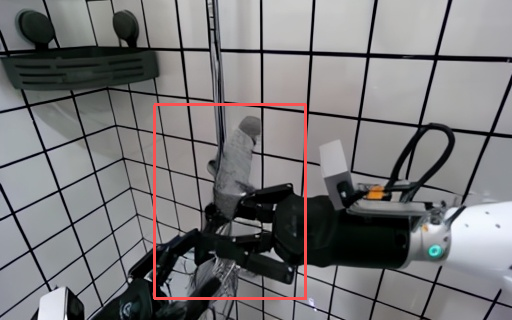
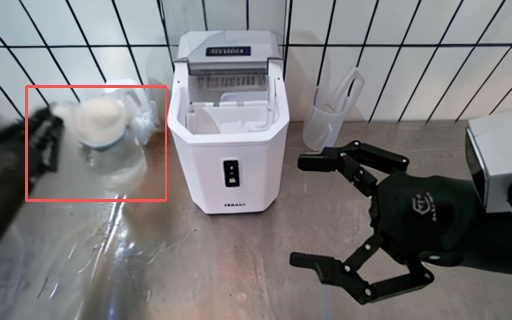
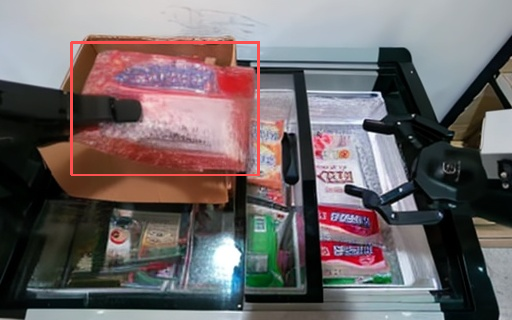
After running the inference results, the left side shows the results generated by the official baseline, while the right side shows the results generated by this improvement method. All results are based on the same input and represent the last frame effect, ensuring the accuracy and validity of the comparison experiments.
| Comparison Group | Official Baseline Result | Improved Method Result |
|---|---|---|
| Group 1 | 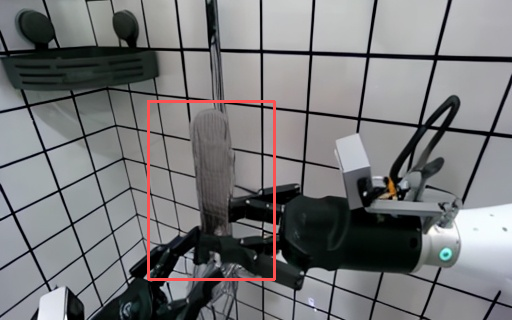 |
 |
| Group 2 | 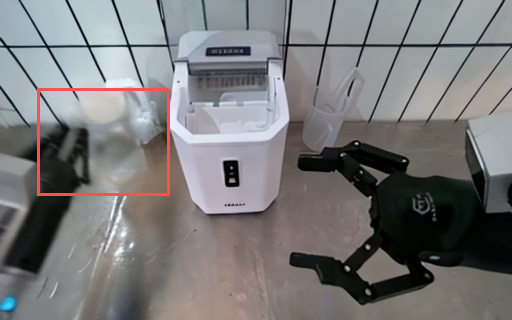 |
 |
| Group 3 | 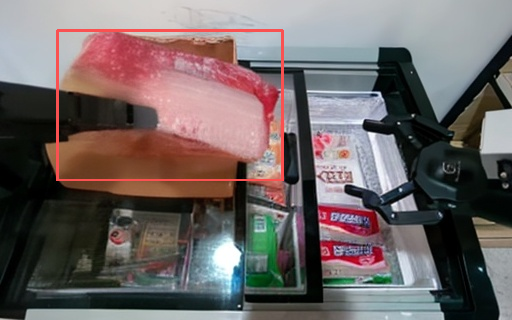 |
 |
| Group 4 | 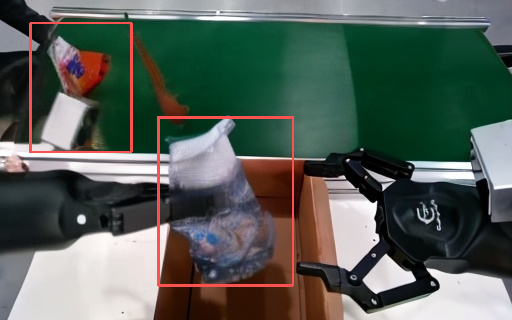 |
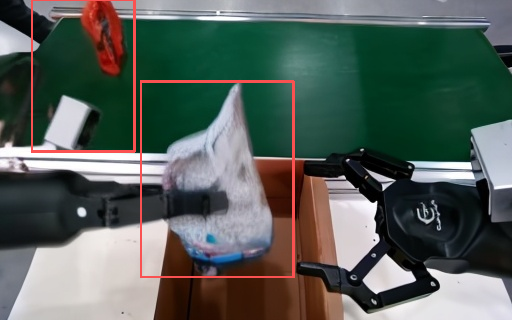 |
It can be seen that the improved method produces clearer objects with a more complete structure.
However, there are still some issues. As can be seen from the improved model generation results, although the improved methods have better performance compared to the official baseline model, the overall visual quality is still not good enough. In addition to the visual quality, there are also other problems.
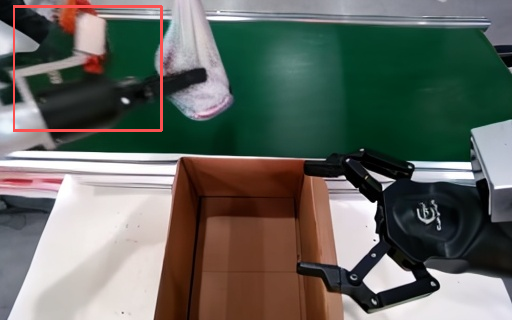
As can be seen in this figure, for the issue of objects continuing to be generated after being occluded, they tend to disappear and deform easily after being blocked. This may require improvements in the model’s memory capacity or its structure itself.
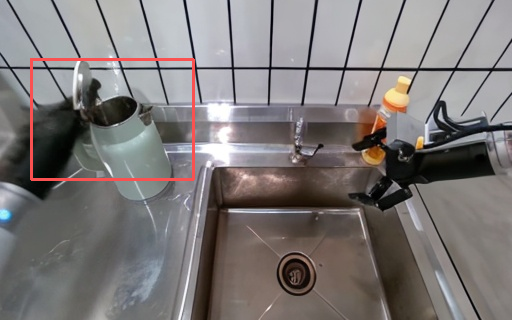
This image shows that the generative model does not have a good understanding of the physical structure of the hinge during the operation of closing a water bottle cap. As a result, the robotic arm encountered a mold penetration issue. We will further improve the physical information comprehension of the world model in the future.
5. Summary
This tutorial introduces the reproduction and improvement process of a motion condition video diffusion World Model, focusing on the improved version of the code. The basic method uses latent diffusion to predict future robot manipulation videos; the improved method incorporates LoRA fine-tuning, temporal differential loss, Sobel edge loss, and first-frame anchoring, without fully training the large model.
From the perspective of method division of labor:
- LoRA is responsible for low-cost adaptation of game data.
- Temporal Difference Loss is responsible for enforcing motion continuity.
- Sobel Edge Loss is responsible for enhancing object edges and details.
- First-frame anchoring is responsible for mitigating appearance forgetting in long sequences.
The final reproduction route can be summarized as:
text安装依赖
  -> 配置 EVAC 权重、CLIP 权重和数据路径
  -> 开启 LoRA、Temporal Loss、Sobel Loss、首帧锚定
  -> 训练 LoRA checkpoint
  -> 使用 infer_lora.sh 推理
  -> 检查 results 和 results_video 输出
  -> 确认逐帧图片和 outputs.mp4 正常生成
Hope this tutorial helps everyone gain a better understanding of the world model. Meanwhile, we will continue to focus on the field of robot world model. We look forward to seeing more papers published. We will also keep working hard and submit more top conferences. We are excited to meet you at the top conference.