
Practical Implementation of OpenVLA Model: Environment Setup, Evaluation and Principle Analysis
1. Introduction
This document aims to provide a comprehensive practical guide for the OpenVLA (Open Vision-Language-Action) model. It covers the entire process, from setting up the basic environment, installing dependency libraries, batch downloading model weights, to evaluating the model on Libero simulation benchmarks. Additionally, the document details common errors that may occur during operation and their solutions, as well as analyzes in depth the core architecture of OpenVLA and the principles of multi-modal data processing, providing both theoretical and practical references for researchers and developers.
2. Environment Setup and Model Preparation
2.1 Basic dependency installation
First, you need to install the NVIDIA CUDA toolkit and clone the OpenVLA repository.
bash# 安装 NVIDIA CUDA Toolkit
sudo apt install nvidia-cuda-toolkit

# 克隆 OpenVLA 模型权重仓库 (Hugging Face)
git clone https://huggingface.co/openvla/openvla-7b

# 克隆 OpenVLA 代码仓库 (GitHub)
git clone https://github.com/openvla/openvla.git
# 备用镜像地址:git clone https://bgithub.xyz/openvla/openvla.git
2.2 Python Environment Configuration
Enter the code directory and install the necessary Python dependencies. Note that some installation steps require access to GitHub; ensure your network connection is working properly.
bashcd openvla

# 安装当前目录为可编辑模式
# 注意:此步需访问 github.com,若网络不通可能报 "Failed to connect to github.com port 443"
pip install -e .

# 安装构建工具
pip install packaging ninja

# 验证 Ninja 安装 (应返回退出代码 "0")
ninja --version; echo $?

# 安装 Flash Attention (特定版本)
pip install "flash-attn==2.5.5" --no-build-isolation

# 可选:使用 mamba 安装 CUDA Toolkit (如果系统级安装有问题)
# mamba install -c nvidia cuda-toolkit=11.8

# 激活环境并验证 NVCC
mamba activate dl && nvcc -V
2.3 Batch Download of Model Weights
To improve efficiency, it is recommended to use tmux to parallelly download the fine-tuning model weights of the Libero task suite.
bash# 创建一个新的 tmux 会话
tmux new-session -d -s openvla_download

# 创建 4 个窗格 (Pane) 来同时下载不同任务的模型
tmux split-window -h
tmux split-window -v
tmux select-pane -t 0
tmux split-window -v

# 在每个窗格中运行下载命令 (下载到 /data1 目录)
tmux send-keys -t 0 'cd /data1 && git lfs clone https://huggingface.co/openvla/openvla-7b-finetuned-libero-spatial' Enter
tmux send-keys -t 1 'cd /data1 && git lfs clone https://huggingface.co/openvla/openvla-7b-finetuned-libero-object' Enter
tmux send-keys -t 2 'cd /data1 && git lfs clone https://huggingface.co/openvla/openvla-7b-finetuned-libero-goal' Enter
tmux send-keys -t 3 'cd /data1 && git lfs clone https://huggingface.co/openvla/openvla-7b-finetuned-libero-10' Enter

# 附加到会话查看下载进度
tmux attach-session -t openvla_download
3. Libero Evaluation Benchmark Execution
3.1 Standard Evaluation Commands
After the model is downloaded, use the run_libero_eval.py script to evaluate different task suites (such as libero_spatial, libero_goal).
bash# 评估 Libero Spatial 任务
python experiments/robot/libero/run_libero_eval.py \
    --model_family openvla \
    --pretrained_checkpoint /data1/openvla-7b-finetuned-libero-spatial \
    --task_suite_name libero_spatial \
    --center_crop True

# 评估 Libero Goal 任务
python experiments/robot/libero/run_libero_eval.py \
    --model_family openvla \
    --pretrained_checkpoint /data1/openvla-7b-finetuned-libero-goal \
    --task_suite_name libero_goal \
    --center_crop True
3.2 Custom Evaluation Parameters
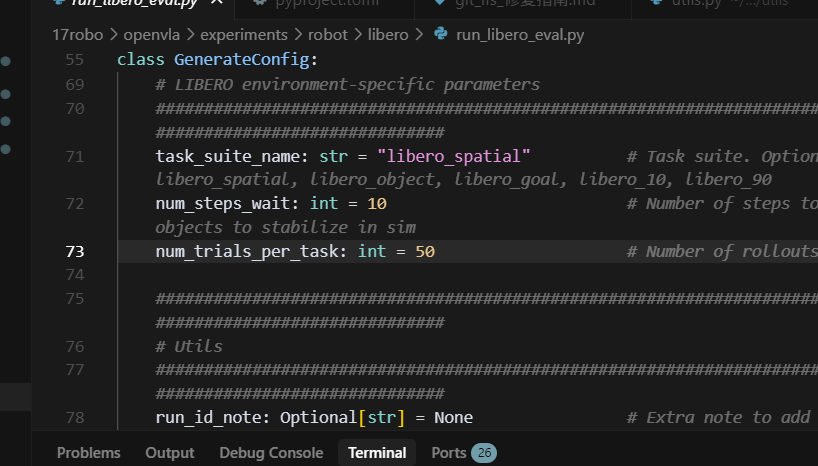
The evaluation configuration can be adjusted through command-line parameters. For example, the number of trials for each task can be reduced to enable rapid testing.
View help document:
bashmicromamba activate dl && cd /home/vipuser/17robo/openvla && python experiments/robot/libero/run_libero_eval.py --help | grep -A 5 -B 5 "num_trials"
Example of modified evaluation times:
By default, num_trials_per_task is set to 50. If you need to change it to 10 times:
bashpython experiments/robot/libero/run_libero_eval.py \
    --model_family openvla \
    --pretrained_checkpoint /data1/openvla-7b-finetuned-libero-spatial \
    --task_suite_name libero_spatial \
    --center_crop True \
    --num_trials_per_task 10
4. Troubleshooting and Problem Solving
When running the evaluation script, the following errors may occur. This section details the error messages and solutions.
4.1 Error 1: Weights only load failed (Pickle Error)
Error message:
plaintext_pickle.UnpicklingError: Weights only load failed. This file can still be loaded, to do so you have two options...
WeightsUnpickler error: Unsupported global: GLOBAL numpy.core.multiarray._reconstruct was not an allowed global by default.
Cause analysis:
This is caused by the security features of the new PyTorch version. torch.load defaults to enabling weights_only=True, which restricts global objects that can be deserialized, and the Libero initialization state file contains numpy objects, which are intercepted.
Solution:
The loading code in the libero library needs to be modified to explicitly allow the numpy object or temporarily disable the weights_only restriction.
Modification location:
File /data/17robo/LIBERO/libero/libero/benchmark/__init__.py (around line 164).
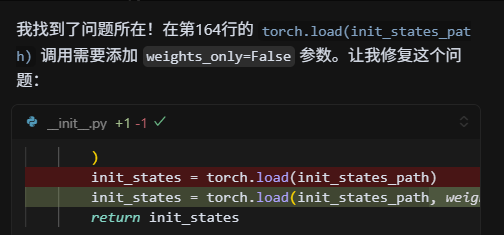
Modify code:
Put:
pythoninit_states = torch.load(init_states_path)
Modified as follows:
python# 允许加载 numpy 相关对象
import numpy as np
init_states = torch.load(init_states_path, weights_only=False)
# 或者更安全的做法(如果 PyTorch 版本支持):
# torch.serialization.add_safe_globals([np.core.multiarray._reconstruct])
# init_states = torch.load(init_states_path)
4.2 Error 2: EGL Context Error (Negligible)
Error message:
plaintextOpenGL.raw.EGL._errors.EGLError: EGLError(err = EGL_NOT_INITIALIZED, ...)
Analysis:
This is the error message from Robosuite/MuJoCo when terminating the rendering context. It usually occurs when the program ends or a task is switched, and it does not affect the evaluation process and result generation, so it can be ignored.
4.3 Successful Execution Verification
After fixing the above Pickle error, the script should run properly and generate an evaluation video.
Example of running log:
plaintextLoading checkpoint shards: 100%|██████████████████| 4/4 [00:01<00:00,  3.16it/s]
Loaded model: <class 'transformers_modules.openvla...OpenVLAForActionPrediction'>
Task: pick up the black bowl between the plate and the ramekin and place it on the plate
Starting episode 1...
Saved rollout MP4 at path ./rollouts/...--success=True--task=....mp4
Success: True
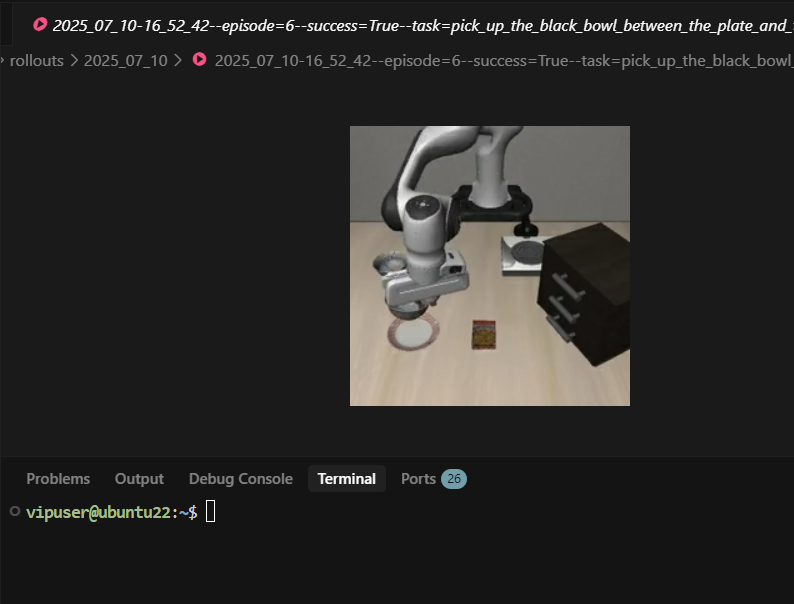
VRAM usage monitoring: Approximately 10,321M VRAM is used.
5. OpenVLA Architecture and Simulation Principles
This section provides an in-depth analysis of the internal working mechanism of OpenVLA and its operation process in the Libero simulation environment.
5.1 Core Architecture
OpenVLA is a typical Vision-Language-Action (VLA) multimodal model. Its architecture is designed to integrate visual perception, language understanding, and action generation into a single end-to-end Transformer network.
1. Vision Backbone
- Function: Extract high-level semantic features from images.
- Supported Models: SigLIP, DINOv2, CLIP, and other mainstream pre-trained models.
- Dual Encoder Policy: Supports using two visual encoders simultaneously (such as DINOv2 + CLIP) to combine different visual features (for example, DINOv2 is good at spatial geometry, while CLIP is good at semantic alignment).
- Output: Image Patch Embeddings, in the format
[batch, num_patches, vision_dim].
2. Visual-Language Mapping Layer (Projector)
- Function: Project visual features into the embedding space of the language model (LLM) so that they can be understood by the LLM.
- Structure: Usually a multi-layer perceptron (MLP).
python# 双视觉编码器示例结构
fc1: vision_dim -> 4 * vision_dim
fc2: 4 * vision_dim -> llm_dim
fc3: llm_dim -> llm_dim
3. Language Model Backbone
- Function: Processes multimodal input sequences for reasoning and generation.
- Model Support: LLaMA-2, Vicuna, Mistral, etc.
- Optimization: Integrated Flash Attention 2 to accelerate computation, and used BF16 precision to reduce memory usage.
4. Action Head
- Function: Decodes the output of the LLM into specific robot control commands.
- Output Space: 7-dimensional continuous action vector
[x, y, z, rx, ry, rz, gripper](position + pose + gripper opening/closing). - Normalization: The model predicts normalized actions, and De-normalization using dataset statistical information is required during inference.
5.2 Simulation Workflow
The Libero simulation benchmark is built using the RoboSuite and MuJoCo physics engines, providing a standardized evaluation process.
Evaluation loop pseudocode:
python# 遍历任务套件中的每个任务 (如 Libero Spatial 有 10 个任务)
for task_id in range(10):
    # 每个任务进行多次试验 (默认为 50 次)
    for episode in range(50):
        env.reset()
        # 设置预定义的初始状态,保证公平性
        obs = env.set_init_state(initial_states[episode])

        for step in range(max_steps):
            # 1. 获取当前帧的 RGB 图像
            image = get_libero_image(obs)

            # 2. 构建任务提示词 (Prompt)
            prompt = f"What action should the robot take to {task_description}?"

            # 3. VLA 模型推理
            # 输入:提示词 + 图像
            # 输出:归一化动作 -> 反归一化动作
            action = vla.predict_action(prompt, image, unnorm_key=task_suite_name)

            # 4. 在仿真环境中执行动作
            obs, reward, done, info = env.step(action)

            if done: break
6. Multimodal Data Processing Mechanism
How OpenVLA efficiently integrates visual, text, and action data is the source of its core competitiveness.
6.1 Multimodal Fusion Policy (Multimodal Fusion)
1. Input preprocessing
- Text: Use the Tokenizer to convert the Prompt into Token IDs.
- Image: Resize to 224x224, and extract features via the Vision Backbone
[num_patches, vision_dim].
2. Feature alignment and concatenation
- Visual features are mapped to the LLM dimension via the Projector
[num_patches, llm_dim]. - In the input sequence, visual Tokens are inserted between text Tokens (usually before or within the instruction).
pythoninput_embeds = [text_embeds[:prefix], projected_vision, text_embeds[prefix:]]
3. Joint Attention Mechanism
- Cross-modal interaction: Using the Self-Attention mechanism of Transformer, text tokens can attend to visual patches, and vice versa. This enables the model to understand instructions such as “pick up that red square in the image”.
- Causal Mask: Preserves the autoregressive generation property to prevent information leakage.
6.2 Training Data Pipeline
-
Data Format:
- Image: RGB observation data.
- Text: Natural language task descriptions.
- Label: 7-dimensional action vectors in expert demonstration trajectories.
-
Data Augmentation:
- Training phase: Random crop, color jitter, etc., to improve robustness.
- Inference phase: Center crop, maintaining input consistency.
-
Action Normalization: Due to the significant differences in action magnitudes across tasks, it is difficult to converge by directly returning the original values. OpenVLA uses Z-Score normalization:
During inference:
Through this end-to-end architecture and precise data processing, OpenVLA achieves a efficient closed loop from perception to decision-making, demonstrating excellent generalization capabilities in benchmarks such as Libero.