
DiT4DiT-LIBERO Training and Evaluation Reproduction Tutorial
This chapter shows you how to complete the minimum reproducible process of DiT4DiT on the LIBERO benchmark: first run the pre-trained model evaluation, then perform a 2-step training with libero_spatial data for a smoke test. The goal is not to replicate a full paper-level training, but to help everyone understand the engineering flow of DiT4DiT: how data enters the model, how the model service connects to the simulation environment, and how the training script verifies that backpropagation works properly.
The testing environment for this tutorial is a single-card NVIDIA L40 server. Two verifications were successfully completed:
libero_spatialSmoke test evaluation: 10 tasks, 1 rollout per task, with a success rate of10/10.libero_spatialTraining smoke test: 2 optimization steps, batch size of 1, capable of completing model loading, data reading, backpropagation, DeepSpeed initialization, and W&B offline logging.
Note: The public simulation reproduction of DiT4DiT mainly relies on MuJoCo-based environments such as LIBERO / RoboCasa. The LIBERO reproduction in this chapter does not require Isaac Sim.
It is recommended that you treat this chapter as a “practical experiment class”. Do not set the goal of completing a full paper training from the start. Full training involves more data, more GPU resources, long-term stable operation, and more complex checkpoint management. In this chapter, we break down the most error-prone parts into several small checkpoints. As long as these checkpoints are passed, you can later expand the dataset, increase the training steps, and use multi-GPU parallelism, making troubleshooting much easier.
Recreation Roadmap
When replicating, friends can follow this path. Each step corresponds to a clear success signal, avoiding the situation where “the command runs for a long time, but it’s unclear where it gets stuck.”
| Phase | Running Environment | Main Objectives | Success Indicators | Priority Checks in Case of Failure |
|---|---|---|---|---|
| 1. Server Preparation | Linux shell | Verify GPU, disk, proxy, token | nvidia-smi is normal, HF_TOKEN=set |
CUDA driver, disk mounting, HF authorization |
| 2. Model Download | DiT4DiT Environment | Download DiT4DiT checkpoint and Cosmos backbone | Model directory exists, no .incomplete file |
Hugging Face gated permissions, proxy node |
| 3. LIBERO Evaluation | Two Environments Working Together | Policy server connects to LIBERO client | Total success rate is printed out |
Server port, websockets, EGL rendering |
| 4. Data Preparation | DiT4DiT Environment | Download libero_spatial and add metadata |
Length of dataloader is 52970 |
modality.json, pyarrow, video decoding |
| 5. Training Smoke Test | DiT4DiT Environment | Complete 2-step training process | Appearances of Step 1, Step 2, Training complete |
Memory, DeepSpeed, missing packages, checkpoint saving |
This table can also be used as a troubleshooting index: If the model service has not been started, do not check the LIBERO success rate; if the dataloader has not been created, do not check whether the loss is normal. By pinpointing the problem at a specific stage, the reproduction efficiency will be much higher.
1. What is DiT4DiT doing
DiT4DiT can be understood as a “large model + diffusion action head” framework tailored for robot manipulation tasks. It uses video/visual language backbones such as Cosmos-Predict2.5-2B to extract image and language conditions, and then uses an DiT-style action model to predict a future sequence of actions.
The names here are confusing, so let’s break them down:
- The first
DiTmore closely reflects the meaning of diffusion transformer, generating continuous actions using the ideas of a diffusion model. - The second
DiTrefers to the overall policy learning framework of this project, connecting the video/language backbone with the action diffusion head. - In the LIBERO task, what it ultimately outputs is not a single sentence of text, but the continuous control values that the robotic arm will execute next.
So when replicating this system, everyone should focus on the main theme: it is not just about running a vision-language model, nor just running a MuJoCo environment, but rather aligning the “vision-language model, action generation head, and simulation environment”.
In the LIBERO task, the model receives:
- Current camera observations, such as main view and wrist view images;
- Language task instructions, such as “pick up the black bowl…”;
- Current robot status;
- Action labels are also read during training to compute action loss.
During evaluation, the LIBERO simulation environment sends observations to the policy server. The policy server returns actions, and the simulation environment executes these actions and counts whether the task is successful.
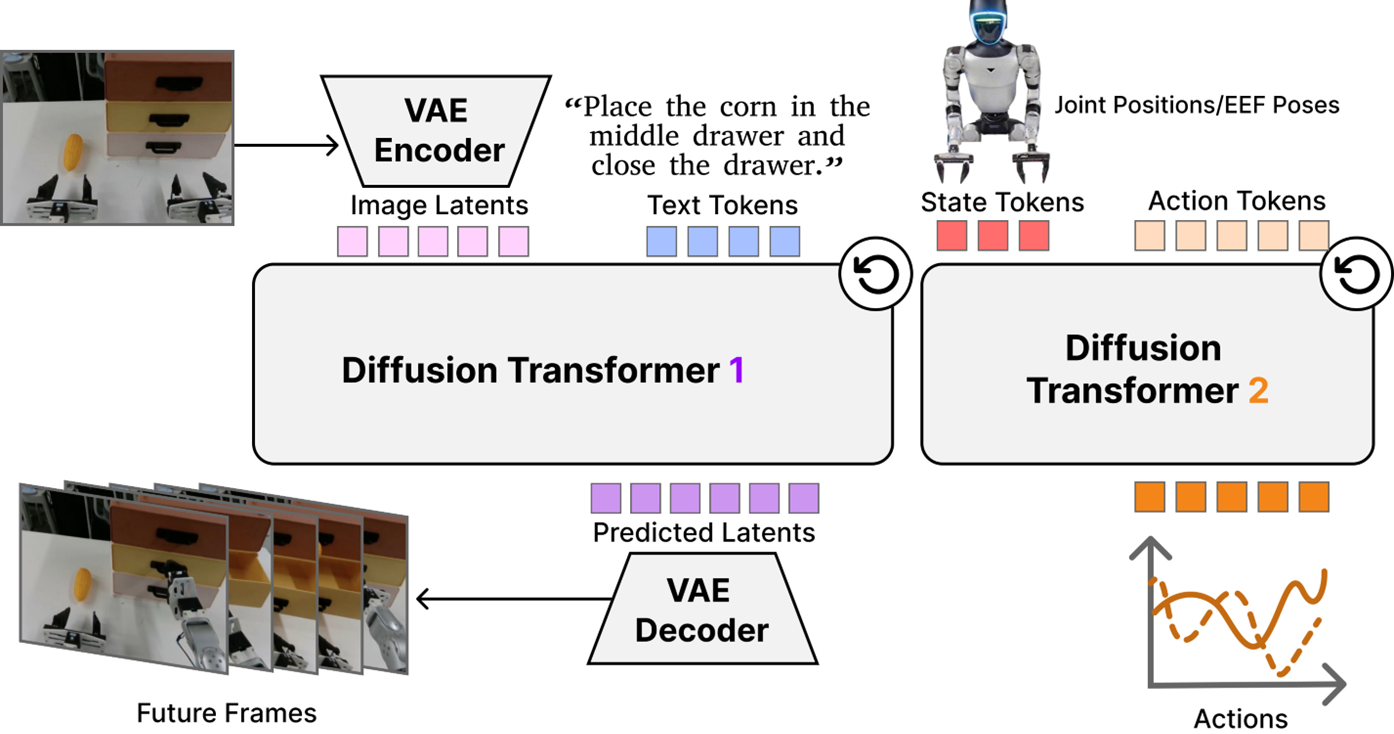
Figure 1: Overview of the official DiT4DiT policy. This figure illustrates the core idea in the original paper: first, a video diffusion/video prediction model is used to understand visual and linguistic conditions, and then action generation is organized as a diffusion-style transformer process. Two key points deserve attention: first, the policy does not directly output an action from a single image, but generates an action sequence using historical observations, linguistic, and temporal conditions; second, there is a clear conditional transmission relationship between the world model and the action diffusion head.
Source: DiT4DiT official project page / paper method diagram.
The official diagram is more suitable for helping everyone understand the paper’s methods. The following replicated architecture diagram breaks down the actual engineering process in this chapter: what is on the server disk, which scripts run in the DiT4DiT environment, which scripts run in the LIBERO environment, and how the two processes communicate during evaluation.
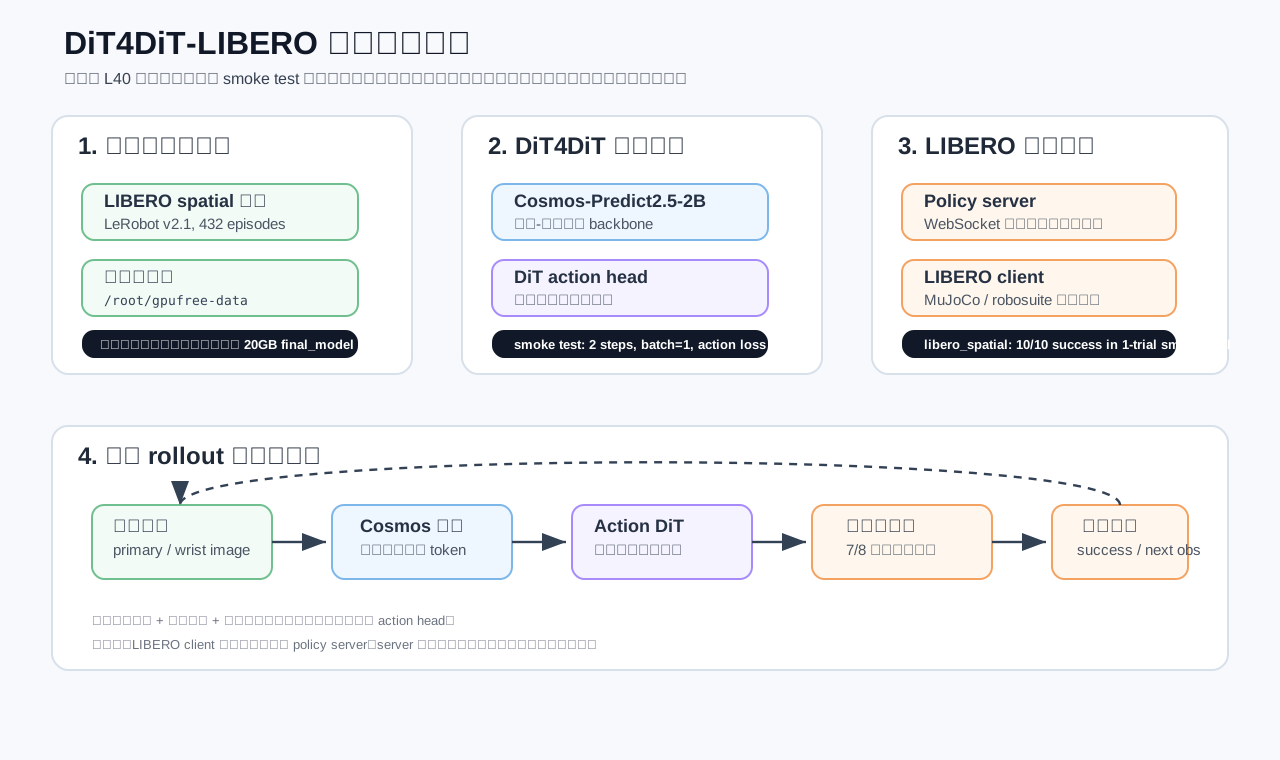
Figure 2: Minimum reproduction architecture for DiT4DiT-LIBERO. On the left is the training data and directory structure; in the middle are the Cosmos backbone of DiT4DiT and the DiT action head; on the right are the policy server during evaluation and the LIBERO simulation client. The dashed lines in the figure indicate that a rollout repeats continuously: observations enter the model, actions are executed in the environment, and the environment generates the next frame of observations.
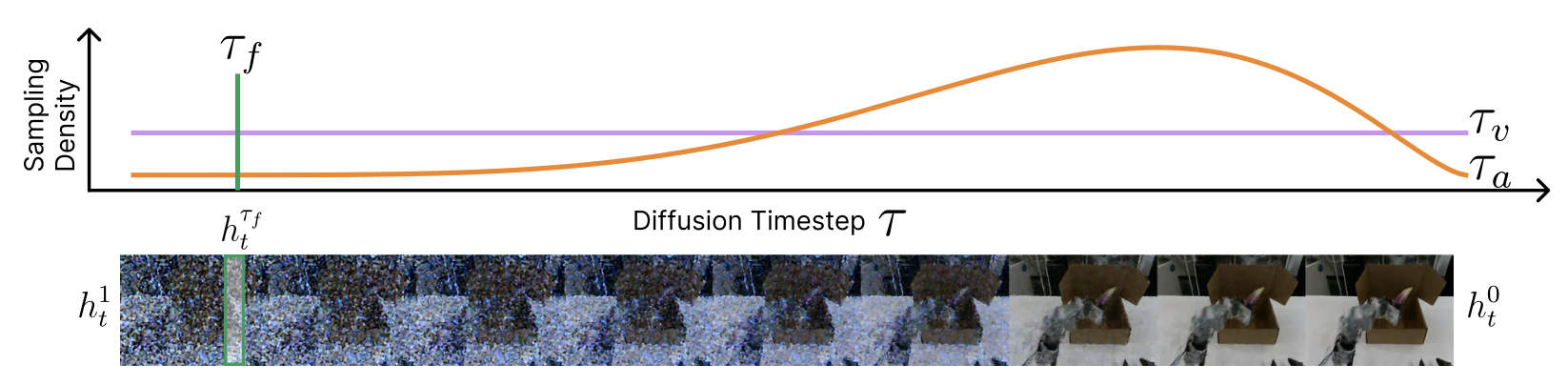
Figure 3: The tri-timestep mechanism of DiT4DiT. This official figure can be understood as DiT4DiT handling the detailed “time” aspects: the video model has its own time steps, the action diffusion head also has its own denoising time steps, and the robot trajectory itself includes real control times. When replicating and training, users do not need to modify this mechanism initially, but they must understand that issues such as loss, sampling steps, and action horizon are all related to this.
Source: DiT4DiT official project page / paper mechanism diagram.
II. What the training data looks like
This time, only a dataset libero_spatial_no_noops_1.0.0_lerobot was downloaded. It is LeRobot format data containing 432 episodes and approximately 53,000 frames, totaling about 362 MB. It is very suitable for teaching and smoke testing.
The following three videos come from the same training data directory, illustrating the LIBERO visual observations that the model actually sees. The first and second columns are the main view and wrist view of the same episode; the third column is the main view of another episode, highlighting task differences.
|
Video 1: Main perspective observation Episode 285: Desktop global perspective, used to observe objects and target areas. |
Video 2: Wrist perspective observation Episode 285: End-of-robotic arm perspective, focusing on local contact near the gripper. |
Video 3: Another task trajectory Episode 372: Displays spatial manipulation data under different initial conditions. |
Figure 4: Multi-view video samples from the LIBERO spatial training dataset. These videos are not the final renderings of the rollout evaluation, but rather demonstration trajectories in the training dataset. Their purpose is to help everyone understand the model input: language instructions define the task, visual sequences provide scene states, and action labels provide supervisory signals.
III. Server and Directory Planning
A key principle of this chapter is that large models and conda environments can reuse the paid shared disk, while training data, logs, and teaching outputs are stored on the free data disk. This ensures the process runs smoothly without leaving the free disk full with checkpoints of 20GB due to smoke tests.
| Type | Measured Path | Purpose |
|---|---|---|
| Project Root Directory | /root/gpufree-share/dit4dit_eval |
DiT4DiT repository, LIBERO repository, model cache |
| DiT4DiT Environment | /root/gpufree-share/conda-envs/dit4dit |
policy server and training scripts |
| LIBERO Environment | /root/gpufree-share/conda-envs/libero |
MuJoCo / robosuite simulation evaluation |
| Free Dataset Disk | /root/gpufree-data/dit4dit_train_test |
single suite dataset, training logs, smoke test output |
| Cosmos Backbone | /root/gpufree-share/dit4dit_eval/models/Cosmos-Predict2.5-2B |
gated Hugging Face model |
| DiT4DiT Checkpoint | /root/gpufree-share/dit4dit_eval/models/dit4dit-model/dit4dit_libero/final_model/pytorch_model.pt |
pre-trained policy weights |
If you use your own server, you can keep this idea, but replace the path with your mount drive. It is recommended to prepare at least 48GB of VRAM for single-card evaluation and smoke training. The RTX 4090 may also be able to run some processes, but 24GB of VRAM is more likely to encounter OOM issues.
Here, we would like to emphasize the disk planning. The models of DiT4DiT, Cosmos backbone, and conda environments have large weights, so they are suitable for storage on a larger shared or long-term disk. The data, logs, and temporary outputs used for training smoke tests should be stored on a cheaper data disk. If everyone puts all the content directly on the system disk, No space left on device errors are likely to occur. Moreover, these errors often appear during pip installation, HF download, or checkpoint saving, making troubleshooting time-consuming.
IV. Proxy and Hugging Face Permissions
Cosmos-Predict2.5-2B is a gated model, and the NVIDIA model license requires approval from a Hugging Face account. On the server, it is sufficient for the current shell to be able to read HF_TOKEN, but it is not recommended to include tokens in tutorials, scripts, or Git repositories.
It is recommended to save a private env file on the server:
bashmkdir -p /root/.secrets
chmod 700 /root/.secrets
cat > /root/.secrets/codex_tokens.env <<'EOF'
export HF_TOKEN=hf_xxx
export HUGGING_FACE_HUB_TOKEN="$HF_TOKEN"
EOF
chmod 600 /root/.secrets/codex_tokens.env
Then load it in the project environment script or current shell:
bashsource /root/.secrets/codex_tokens.env
When checking whether the token has been read by the current shell, do not print the token value directly. You can only check whether the variable exists:
bashfor k in HF_TOKEN HUGGING_FACE_HUB_TOKEN; do
  v=${!k:-}
  [ -n "$v" ] && echo "$k=set" || echo "$k=missing"
done
If the output is HF_TOKEN=set, it means the environment variable has taken effect; if it is still missing, check whether there is no source /root/.secrets/codex_tokens.env, or whether the login shell does not automatically load this file.
If the server has slow access to GitHub / Hugging Face, you can directly install the Clash-compatible core on the remote server, such as mihomo. In this reproduction, the download of Hugging Face got stuck at the Xet shard download path. Finally, by using a stable proxy node and setting the following environment variables, it was restored:
bashexport HF_HUB_DISABLE_XET=1
export HF_HUB_ENABLE_HF_TRANSFER=0
export HF_HUB_DOWNLOAD_TIMEOUT=600
5. Download Models and Data
This chapter requires two model resources for reproduction:
bashsource /root/gpufree-share/dit4dit_eval/env.sh

# DiT4DiT LIBERO checkpoint
huggingface-cli download mondo-robotics/dit4dit-model \
  --local-dir /root/gpufree-share/dit4dit_eval/models/dit4dit-model

# Cosmos backbone,需要 HF gated model 权限
huggingface-cli download nvidia/Cosmos-Predict2.5-2B \
  --local-dir /root/gpufree-share/dit4dit_eval/models/Cosmos-Predict2.5-2B
After the download is completed, it is recommended to immediately perform two checks:
bashdu -sh /root/gpufree-share/dit4dit_eval/models/dit4dit-model
du -sh /root/gpufree-share/dit4dit_eval/models/Cosmos-Predict2.5-2B
find /root/gpufree-share/dit4dit_eval/models/Cosmos-Predict2.5-2B -name '*.incomplete' | wc -l
The first check confirms that the model is actually saved to disk; the second check ensures that there are no remaining .incomplete files in the Cosmos directory. If the number of .incomplete files is not zero, it indicates that the download may have been interrupted. When loading the model later, it is easy to encounter shard missing or safetensors read errors.
Training the smoke test only requires downloading a LIBERO suite:
bashmkdir -p /root/gpufree-data/dit4dit_train_test/datasets

huggingface-cli download IPEC-COMMUNITY/libero_spatial_no_noops_1.0.0_lerobot \
  --repo-type dataset \
  --local-dir /root/gpufree-data/dit4dit_train_test/datasets/libero_spatial_no_noops_1.0.0_lerobot
The directory space occupied after actual download is as follows:
text362M /root/gpufree-data/dit4dit_train_test/datasets
The advantage of downloading only one suite is clear: it is small enough to quickly verify the training dataloader; at the same time, it uses real LIBERO data, not fabricated fake samples. This ensures that the loss, video decode, and state/action field mappings shown are consistent with those in subsequent expanded experiments.
VI. Run through the LIBERO evaluation
The LIBERO evaluation of DiT4DiT is generally divided into two processes: one process starts the policy server, and the other starts the LIBERO simulation client. For teaching convenience, it can be encapsulated into a script:
bash/root/gpufree-share/dit4dit_eval/scripts/run_libero_one_suite.sh \
  /root/gpufree-share/dit4dit_eval/models/dit4dit-model/dit4dit_libero/final_model/pytorch_model.pt \
  libero_spatial \
  1 \
  0
The four parameters are as follows:
| Parameter | Meaning |
|---|---|
| checkpoint path | DiT4DiT-LIBERO pre-trained checkpoint |
| task suite | Here, choose libero_spatial |
| trials per task | How many times to run each task; for smoke test, use 1 |
| GPU id | For single-card servers, usually use 0 |
When this step is successful, everyone should see two types of signals:
server.logcontainsserver runningandconnection open, indicating that the policy server has loaded the checkpoint, and the LIBERO client can connect to it.eval_libero_spatial.logfrequently containsSuccess: TrueorSuccess: False, suggesting that the simulation environment is executing a rollout, rather than being stuck in the model loading or environment initialization phase.
The final log of this smoke test is as follows:
textTask: pick up the black bowl on the wooden cabinet and place it on the plate
Starting episode 1...
Success: True
# episodes completed so far: 10
# successes: 10 (100.0%)
Current task success rate: 1.0
Current total success rate: 1.0
Total success rate: 1.0
Total episodes: 10
Table 1: LIBERO spatial evaluation smoke test results. This is only used for link verification, so each task is run only once. During formal evaluation, trials per task can be replaced with 50, but the execution time will increase significantly.
An EGL cleanup warning may appear at the end of the evaluation:
textException ignored in: <function MjRenderContext.__del__ ...>
OpenGL.raw.EGL._errors.EGLError: EGL_NOT_INITIALIZED
This warning appears during the destructor phase of the robosuite / EGL context. If Total success rate and Total episodes have been printed earlier, it indicates that the evaluation is complete.
If everyone’s logs only stop at server listening, but there is no connection open, it usually means the client has not started, the port is incorrect, or the client environment lacks required packages. If the client has started but there are no task logs, prioritize checking whether the LIBERO data path and EGL off-screen rendering can be initialized.
VII. Pass the 2-step training smoke test
The complete DiT4DiT training is very intensive. The official script defaults to multi-GPU training. A more reasonable goal during teaching is to first prove that the training process works: data can be read, the model can be loaded, the action head has trainable parameters, the loss can be backpropagated, and the optimizer can take steps.
This 2-step smoke test proves that the training program can run, not that the model has been trained successfully. Do not use this 2-step loss to judge the model’s performance, and also do not use this checkpoint for formal evaluation. Its value lies in quickly verifying that the environment, data format, memory, DeepSpeed, and model code have no obvious issues.
The smoke script used in this chapter has been archived at:
textassets/logs/run_train_smoke_libero_spatial.sh
The execution command on the server is:
bash/root/gpufree-data/dit4dit_train_test/run_train_smoke_libero_spatial.sh 2 1
Here, 2 indicates a 2-step training, and 1 indicates a batch size of 1 per device. The script does several key things:
bashexport WANDB_MODE=offline
export HF_HOME="$FREE_ROOT/hf_cache"
export CUDA_VISIBLE_DEVICES="${CUDA_VISIBLE_DEVICES:-0}"

accelerate launch \
  --config_file DiT4DiT/config/deepseeds/deepspeed_zero2.yaml \
  --num_processes 1 \
  DiT4DiT/training/train.py \
  --datasets.vla_data.data_mix libero_spatial_only \
  --datasets.vla_data.per_device_batch_size "$BATCH" \
  --trainer.pretrained_checkpoint "$PRETRAINED" \
  --trainer.freeze_modules backbone_interface \
  --trainer.max_train_steps "$STEPS" \
  --trainer.save_interval 999999 \
  --trainer.eval_interval 999999
The three most important points here are:
data_mix=libero_spatial_only: Run only one suite to avoid downloading four LIBERO dataset.freeze_modules=backbone_interface: Freeze the Cosmos backbone and verify only the training path of the action head.save_interval=999999: Do not save intermediate checkpoints during training to prevent frequent large file writing.
The script also sets WANDB_MODE to offline. In this way, W&B only records the curves and summaries locally, without requiring everyone to log in with an online account. For teaching reproduction, this setting is more convenient: ensure that the training runs properly first, and then switch back to online mode for long-term experiments.
Model parameter statistics can be seen in the training log:
textTotal parameters:      10,641,307,643 (10641.308M)
Trainable parameters:  163,073,544 (163.074M)
Frozen parameters:     10,478,234,099 (10478.234M)
Trainable ratio:       1.53%
This indicates that the smoke test did not attempt to fine-tune the entire 10B parameter model, but only trained the parameters related to the action model. For teaching purposes, this setting is more stable and saves more VRAM.
The key logs after the 2-step training are as follows:
textTotal optimization steps = 2
Per device batch size = 1
len(vla_train_dataloader) = 52970

Step 1, Loss: {
  'action_dit_loss': 0.005973855499178171,
  'future_video_loss': 0.009470176883041859,
  'future_video_loss_scaled': 0.0,
  'total_loss': 0.005973855499178171
}

Step 2, Loss: {
  'action_dit_loss': 2.472470998764038,
  'future_video_loss': 0.004216373898088932,
  'future_video_loss_scaled': 0.0,
  'total_loss': 2.472470998764038
}

Training complete. Final model saved ...
Table 2 DiT4DiT training smoke test checkpoint. This result indicates that two optimizer steps have been completed in the main training loop. Due to the small number of steps, the loss value does not represent convergence, but only indicates that the system is operational.
You can also confirm that the training is actually completed, rather than just starting the model, by checking the following points:
- The appearance of
Total optimization steps = 2in the log indicates that the configuration is correctly overwritten. - The appearance of
len(vla_train_dataloader) = 52970in the log indicates that the dataset is correctly indexed. - The appearances of
Step 1andStep 2in the log indicate that the dataloader, forward, backward, and optimizer steps have all been executed. - Finally, the appearance of
Training completeindicates that the training main loop exits normally.
VIII. Why delete final_model after training is completed
The _finalize_training() of DiT4DiT will save a complete final_model/pytorch_model.pt at the end of training. Even if only 2 steps are trained, this file is nearly 20GB in size. To prevent the free disk from being full, the smoke script defaults to deleting this directory after confirming that training is completed:
bashFINAL="$RUN_ROOT/$RUN_ID/final_model/pytorch_model.pt"
if [ -f "$FINAL" ]; then
  du -sh "$RUN_ROOT/$RUN_ID" || true
  if [ "${KEEP_FINAL_MODEL:-0}" != "1" ]; then
    rm -rf "$RUN_ROOT/$RUN_ID/final_model"
    echo "Removed large final_model to keep free data disk small."
  fi
fi
If you really want to keep the checkpoint, you can run it like this:
bashKEEP_FINAL_MODEL=1 /root/gpufree-data/dit4dit_train_test/run_train_smoke_libero_spatial.sh 2 1
The disk usage after this cleanup is as follows:
text362M  /root/gpufree-data/dit4dit_train_test/datasets
96K   /root/gpufree-data/dit4dit_train_test/logs
76K   /root/gpufree-data/dit4dit_train_test/results
9. Add the metadata required by DiT4DiT for training data
The HF dataset used this time is in LeRobot v2.1 format. The original meta/ directory does not contain meta/modality.json as expected by the DiT4DiT dataloader. Therefore, a field mapping file is required to split the observation.state and action vectors from LIBERO into field names used in the DiT4DiT code.
This is a very common issue: the data itself is complete, but different projects have inconsistent “field naming” and “metadata descriptions” for the same dataset. The DiT4DiT dataloader not only reads parquet, but also first reads meta/modality.json to determine which column or segment of vectors in the original data correspond to the abstract fields state.x, action.gripper, and video.primary_image. Therefore, what is added here is not new data, but a way for the dataloader to interpret the existing data.
Example mapping is as follows:
json{
  "state": {
    "x": {"start": 0, "end": 1, "absolute": true, "dtype": "float32", "original_key": "observation.state"},
    "y": {"start": 1, "end": 2, "absolute": true, "dtype": "float32", "original_key": "observation.state"},
    "z": {"start": 2, "end": 3, "absolute": true, "dtype": "float32", "original_key": "observation.state"},
    "gripper": {"start": 7, "end": 8, "absolute": true, "dtype": "float32", "original_key": "observation.state"}
  },
  "action": {
    "x": {"start": 0, "end": 1, "absolute": false, "dtype": "float32", "original_key": "action"},
    "y": {"start": 1, "end": 2, "absolute": false, "dtype": "float32", "original_key": "action"},
    "z": {"start": 2, "end": 3, "absolute": false, "dtype": "float32", "original_key": "action"},
    "gripper": {"start": 6, "end": 7, "absolute": false, "dtype": "float32", "original_key": "action"}
  },
  "video": {
    "primary_image": {"original_key": "observation.images.image"},
    "wrist_image": {"original_key": "observation.images.wrist_image"}
  },
  "annotation": {
    "human.action.task_description": {"original_key": "task_index"}
  }
}
When the dataloader is started for the first time, the code will automatically count stats_gr00t.json and generate steps_data_index.pkl. The counting of 432 parquet files took very little time, and it will read from the cache directly when run again later.
If you notice that the first run is much slower than subsequent ones, don’t worry. The slowness in the first run is mainly due to two tasks: scanning all parquet files to calculate statistics, and generating sampling step indices for each episode. As long as meta/stats_gr00t.json and meta/steps_data_index.pkl are generated successfully, subsequent starts will be significantly faster.
X. Common Issues and Fixes
1. Hugging Face returns 403
If an error occurs during the download of Cosmos:
text403 Forbidden: not in the authorized list
Note that the current HF account has not yet agreed to the gated model permission for nvidia/Cosmos-Predict2.5-2B. First, apply for/agree to the permission on the Hugging Face model page, and then run the download script again.
2. Download speed suddenly stalls
If the model download stalls on a shard for a long time, you can try:
bashexport HF_HUB_DISABLE_XET=1
export HF_HUB_ENABLE_HF_TRANSFER=0
If the server uses a Clash-compatible proxy, it is recommended to use a node that is more stable for Hugging Face instead of relying on automatic selection.
3. Python version compatibility in LIBERO environment
The LIBERO environment commonly uses Python 3.8. If list[int] or np.ndarray | float type annotation errors related to Python 3.10 occur in the evaluation client, add at the top of the corresponding file:
pythonfrom __future__ import annotations
This will not change the execution logic; it only delays the parsing of type annotations in the old Python version.
4. Training lacks lightweight dependencies
The training path has covered these dependencies:
bashpip install wandb numpydantic albumentations opencv-python-headless pyarrow
It is not recommended to install the training version requirements.txt in its entirety from the start, as it may contain many packages unrelated to smoke tests, which will increase the download time and the likelihood of failures.
5. What to do if pytorch3d doesn’t want to be compiled
The top-level import for the universal state/action transform file of DiT4DiT contains pytorch3d.transforms. However, rotation representation conversion is not used in practice for the LIBERO path. To avoid compiling pytorch3d, the import can be changed to lazy loading:
pythontry:
    import pytorch3d.transforms as pt
except ImportError:
    pt = None
And throw the error only when RotationTransform is actually initialized. This will not affect the LIBERO smoke training.
6. Assess the websocket version issues of the client
If the websockets version in the Python 3.8 environment is outdated, the connection parameters may not be compatible. For example, ping_interval may be treated as an unknown parameter by the underlying socket. The solution is for the client to use compatible syntax and only pass the parameters supported by the current version.
11. Which files should everyone keep
In open-source tutorials, do not submit model weights, conda environments, HF caches, or complete datasets. It is recommended to keep only the lightweight evidence like this chapter:
text05DiT4DiT-LIBERO/
  01DiT4DiT-LIBERO训练与评估.md
  assets/
    dit4dit_architecture.svg
    official_images/
      pipeline.jpg
      tri_timestep.png
    libero_spatial_episode_285_primary.mp4
    libero_spatial_episode_285_primary.png
    libero_spatial_episode_285_wrist.mp4
    libero_spatial_episode_285_wrist.png
    libero_spatial_episode_372_primary.mp4
    libero_spatial_episode_372_primary.png
    logs/
      train_smoke_libero_spatial_2steps.log
      eval_libero_spatial_1trial.log
      policy_server.log
      run_train_smoke_libero_spatial.sh
      dataset_statistics.json
These files are sufficient to help everyone understand the reproduction process, without turning the repository into a model or data warehouse. Both the model weights and dataset can be re-downloaded via scripts. The tutorial repository should also retain evidence on “how to reproduce” and “what the successful reproduction looks like”.
XII. How to expand further
After completing this chapter, you can continue to expand in three directions:
- Replace
trials per taskwith50from1, to achieve a higher LIBERO spatial success rate closer to the formal evaluation. - Download
libero_object,libero_goal, andlibero_10, and expandlibero_spatial_onlyback tolibero_all. - On multi-card servers, remove the minimal smoke settings for the action head, and gradually increase the batch size, training steps, and save frequency.
The most important conclusion of this chapter is: do not attempt to train a complete paper from the start. First, use a single suite, a single card, and a 2-step smoke test to integrate the environment, data, model, and simulation process. Then, gradually increase the training scale. This will significantly reduce the troubleshooting costs.