
LeRobot MuJoCo Training ACT, SmolVLA, Pi0 Tutorial
This repository provides a minimal working example: it is used to collect teaching data and train (or fine-tune) the visual-language-action (VLA) model on a custom dataset.
Table of Contents
- Installation
- Update Plan
- 1. Collecting teaching data
- 2. Playing back data
- 3. Training Action-Chunking-Transformer (ACT)
- 4. Deploying ACT policy
- 5-6. Collection and visualization in language condition environment
- Models and dataset
- 7. Training and deploying pi_0
- 8. Training and deploying SmolVLA
- 10. Fine-tuning OMY with π0.5
- Acknowledgments
Installation
It passed the test on Python 3.10.
It is not recommended to use pip install lerobot directly, as it may cause errors.
Install MuJoCo dependencies and lerobot:
bashconda create -n py310 python=3.10
pip install -r requirements.txt
conda install jupyterlab
pip install ipywidgets ipykernel
python -m ipykernel install --user --name py310 --display-name "py310"
jupyter lab .
# 在当前目录启动


# 如果torch的cuda有问题:
pip uninstall -y torch torchvision torchaudio
pip install --no-cache-dir --force-reinstall --index-url https://download.pytorch.org/whl/cu124 torch==2.6.0 torchvision==0.21.0 torchaudio==2.6.0
python -c "import torch; print(torch.__version__, torch.version.cuda, torch.cuda.is_available())"
Please confirm that the MuJoCo version is 3.1.6.
Unzip resource files:
bashcd asset/objaverse
unzip plate_11.zip
Update Plan
- [x] Viewer update
- [x] Add various mugs and plates for different language commands
- [x] Add pi_0 training and inference
- [x] Add SmolVLA
1. Collect teaching data
By default, the ROBOTIS OMY six-axis robotic arm and gripper MuJoCo simulation model is used, with the scene file being asset/example_scene_y.xml. No physical robotic arm is required. After running the acquisition unit, focus the keyboard on the MuJoCo window before manipulation. The fixed version of this chapter’s LeRobotDataset saves data in LeRobot v2.1 format.
Collects teaching data in the given environment. The task is to pick up the cup and place it on the plate. When the cup is on the plate, the gripper is open, and the end effector is above the cup, the environment determines success.

Key position descriptions:
WASD: movement in the x-y planeR/F: z-axis movementQ/E: tilt方向键: remaining rotation空格: switch gripper stateZ: reset the environment and discard the current round cache data
Overlaid image descriptions:
- Top right: Agent’s perspective
- Bottom right: Wrist (first-person) perspective
- Top left: Side view
- Bottom left: Top view
Dataset structure:
pythonfps = 20,
features={
    "observation.image": {
        "dtype": "image",
        "shape": (256, 256, 3),
        "names": ["height", "width", "channels"],
    },
    "observation.wrist_image": {
        "dtype": "image",
        "shape": (256, 256, 3),
        "names": ["height", "width", "channel"],
    },
    "observation.state": {
        "dtype": "float32",
        "shape": (6,),
        "names": ["state"], # x, y, z, roll, pitch, yaw
    },
    "action": {
        "dtype": "float32",
        "shape": (7,),
        "names": ["action"], # 6 个关节角 + 1 个夹爪
    },
    "obj_init": {
        "dtype": "float32",
        "shape": (6,),
        "names": ["obj_init"], # 仅物体初始位置,训练中不使用
    },
},
Data is stored in the ./demo_data directory by default. The historical example demo_data_example in the repository can be used to view the directory structure and replay; for training, please use the data collected again after this fix.
After starting the manipulation, the code caches images, states, and actions at 20 Hz; an episode is saved upon successful judgment. Z discards the current unsaved round. A new round must be recorded by restarting the operation after successful saving or reset. By default, NUM_DEMO=1 collects only one teaching; the number should be increased and different object positions should be covered during training.
Difference between action and observation: The observation.state at the four keyboard acquisition points is the final pose before issuing the command for this frame, while action is the absolute target joint angle obtained via inverse kinematics plus the normalized gripper command (0 indicates open, 1 indicates closed). OMY, Nova5, and xArm6 are 7-dimensional, and xArm7 is 8-dimensional. After calling PnPEnv.step(action) to prepare the control command, PnPEnv.get_commanded_joint_action() is used to read the action label; the return value of step() is still an observation and cannot serve as a target action. When the gripper reaches smooth or contact limits, the label records the actual command issued after passing through these restrictions.
Old data processing (2026-10-02): Older versions of 1.collect_data.ipynb, 1.collect_data_nova5.ipynb, 1.collect_data_xarm6.ipynb, and 1.collect_data_xarm7.ipynb incorrectly saved the current joint state as an action label. It is recommended to use the corrected code for re-collection and training; simply updating the code cannot fix the labels in the existing data. Please keep the old data backup, switch to the new ROOT directory, and modify the training data path accordingly to prevent the inclusion of old data. After updating the environment code, restart the Notebook kernel and run the process from scratch.
The language condition collection entry in Section 5 also uses the same target action interface, but observation.state is retained as the six robotic arm joint angles of the current system, rather than the end pose; respective state definitions should be used during training and deployment.
After installing the dependencies of this chapter, you can run python -m unittest -v test_collection_actions from the directory of this chapter to check the action tags, gripper commands, round boundaries, and five collection entrances. This check does not require opening a graphical window or running GPU training.
2. Replay Data
Select the replay entry using the robot used during collection. The data path and robot model must be consistent:

Visualize your actions in the reconstructed simulation scene. The main window will replay the actions; the images overlaid in the top-right and bottom-right come from a dataset.
3. Train Action-Chunking-Transformer (ACT)
Run 3.train.ipynb
It takes about 30~60 minutes.
Train ACT on a custom dataset. In the example chunk_size=10.
The trained checkpoint will be saved in ./ckpt/act_y.
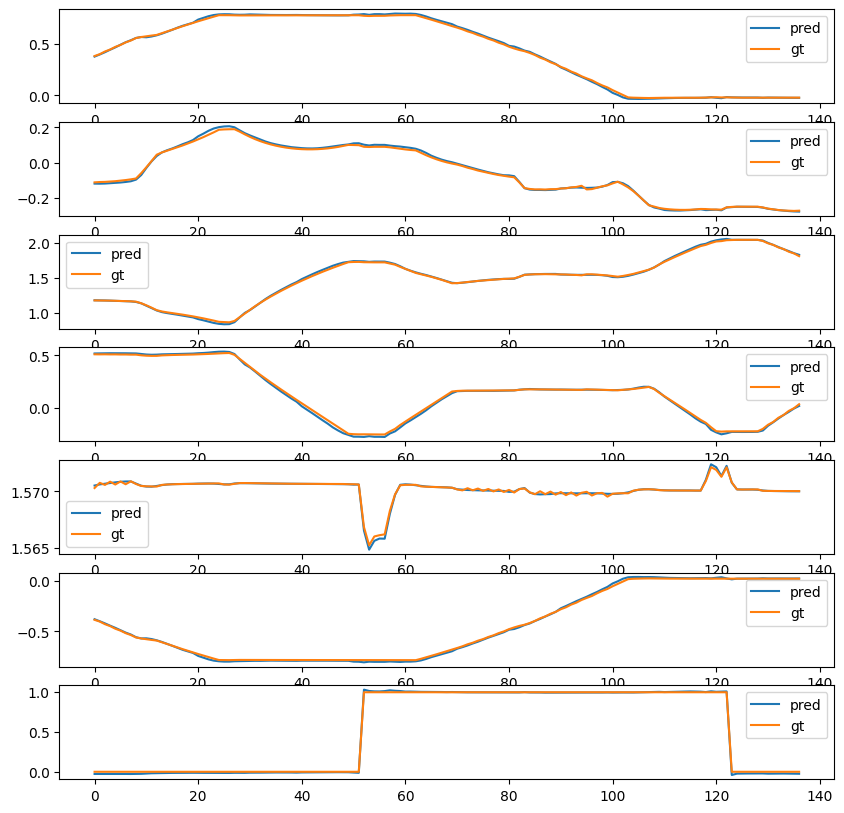
The policy error can be evaluated by comparing it with the true value action of the dataset.
PicklingError: Can't pickle <function <lambda>>...>
If a pickling error occurs, set `num_workers` to `0`, for example:pythondataloader = torch.utils.data.DataLoader(
dataset,
num_workers=0, # 4
batch_size=64,
shuffle=True,
pin_memory=device.type != "cpu",
drop_last=True,
)
4. Deploy the ACT policy
Run 4.deploy.ipynb
If there is no GPU available for training, download the checkpoint from Google Drive:

5-6. Collection and Visualization in Language Condition Environment
- 5.language_env.ipynb: Keyboard remote manipulation for data collection (key mapping matches the first environment)
- Only one piece of data is collected in Task 1, and 20 pieces of data are collected in Task 5. These are two tasks involving the red and blue cups
- 6.visualize_data.ipynb: Visualize collected data
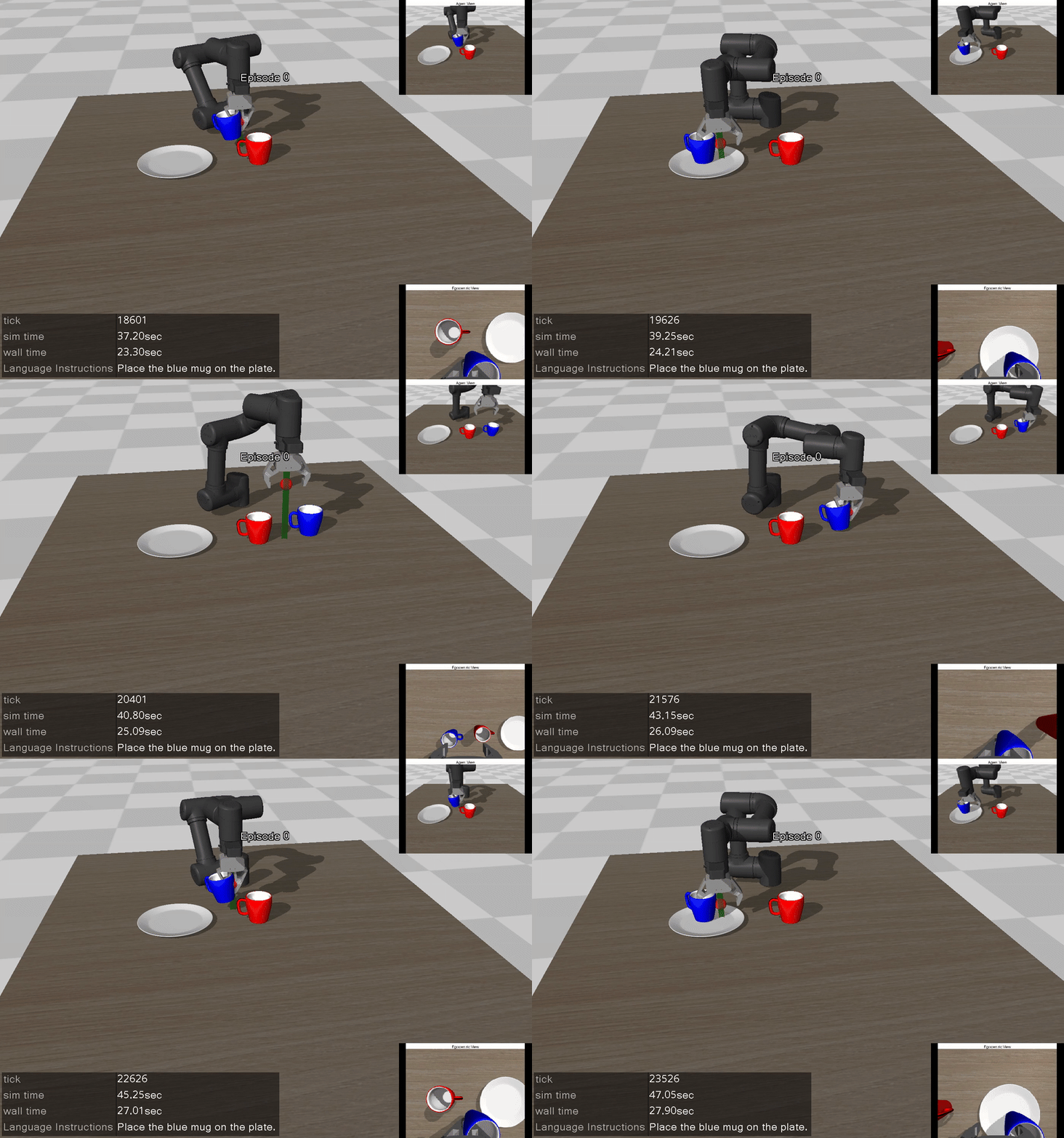
Data Example
Models and Dataset
Obtain language condition dataset
Pi0 and SmolVLA use the same language condition data. Choose one of the following methods. All commands are run in the chapter directory, and the data is stored uniformly in ./demo_data_language.
Method 1: Download the public sample
Datawhale Public Sample is the LeRobot v2.1 dataset for the OMY scenario, containing 20 episodes and 2621 frames, along with two tasks: red cup and blue cup.
First, install Git LFS, then execute:
bashgit lfs install
git clone https://huggingface.co/datasets/Datawhale/datawhale_eai_pnp_language demo_data_language
git -C demo_data_language lfs pull
Do not clone or delete the original data if there is already a directory with the same name. If the directory is a Git repository for this dataset, you can directly execute the last command to populate the LFS files. Downloading only the LFS pointer files does not mean that the data is complete.
Method 2: Self-collection
Run 5.language_env.ipynb, keep REPO_NAME = 'datawhale_eai_pnp_language' and ROOT = "./demo_data_language", collect and save the red and blue cup demonstrations, and then use 6.visualize_data.ipynb to check the trajectory. This Notebook includes a confirmation step for deleting old data when the directory already exists; if data has been downloaded or demonstrated, you should back up or change the directory first.
Both methods can use pi0_datawhale_eai.yaml and smolvla_datawhale_eai.yaml from this chapter without changing the configuration:
yamldataset:
  repo_id: datawhale_eai_pnp_language
  root: ./demo_data_language
root is the local data path relative to the execution directory; when the complete dataset exists in this directory, the fixed version of LeRobot uses local files. repo_id is the dataset identifier. The values without the organization name above follow the naming convention used in the collection Notebook and cannot be used as a searchable Hugging Face full address. When the complete ID Datawhale/datawhale_eai_pnp_language needs to be automatically retrieved from the Hub, it should be used. When the local directory is changed, the paths in the YAML and deployment Notebook must also be updated accordingly.
Model Reference
| Model 🤗 | Dataset 🤗 |
|---|---|
| pi_0 finetuned | dataset |
| smolvla finetuned | Same as above |
7. Training and deployment of pi_0
The following commands are executed in the chapter directory. Use requirements.txt to fix LeRobot 10b7b3532543b4adfb65760f02a49b4c537afde7.
First, execute python check_training_configs.py to check two configurations (no training, no weight download).
In the YAML command, spaces are retained between --config_path and file names; the equal sign notation of this version will follow the JSON checkpoint loading branch.
- train_model.py: Training script
- pi0_datawhale_eai.yaml: Training configuration
- 7.pi0.ipynb: Deployment example
Training command:
bashpython train_model.py --config_path pi0_datawhale_eai.yaml
Deployment effect:

Training log:
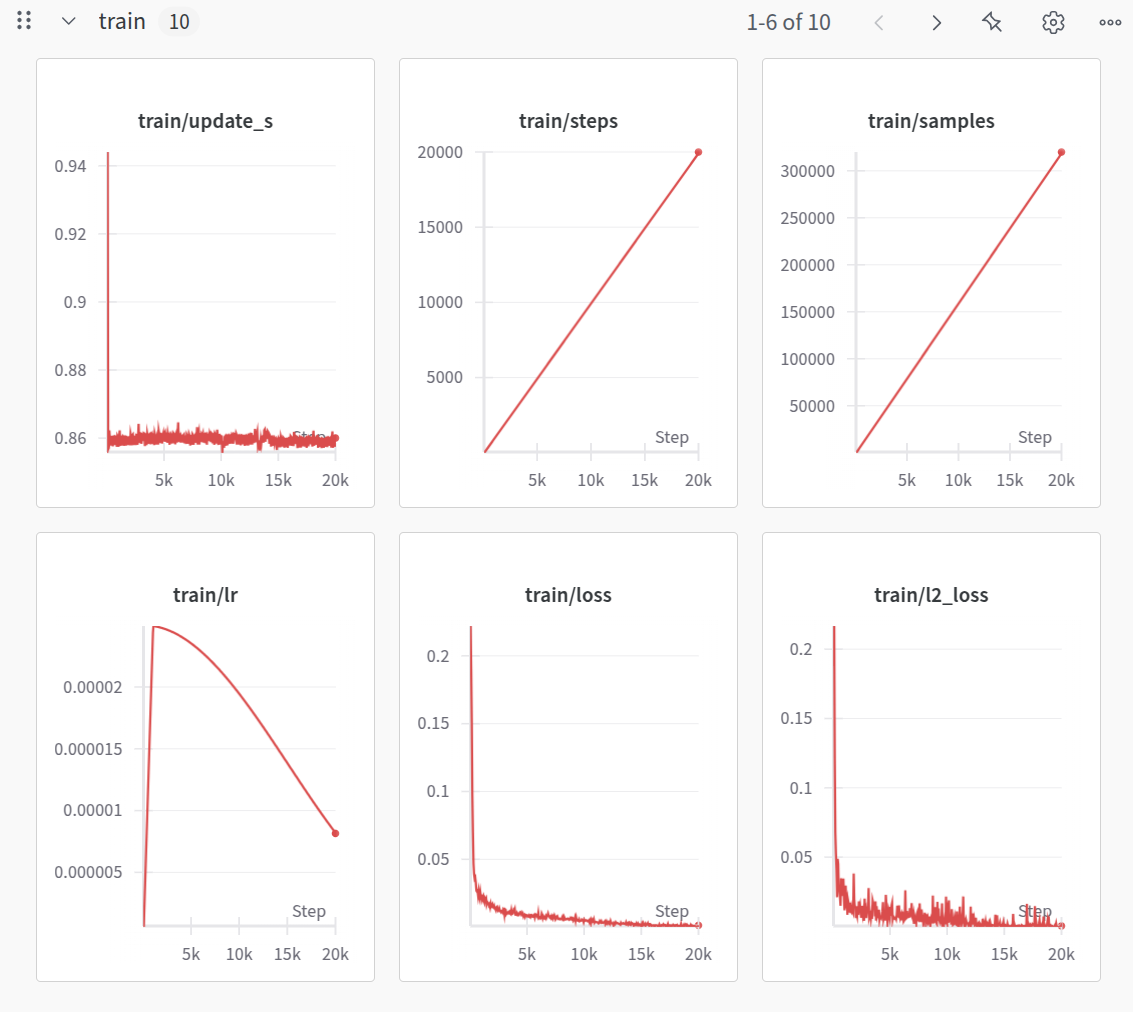
The configuration should follow the YAML format linked in this section. By default, ./demo_data_language from Section 5 is read, and dataset.repo_id corresponds to datawhale_eai_pnp_language. When using other data, both items need to be modified simultaneously. W&B is disabled by default; set your own project and account before enabling it. Training requires complete data, model weights, and a CUDA environment. The configuration parsing does not indicate that the full training has been verified.
8. Training and Deployment of SmolVLA
- train_model.py: Training script
- smolvla_datawhale_eai.yaml: Training configuration
- 8.smolvla.ipynb: Deployment example
Training command:
bashpython train_model.py --config_path smolvla_datawhale_eai.yaml
Deployment effect:

Training log:
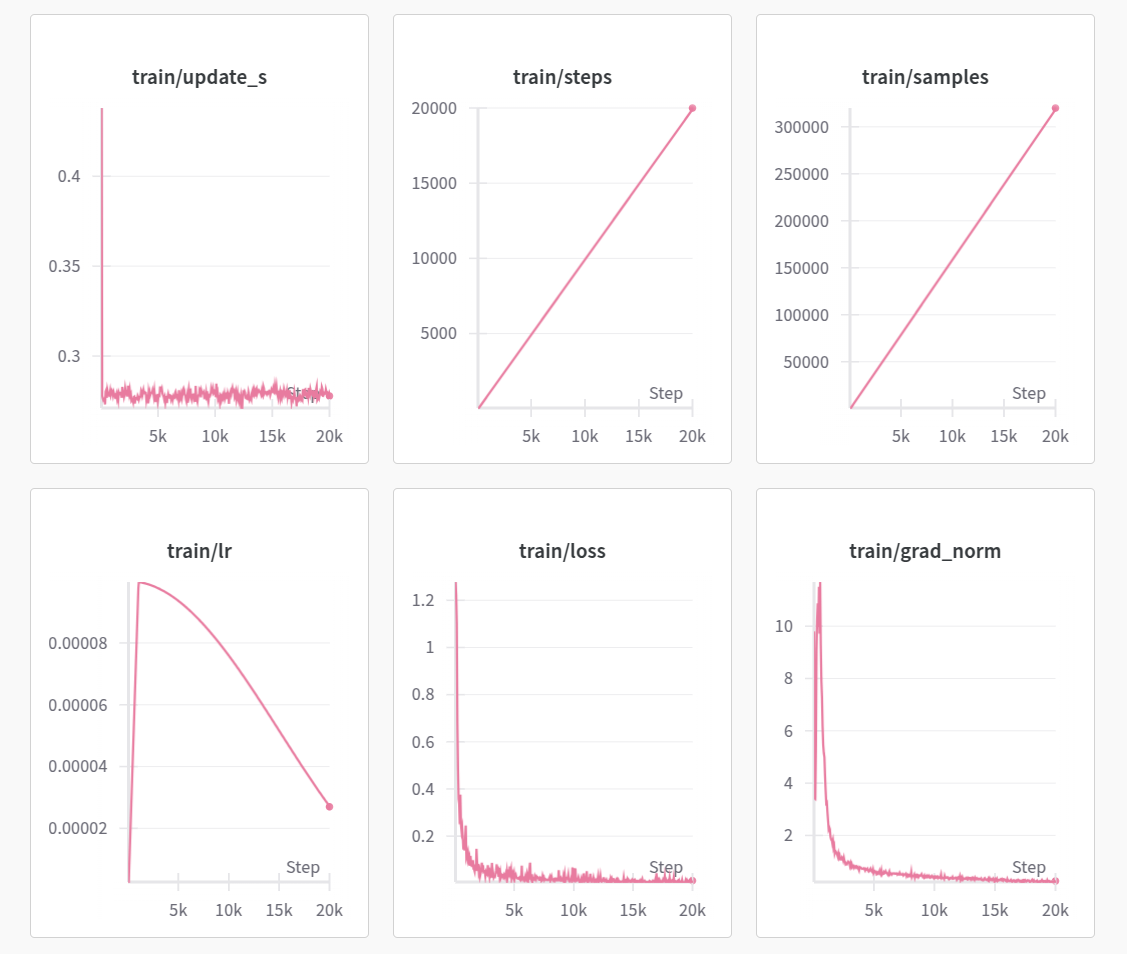
The configuration should follow the YAML format linked in this section. By default, ./demo_data_language from Section 5 is read, and dataset.repo_id corresponds to datawhale_eai_pnp_language. When using other data, both items need to be modified simultaneously. W&B is turned off by default; set your own project and account before enabling it. Training requires complete data, model weights, and a CUDA environment; the configuration parsing does not indicate that the full training has been verified.
10. Tune OMY with π0.5
Run 10.pi05_omy.ipynb. The process continues from the OMY single-cup grasp-and-release data in Section 1: check the teaching and action labels, convert LeRobot v2.1 into independent v3 data, calculate training percentile values, perform five-step training checks, conduct formal fine-tuning, keep action comparisons, and conduct MuJoCo simulation evaluations.
Use a separate Python 3.12 / LeRobot 0.6.1 environment and requirements_pi05.txt. Do not upgrade the old environment in sections 1–9. Detailed installation, editable parameters, and startup steps are in the notebook; see pi05_omy_utils.py for auxiliary interfaces. By default, fine-tuning is performed from lerobot/pi05_base, and a compatible local pre-trained directory can be specified using OMY_PI05_PRETRAINED. The batch size is 1; only the action expert is trained. Five checks are performed first, and complete training and evaluation results are generated during actual operation.
pi05_omy_train.py Calls the official training entry and requires all pre-trained parameters to be loaded successfully. Training stops when weight reading fails; the same check is performed for inference loading to prevent the random initialization fallback of the fixed version loader from being misdiagnosed as fine-tuning success. For the settings, sources, and results of the remote short-step verification, see pi05_omy_short_check.md.
Input consists of two streams of images, a six-dimensional pose, and language commands; output is six absolute joint angles and normalized gripper commands. The acquisition frequency is maintained at 20 Hz, and relative motion conversion is disabled. The state in Section 5 is in joint angles, and the scene interface is different, so this process cannot be directly applied. Historical error action labels cannot be restored through format migration. Please use the corrected Section 1 for re-acquisition and playback instead.
The transformation retains the original data, and the target directory must be empty. For more than three rounds, approximately 20% of the evaluation is reserved for each full round, and only the training rounds are used to calculate normalized statistics. One or two demonstrations are suitable for interface inspection, but cannot be used as a basis for generalization success rate. Appropriate CUDA workstations are required for training; the passing of short-step training and the reduction in loss do not indicate that the grasping and releasing operations have been successfully reproduced.
After installing the independent environment, run python -m unittest -v test_pi05_omy in the directory of this chapter to check the new data interface, image and action fidelity, round boundaries, and control timing. The test does not download model weights or initiate full training.
Later, we will also present additional grasping experiments for data training with ACT and diffusion training. Stay tuned.
Acknowledgments
- Robotis-OMY robotic arm resources come from robotis_mujoco_menagerie
- MuJoco Parser Class is derived from yet-another-mujoco-tutorial-v3
- The tutorial referenced lerobot examples
- Plate and mug resources come from Objaverse