
   # 克隆RoboGen仓库
   git clone https://github.com/Genesis-Embodied-AI/RoboGen.git

   # 设置环境
   conda env create -f environment.yaml
   conda activate robogen

   # 在gpt_4/query.py顶部设置OpenAI API密钥

   # 生成与微波炉相关的任务
   python run.py --category Microwave
   pip install openai pybullet

   # 或者基于特定描述生成任务
   python gpt_4/prompts/prompt_from_description.py --task_description "A mobile franka arm heats the corn with the bowl and the microwave" --object "Microwave"
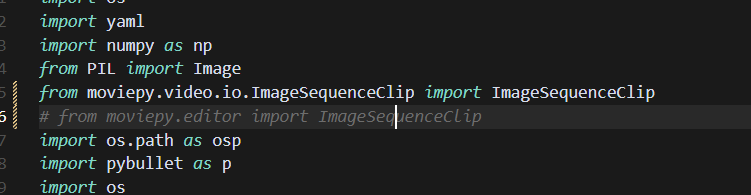
Need to change the moviepy-related aspects
ag-0-1inqkk4k9ag-1-1inqkk4kaag-0-1inqkk4k9ag-1-1inqkk4ka(robogen) kewei@sxy-gpus3090:~/17robo/RoboGen$ python -c "import pybullet; print('成功')"
Traceback (most recent call last):
  File "<string>", line 1, in <module>
ModuleNotFoundError: No module named 'pybullet'
(robogen) kewei@sxy-gpus3090:~/17robo/RoboGen$ which python
/home/kewei/micromamba/envs/robogen/bin/python
(robogen) kewei@sxy-gpus3090:~/17robo/RoboGen$    /home/kewei/micromamba/envs/robogen/bin/python -c "import pybullet; print('成功')"
pybullet build time: Sep  3 2024 12:55:23

A module that was compiled using NumPy 1.x cannot be run in
NumPy 2.0.2 as it may crash. To support both 1.x and 2.x
versions of NumPy, modules must be compiled with NumPy 2.0.
Some module may need to rebuild instead e.g. with 'pybind11>=2.12'.

If you are a user of the module, the easiest solution will be to
downgrade to 'numpy<2' or try to upgrade the affected module.
We expect that some modules will need time to support NumPy 2.

Traceback (most recent call last):  File "<string>", line 1, in <module>
AttributeError: _ARRAY_API not found
Traceback (most recent call last):
  File "<string>", line 1, in <module>
ImportError: numpy.core.multiarray failed to import
This is due to the issue I set up in bashrc:

Since the diagram doesn’t use the main environment to install Python, haha, it seems this approach won’t work.
But the second one can be retained temporarily, which means having nvitop and jupyter in the dl environment.
To install OMPL from the source code, run
./install_ompl_1.5.2.sh --python
This will install ompl using Python on a system-wide level. Note that line 19 of the installation script requires running sudo apt-get -y upgrade. This may cause issues with the system packages, so this line can be commented out during installation (the installation may fail, and the commented line has not been fully tested). Then, export the installation to a conda environment for use with RoboGen:
echo "/home/kewei/17robo/RoboGen/ompl-1.5.2/py-bindings" >> ~/micromamba/envs/robogen/lib/python3.9/site-packages/ompl.pth

echo "/home/kewei/17robo/RoboGen/ompl-1.5.2/py-bindings" >> ~/miniconda3/envs/robogen/lib/python3.9/site-packages/ompl.pth
Remember to change the path to your ompl installation path and conda environment path.
dataset.zip - Google Cloud Storage
Download this
Unzip to data/dataset
objaverse-sentence-bert-embeddings.zip - Google Cloud Storage
objaverse_utils/data/