
Read file: /home/kewei/17robo/ManiSkill/examples/baselines/ppo/README.md
Proximal Policy Optimization (PPO)
The code for the PPO reinforcement learning algorithm is adapted from CleanRL and LeanRL. The code is designed as a single file, making it easy to understand and read, and it supports state-based reinforcement learning and visual-based reinforcement learning.
Note that ManiSkill is still in the testing phase, so we have not completed the training scripts for all pre-built tasks yet (some of these tasks are difficult to solve even by RL alone).
The official benchmark results can be obtained by running the script in the baselines.sh file. The results have been organized and published in our wandb report .
Currently, there is experimental support based on LeanRL, including compiled PPO and CUDA Graphs enabled. The code is in ppo_fast.py. You need to install torchrl and tensordict:
bashpip install torchrl tensordict
State-based Reinforcement Learning
Here are some example commands that can be run to train state-based policies for various PPO tasks that have been slightly adjusted. The fastest is the PushCube-v1 task, which takes less than one minute to train on a GPU, while the PickCube-v1 task requires 2–5 minutes on a GPU.
The PPO baseline does not guarantee applicability to all tasks, as some tasks lack intensive rewards, have not been well-tuned, or are simply beyond the scope of standard PPO.
bashpython ppo.py --env_id="PushCube-v1" \
  --num_envs=2048 --update_epochs=8 --num_minibatches=32 \
  --total_timesteps=2_000_000 --eval_freq=10 --num-steps=20
To conduct the evaluation, you can run:
bashpython ppo.py --env_id="PushCube-v1" \
   --evaluate --checkpoint=path/to/model.pt \
   --num_eval_envs=1 --num-eval-steps=1000
Note that when using --evaluate, the trajectory is saved from the GPU simulation. To correctly replay these trajectories using the maniskill.trajectory.replay_trajectory tool, the number of evaluation environments must be fixed at 1 for certain tasks. This is necessary to ensure the reproducibility of tasks with geometric randomization (such as PickSingleYCB). For other tasks without geometric randomization (e.g., PushCube), the number of evaluation environments can be increased.
The examples.sh file contains a complete list of tested commands that can successfully run state-based PPO for various tasks.
The execution result of the state-based PPO baseline script is here: https://api.wandb.ai/links/stonet2000/k6lz966q。
Reinforcement Learning Based on Vision (RGB)
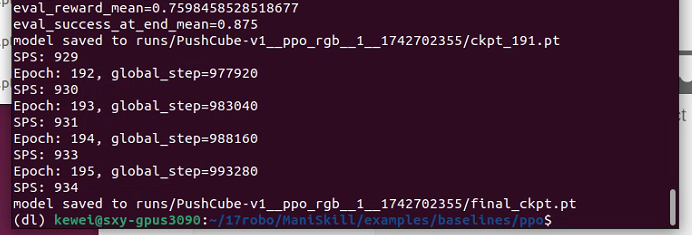
Here are some examples of commands with minor adjustments for training image-based PPO policies. The fastest one is PushCube-v1, which takes about 1–5 minutes, while PickCube-v1 requires 15–45 minutes. You need to adjust the --num_envs parameter based on the GPU memory size, as rendering visual observations consumes a lot of memory. All of the following settings should use less than 15GB of GPU memory. The examples.sh file contains a complete list of tested commands that can run visual-based PPO successfully for many tasks.
bashpython ppo_rgb.py --env_id="PushCube-v1" \
  --num_envs=256 --update_epochs=8 --num_minibatches=8 \
  --total_timesteps=1_000_000 --eval_freq=10 --num-steps=20
python ppo_rgb.py --env_id="PickCube-v1" \
  --num_envs=256 --update_epochs=8 --num_minibatches=8 \
  --total_timesteps=10_000_000
python ppo_rgb.py --env_id="AnymalC-Reach-v1" \
  --num_envs=256 --update_epochs=8 --num_minibatches=32 \
  --total_timesteps=10_000_000 --num-steps=200 --num-eval-steps=200 \
  --gamma=0.99 --gae_lambda=0.95
To evaluate the trained policy, you can run:
bashpython ppo_rgb.py --env_id="PickCube-v1" \
  --evaluate --checkpoint=path/to/model.pt \
  --num_eval_envs=1 --num-eval-steps=1000
This will save the video to path/to/test_videos.
The examples.sh file contains a complete list of tested commands that can successfully run RGB-based PPO for various tasks.
The execution results of the RGB-based PPO benchmark script are here: https://api.wandb.ai/links/stonet2000/k6lz966q
Reinforcement Learning Based on Vision (RGB+Depth)
In development
Reinforcement Learning Based on Vision (Point Cloud)
In development
Replay Evaluation Trajectory
Getting better-looking videos may be useful. A simple way is to first use the evaluation script provided above. It will save a .h5 and .json file named after the date and time, and then you can replay with different settings, as follows:
bashpython -m mani_skill.trajectory.replay_trajectory \
  --traj-path=path/to/trajectory.h5 --use-env-states --shader="rt-fast" \
  --save-video --allow-failure -o "none"
It will replay the trajectory based on the environment status, enable ray tracing (with “rt”, which offers higher quality but slower performance), and save all videos, including failed trajectories.
Some Notes
- Using GPU simulation for evaluation (especially for randomized objects) is somewhat challenging. We recommend reading in our documentation to learn how to use GPU simulation to fairly evaluate policies.
- Many tasks support visual observation, but we have not yet carefully verified whether the camera positions of the tasks are set appropriately so that certain tasks can be solved through visual observation.
Citation
If using this reference, please cite the following content:
@article{DBLP:journals/corr/SchulmanWDRK17,
  author       = {John Schulman and
                  Filip Wolski and
                  Prafulla Dhariwal and
                  Alec Radford and
                  Oleg Klimov},
  title        = {Proximal Policy Optimization Algorithms},
  journal      = {CoRR},
  volume       = {abs/1707.06347},
  year         = {2017},
  url          = {http://arxiv.org/abs/1707.06347},
  eprinttype    = {arXiv},
  eprint       = {1707.06347},
  timestamp    = {Mon, 13 Aug 2018 16:47:34 +0200},
  biburl       = {https://dblp.org/rec/journals/corr/SchulmanWDRK17.bib},
  bibsource    = {dblp computer science bibliography, https://dblp.org}
}