
Genesis World 1.0 Full Experience: From Simulation Base to Nyx High-Fidelity Rendering
After completing this chapter, you can finish three things:
- Understand the position of Genesis World 1.0 in the embodied AI simulation stack: it is more like a base layer consisting of “physics + robot interface + rendering + compiler,” rather than a ready-made home robot task library.
- Run the robot simulation, Nyx high-fidelity rendering, and Gaussian Splat examples of Genesis World locally and verify what each step validates.
- Distinguish between “official promotional images,” “locally reproducible images,” and “asset import boundaries” to avoid mistaking high-fidelity rendering images for the fact that the open-source repository already provides a complete home scenario benchmark.
This chapter is suitable for those who have already read the first two tutorials on Genesis environment configuration to continue learning. If you have not installed Genesis yet, you can first read 01 environment configuration and testing and 02 visualization and rendering .
1. What is Genesis World 1.0 exactly?
Genesis World 1.0 is a open-source robot simulation platform developed by Genesis AI. It is not a single renderer or physical engine, but rather a simulation infrastructure stack tailored for Physical AI / Embodied AI.
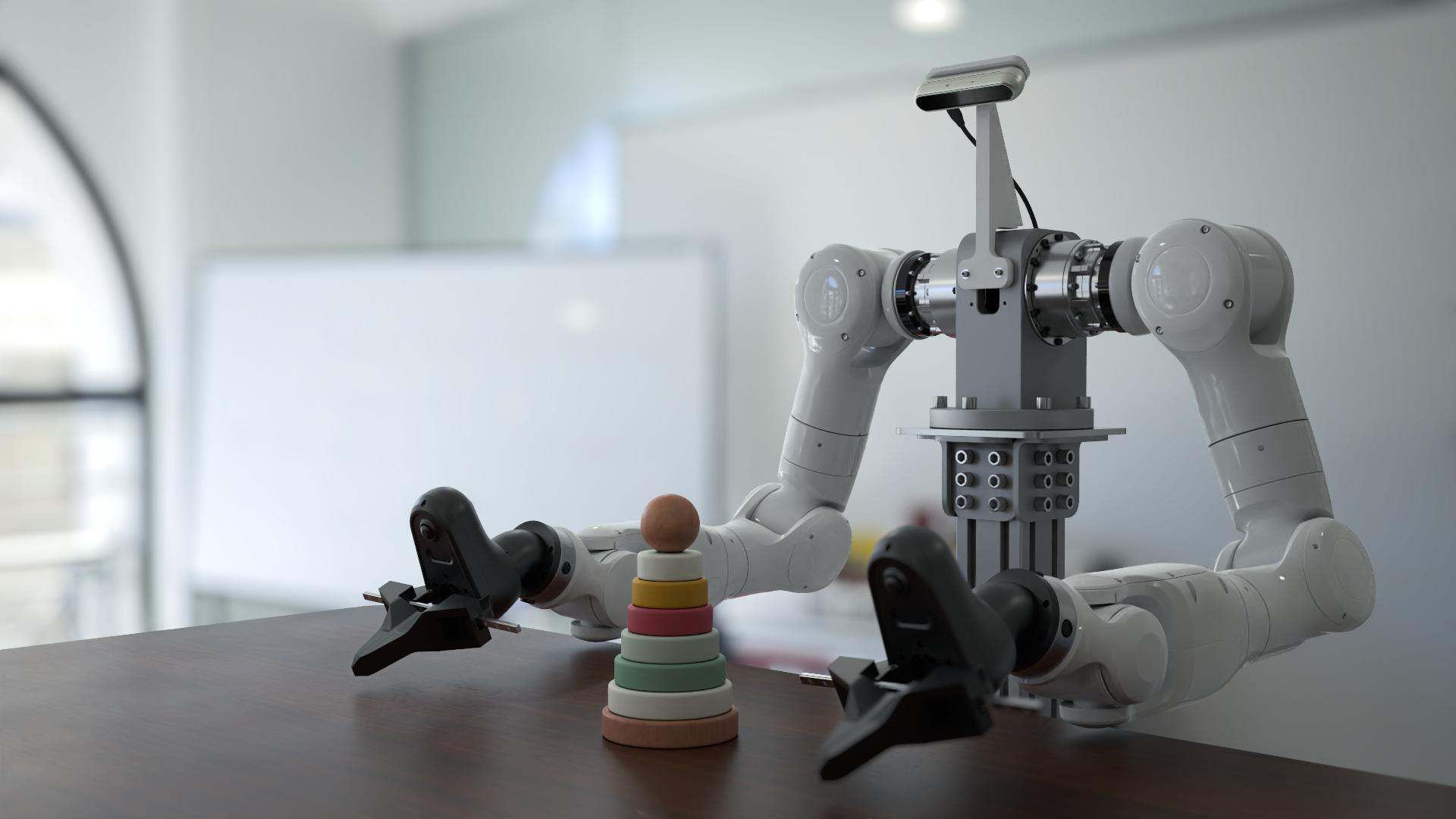
Figure 1: Official cover image of Genesis World
This image demonstrates the high-fidelity robot simulation experience that Genesis World aims to achieve. It is the promotional image in the official README and is not equivalent to the output of a one-click reproduction script in the repository. Source: Genesis World’s official GitHub README.
From the perspective of robot learning, Genesis World mainly covers four layers:
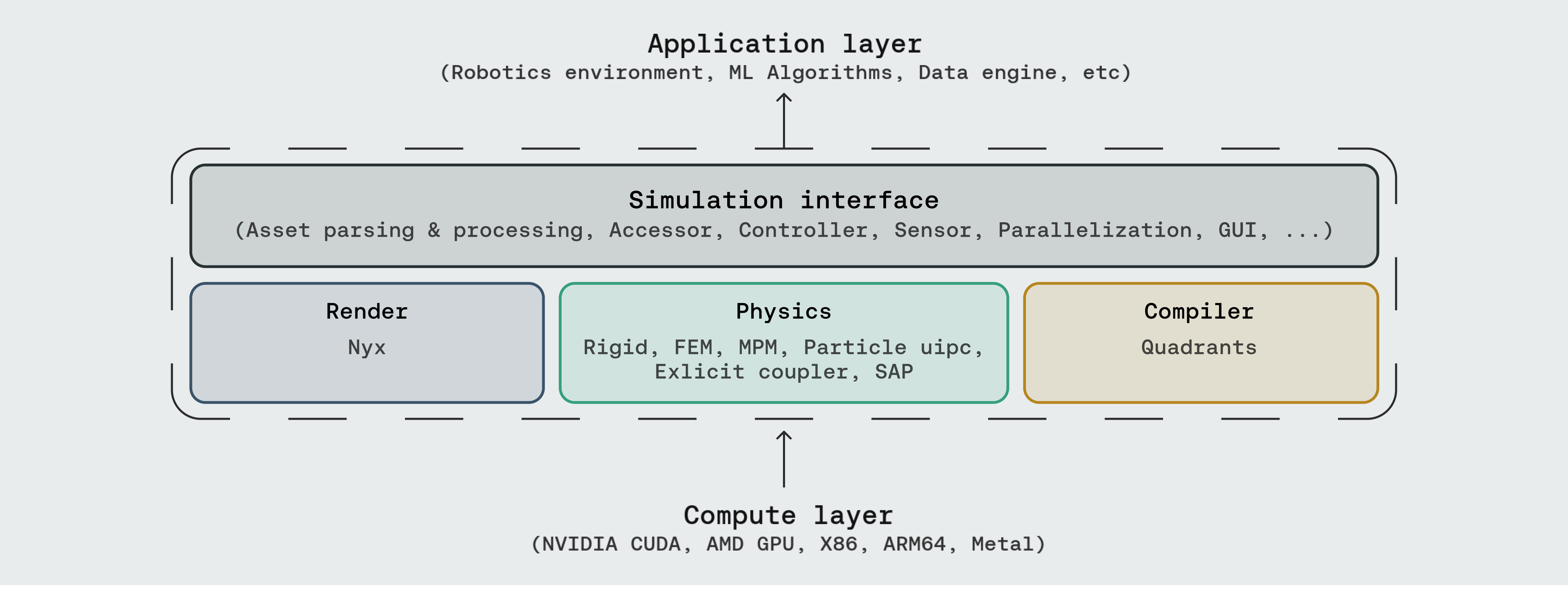
Figure 2 Genesis World official system stack
Everyone should focus on the four layers in the middle: Simulation Interface, Physics, Render, and Compiler. The upper layer can handle RL/VLA/data generation tasks, while the lower layer can run on different computing backends. Source: Genesis World official GitHub README.
| Level | Significance for Robot Learning |
|---|---|
| Simulation Interface | Create scenarios, load robots, read sensors, control joints, and build parallel environments using Python. |
| Physics | Supports rigid bodies, FEM, MPM, PBD/SPH, IPC, SAP, and multi-physics coupling, suitable for studying interactions such as contact, soft matter, particles, and fabrics. |
| Render | Supports common viewer and rendering methods like Pyrender/Luisa/Nyx. Nyx is used for higher fidelity visual observations. |
| Compiler | Quadrants compiles the Python kernel into CUDA/ROCm/Metal/Vulkan/x86/ARM, improving simulation throughput. |
The most important judgment here is: The Genesis World open-source repository mainly provides a simulation foundation and example environments, but does not directly offer a large-scale home scenario robot benchmark. If you want to perform home manipulation tasks, you will need to integrate RoboCasa, iGibson, Habitat, BEHAVIOR, Replica/HM3D, or build your own assets and collision layers.
2. Local experimental environment used in this chapter
In this chapter, the testing environment uses NVIDIA Blackwell GPU. When installing PyTorch on a Blackwell machine, pay special attention to the CUDA version. It is not recommended to copy the cu126 examples from old tutorials.
The combinations that passed the actual test are:
| Component | Measured Result |
|---|---|
| GPU | NVIDIA RTX PRO 6000 Blackwell Workstation Edition |
| Compute Capability | 12.0 |
| PyTorch | 2.8.0+cu128 |
| CUDA Runtime | 12.8 |
| Genesis World | 1.0.0 |
| Quadrants | 0.8.0 |
| gs-nyx | 0.1.1 |
| gs-nyx-plugin | 0.1.2 |
Checkpoint 1: Confirm that PyTorch actually supports Blackwell.
bashpython - <<'PY'
import torch
print("torch:", torch.__version__)
print("cuda runtime:", torch.version.cuda)
print("device:", torch.cuda.get_device_name(0))
print("capability:", torch.cuda.get_device_capability(0))
print("arch list:", torch.cuda.get_arch_list())
x = torch.arange(16, device="cuda", dtype=torch.float32)
print("cuda sum:", float((x * x).sum().item()))
PY
When successful, sm_120 or compute_120 should be visible, and no errors occur in CUDA tensor operations. This check is more reliable than just looking at nvidia-smi.
3. Clone and install Genesis World
It is recommended that you place the working directory on a disk with sufficient capacity. The following command uses $WORKSPACE to represent your own project root directory:
bashexport WORKSPACE=/path/to/workspace
mkdir -p "$WORKSPACE"
cd "$WORKSPACE"

git clone https://github.com/Genesis-Embodied-AI/genesis-world.git
cd genesis-world
When installing, first install PyTorch that is suitable for your GPU. Taking Blackwell/CUDA 12.8 as an example, you can use the PyTorch official cu128 wheel:
bash# 示例:请按自己的 Python 版本和 CUDA 版本选择官方 wheel
pip install torch --index-url https://download.pytorch.org/whl/cu128
Then install Genesis:
bashpip install -e ".[dev]"
Nyx high-fidelity rendering requires additional installation:
bashpip install gs-nyx gs-nyx-plugin
Checkpoint 2: Confirm that the core package can be imported.
bashpython - <<'PY'
import genesis as gs
import quadrants
import gs_nyx
import gs_nyx_plugin

print("genesis:", getattr(gs, "__version__", "unknown"))
print("quadrants:", getattr(quadrants, "__version__", "unknown"))
print("gs_nyx:", getattr(gs_nyx, "__version__", "unknown"))
print("gs_nyx_plugin: ok")
PY
If matplotlib version parsing error is reported here, it usually means the local machine has a release candidate version. You can switch back to the stable version first:
bashpip install "matplotlib>=3.10,<3.11"
4. Minimum Robot Simulation: Franka + Plane
The minimum robotic arm simulation for Genesis is very short. In this example, the ground and Franka robotic arm are loaded, and then the simulation is advanced:
pythonimport genesis as gs

gs.init(backend=gs.gpu)

scene = gs.Scene(show_viewer=True)
plane = scene.add_entity(gs.morphs.Plane())
franka = scene.add_entity(
    gs.morphs.MJCF(file="xml/franka_emika_panda/panda.xml"),
)

scene.build()

for _ in range(1000):
    scene.step()
This smoke test proves three things:
- Genesis can initialize the backend;
- MJCF robot resources can be parsed;
- The physical simulation cycle
scene.step()can proceed normally.
It does not prove that the controller, training environment, or visual rendering are fully available. Next, everyone can continue to read examples/rigid/control_franka.py, examples/manipulation/grasp_env.py, and examples/locomotion/go2_env.py.
5. Typical Pipeline for Genesis Robot Simulation
When performing real robot tasks, the Genesis code is usually organized as the following data flow:
mermaidflowchart LR
    A["任务配置<br/>机器人、物体、随机化参数"] --> B["创建 Scene"]
    B --> C["加载实体<br/>URDF / MJCF / Mesh / Primitive"]
    C --> D["build(n_envs)"]
    D --> E["reset"]
    E --> F["policy(action)"]
    F --> G["control_dofs_*"]
    G --> H["scene.step"]
    H --> I["读取观测<br/>关节、接触、相机、IMU、力传感"]
    I --> J["reward / success / done"]
    J --> F
Figure 3: The basic closed loop of the Genesis robot task.
It can be understood as a robot version of a Gym/RL environment: reset() sets the initial state, step(action) drives the physics, and sensors provide observations. The task code calculates the reward and done status.
In the open-source repository, you can learn according to task types:
| Learning Objectives | Recommended Files |
|---|---|
| Franka Control | examples/rigid/control_franka.py |
| IK and Motion Planning Manipulation | examples/tutorials/IK_motion_planning_grasp.py |
| Manipulation Task Environment | examples/manipulation/grasp_env.py |
| quadruped robot locomotion | examples/locomotion/go2_env.py |
| Drone hovering training | examples/drone/hover_env.py |
| Performance Testing | examples/speed_benchmark/franka.py, examples/speed_benchmark/anymal_c.py |
6. Nyx: Replace the Genesis camera with a high-fidelity rendering sensor
Nyx is a GPU path tracer in the Genesis ecosystem. The official Nyx README shows a dual robotic arm desktop scenario:
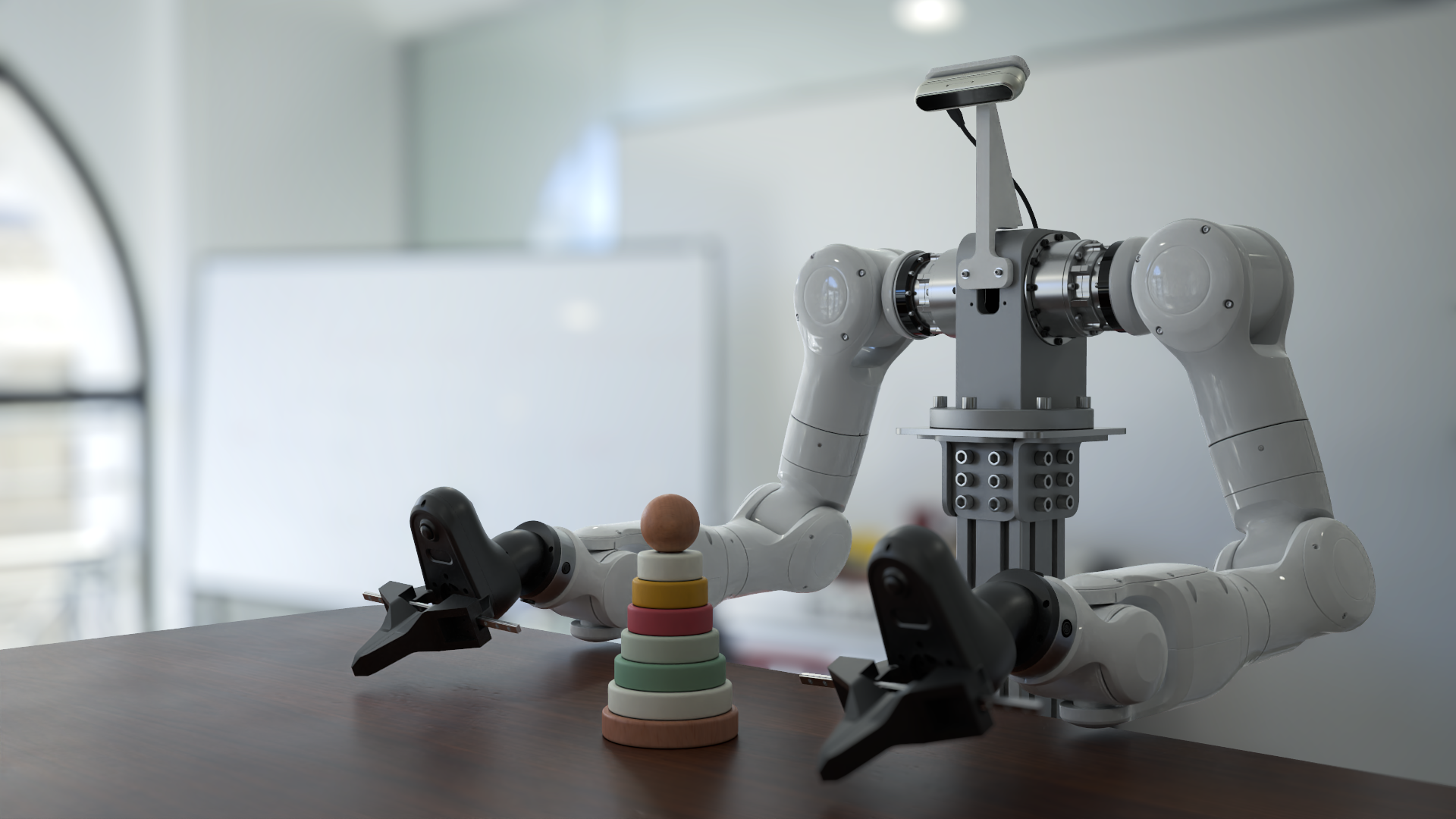
Figure 4: Official dual-arm desktop rendering of Nyx
This figure shows the target rendering quality of Nyx. Note that the current Nyx example repository does not provide the full script and scene assets for generating this landing figure. Source: Nyx for Genesis official README.
The usage of Nyx is not scene.add_camera(), but scene.add_sensor(NyxCameraOptions(...)):
pythonimport genesis as gs
import gs_nyx.nyx_py_renderer as npr
import gs_nyx.nyx_py_sdk as nps
from gs_nyx_plugin.nyx_camera_options import NyxCameraOptions

gs.init(backend=gs.gpu)

scene = gs.Scene(show_viewer=False)
scene.add_entity(gs.morphs.Plane())
scene.add_entity(
    gs.morphs.Sphere(
        radius=0.4,
        pos=(0.0, 0.0, 0.4),
        fixed=True,
        collision=False,
    ),
    surface=gs.surfaces.Gold(),
)

env_map = nps.EnvironmentMapAsset()
env_map.texture = "examples/assets/kloppenheim_07_puresky_4k.hdr"
env_map.layout = nps.EEnvMapLayout.LongLat
env_map.multiplier = 2.0

cam = scene.add_sensor(
    NyxCameraOptions(
        res=(1280, 720),
        pos=(2.0, -3.0, 1.5),
        lookat=(0.0, 0.0, 0.3),
        fov=35.0,
        spp=64,
        denoise=True,
        render_mode=npr.ERenderMode.FastPathTracer,
        env_maps=(env_map,),
    )
)

scene.build(n_envs=1)
scene.step()
rgb = cam.read().rgb
Here, you need to pay attention to two key points:
sppis the number of pixels sampled per unit; higher values result in lower noise, but at the cost of slower processing;cam.read().rgbreturns an RGB tensor on the GPU, which can be directly used as the observation for the visual policy.
7. Local reproduction: Nyx minimal rendering, PBR sphere, and Gaussian splat
We have successfully implemented three checkpoints locally.
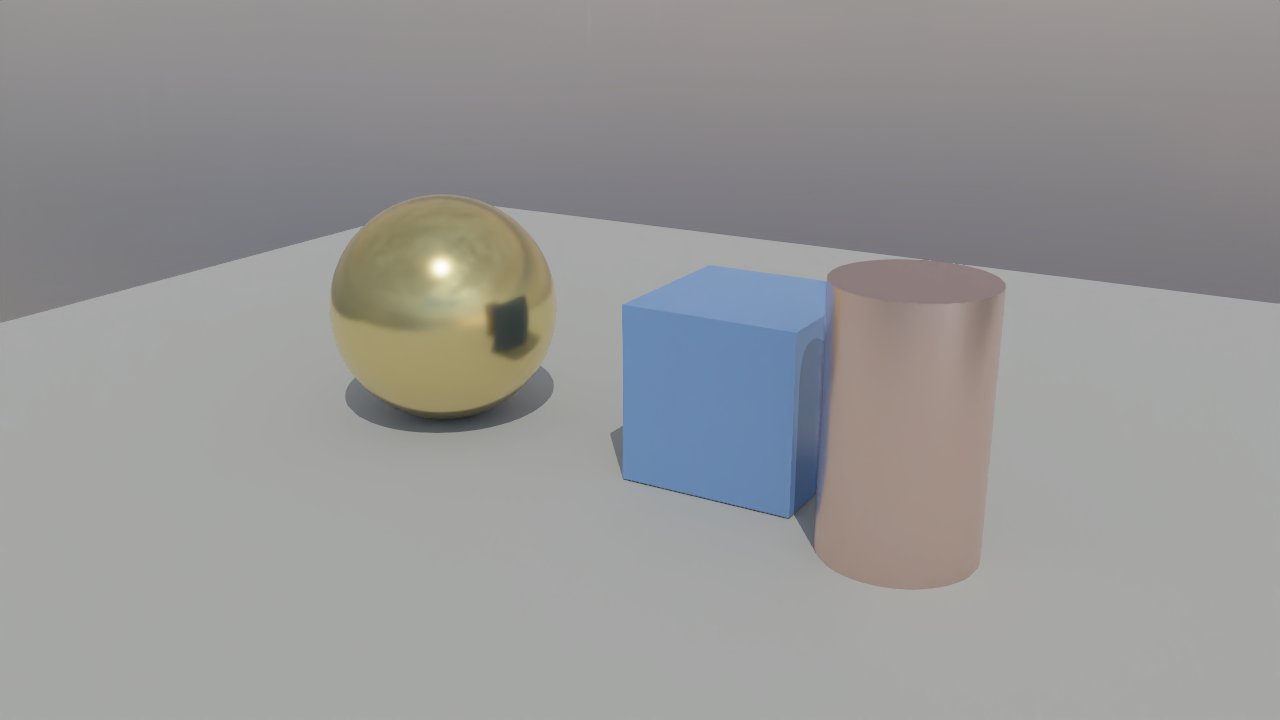
Figure 5: Local Nyx primitive smoke test
This result indicates that Nyx path tracing can output RGB images correctly on the local GPU, but it is only a basic geometry test, and does not mean that the official dual-arm promotional image has been reproduced successfully.
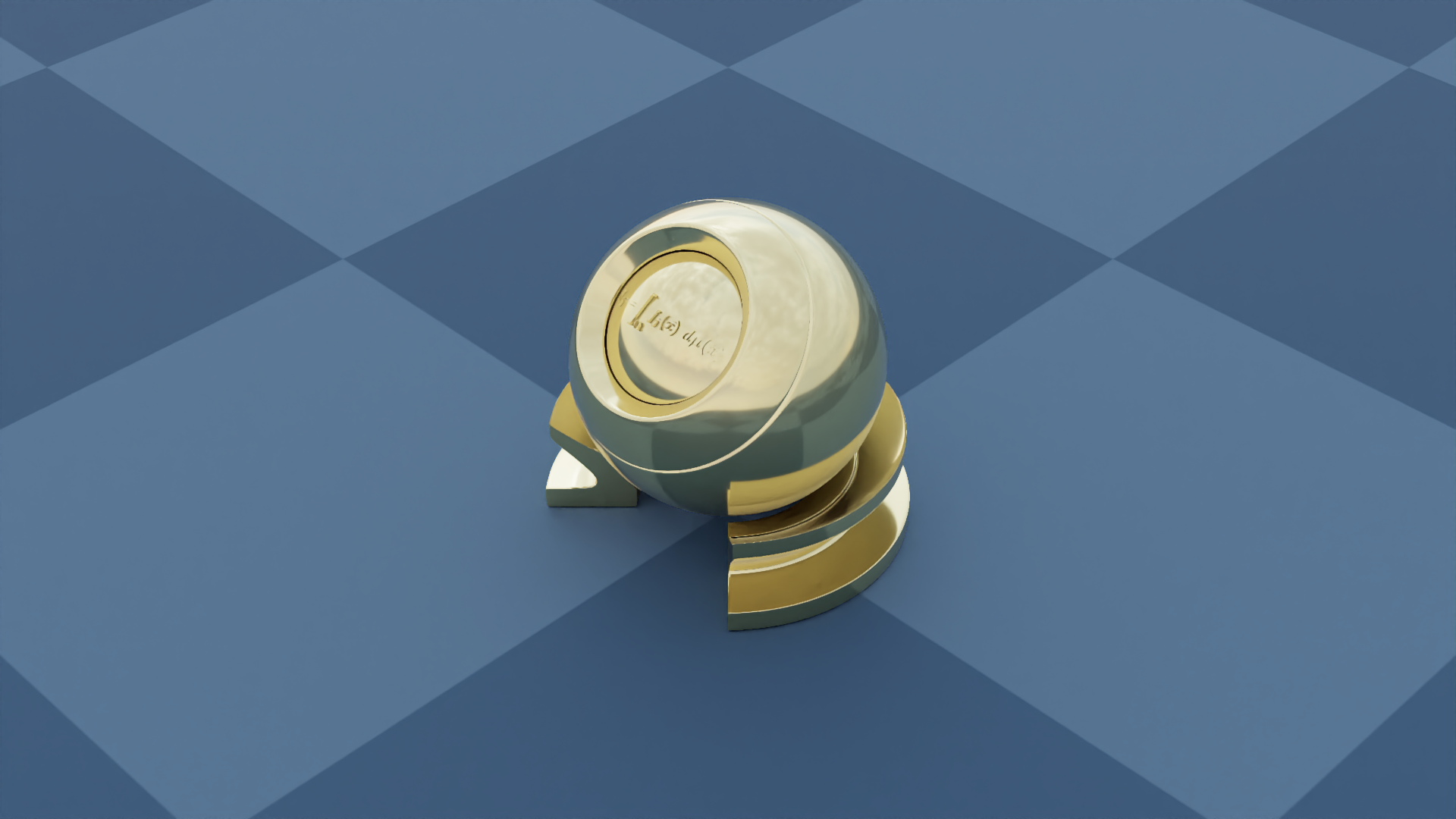
Figure 6: Nyx official 01_hello_nyx example local output
This example loads PBR_Ball.glb and HDRI environment textures, verifying glTF materials, ambient light, and the Nyx camera sensor chain. Script source: genesis-nyx/examples/01_hello_nyx.py.
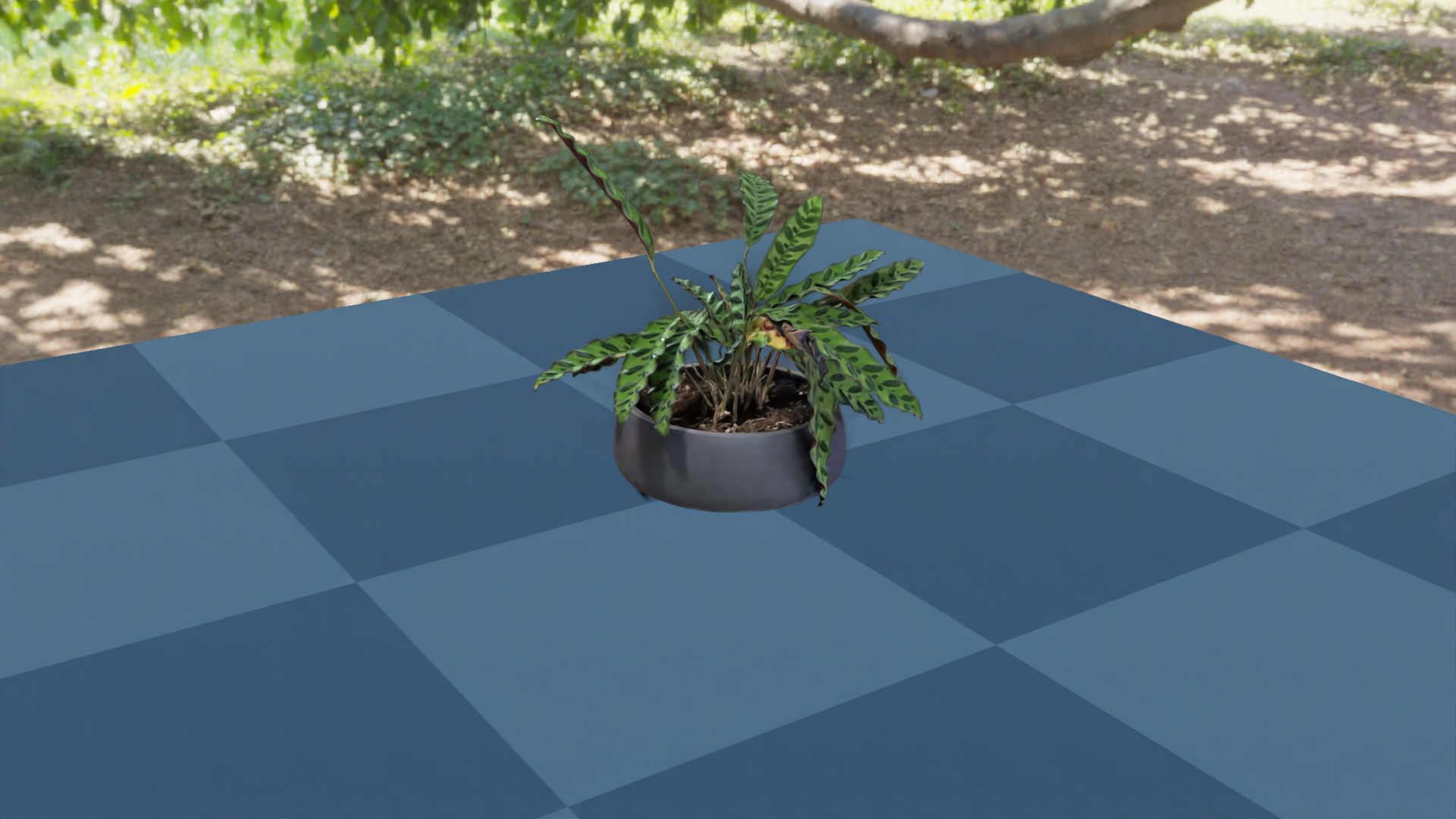
Figure 7: Example of Nyx Gaussian Splat local output
This example renders the real-captured Gaussian Splat and Genesis planar geometry in the same frame, making it suitable for learning how to combine "real scene appearance + simulation geometry". Script source: genesis-nyx/examples/05_gaussian_splat.py.
If you download the Nyx example repository from the GitHub zip file, you may encounter LFS pointer files. The symptoms are that .glb or .ply files are very small, and they start with:
textversion https://git-lfs.github.com/spec/v1
At this point, git lfs pull is needed, or the real file can be downloaded from media.githubusercontent.com. We have completed it locally:
PBR_Ball.glbplant.ply
8. The Pit of High-Fidelity Interior Assets: Sponza is Not for Home Scenarios
To test the support of Genesis/Nyx for high-fidelity indoor glTF, we additionally downloaded Sponza from Khronos glTF Sample Assets.
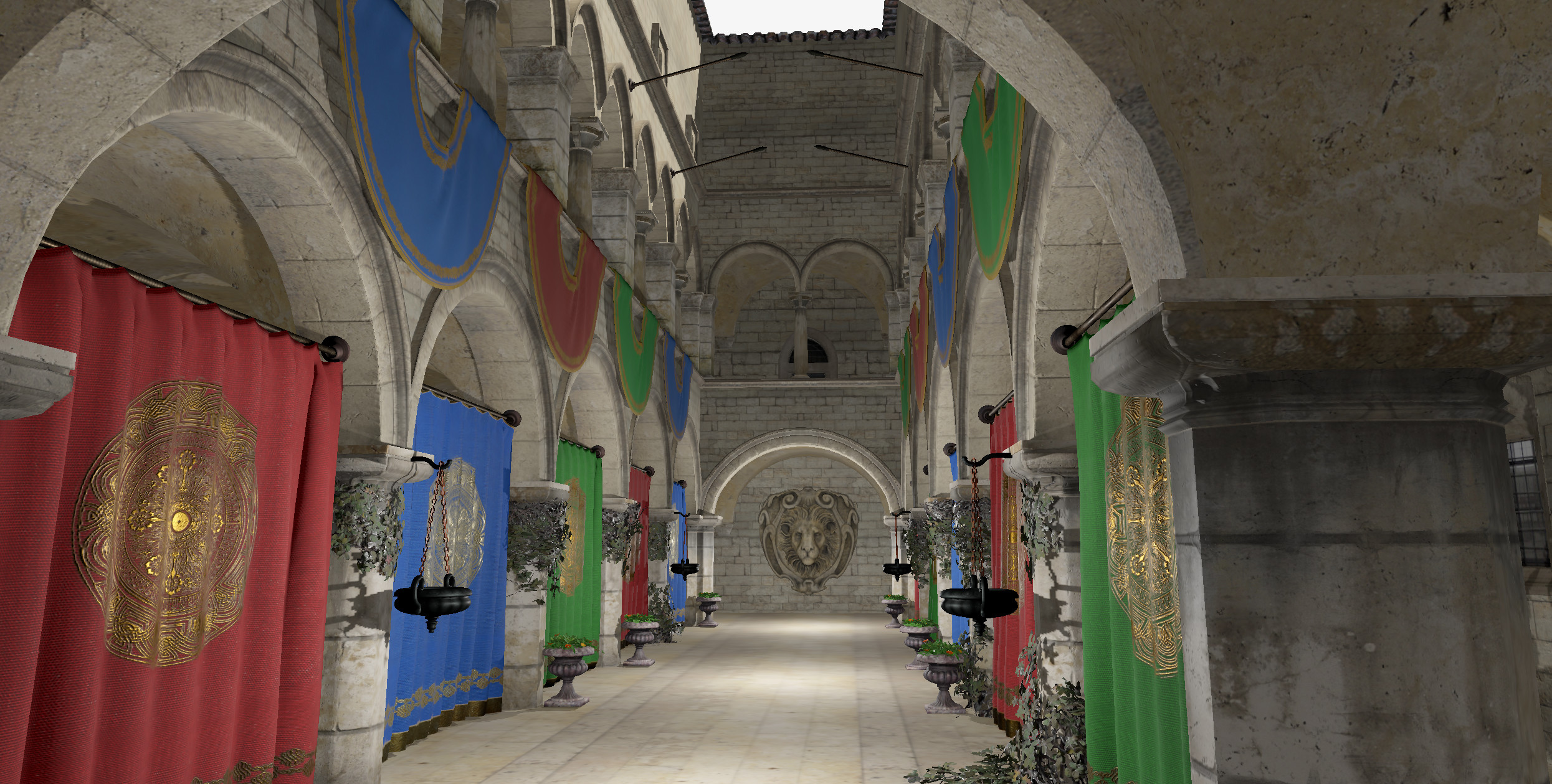
Figure 8: Sponza official reference effect
Sponza is a classic architectural atrium/arcade lighting test scenario, not a home scenario. The lighting in the image is used for reference only and may not be part of the glTF model itself. Source: Khronos glTF Sample Assets / Sponza.
This experiment is highly educational, as it highlights a common misconception: Being able to be displayed properly by a glTF viewer does not mean it can be directly used as a high-quality task scene by a robot simulator.
The methods we use to import Sponza into Genesis are:
pythonscene.add_entity(
    gs.morphs.Mesh(
        file="Models/Sponza/glTF/Sponza.gltf",
        collision=False,
        fixed=True,
    )
)
trimesh can be loaded, and Genesis also works successfully build. However, the current link between the Genesis viewer and Nyx does not provide ideal support for its alpha mask, transparent materials, coordinate system, and lighting.
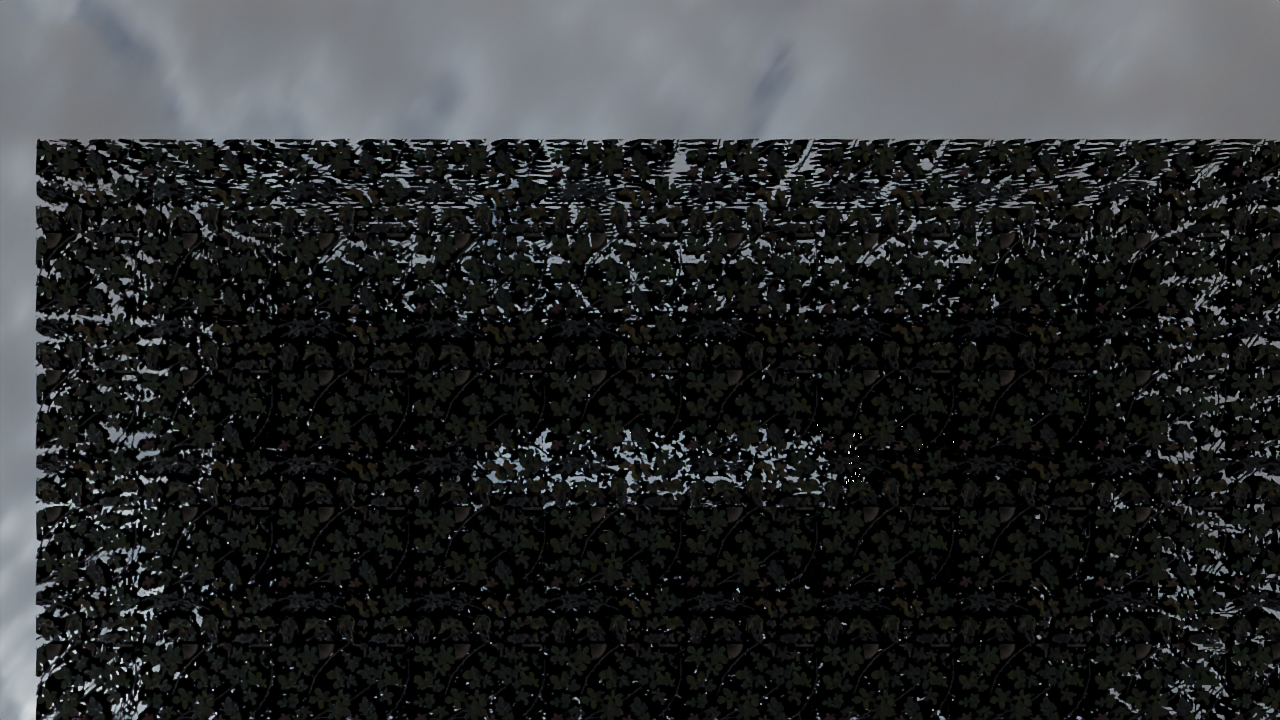
Figure 9: Sponza's boundary effect in the current Nyx link
This figure is not the final result, but a debugging checkpoint: The alpha mask of vegetation/cloth in complex glTF files often becomes large blocks that obscure the view. When creating robot scenes, it is necessary to handle the visual mesh, collision proxy, and task objects separately.
For robot simulation, the correct approach is:
- Visual layer: high-fidelity mesh, PBR textures, HDRI, lighting;
- Collision layer: simplified box, capsule, cylinder, or low-poly collision mesh;
- Task layer: interactive objects, robots, target pose, success judgment;
- Semantic layer: object categories, graspable areas, navigation areas, constraint relationships.
Do not directly place a glTF file from a high-poly room into the simulator collision=True. Complex scenes will trigger expensive convex decomposition, which is slow and may not produce a collision mesh suitable for robot motion planning.
9. Does Genesis already have a large-scale household robot benchmark?
As of the time of this chapter’s compilation, there is no complete large-scale household robot benchmark in the open-source Genesis World repository similar to Habitat Challenge, RoboCasa, and LIBERO.
There are three types of content in the public repository:
| Type | Is it a formal benchmark? | Description |
|---|---|---|
| speed benchmark | Partially | examples/speed_benchmark/franka.py, anymal_c.py mainly test simulation throughput. |
| mini training env | Suitable for learning, not a leaderboard | go2_env.py, hover_env.py, grasp_env.py encapsulate learning environments and training processes. |
| Official promotion/internal evaluation | Limited public information | The Genesis AI blog mentions household/lab/industrial workflows, but the open-source repository has not fully released these task sets. |
If the goal is a household manipulation benchmark, it is recommended to use Genesis as the physics and rendering base, combined with other task libraries:
| Task Domain | Reference Platforms |
|---|---|
| Kitchen and tabletop manipulation | RoboCasa, robosuite, ManiSkill |
| Home navigation and scene understanding | Habitat, Replica, HM3D, iGibson |
| Long-distance household tasks | BEHAVIOR / OmniGibson |
| Benchmark evaluation | LIBERO, RoboTwin, EBench, etc. |
The value of Genesis lies in the fact that it serves as a new underlying option when users require higher physical throughput, multiple physical couplings, GPU simulation, or the integration of Nyx/Gaussian Splat into training observations.
10. Recommended Learning Path
If you want to master Genesis World systematically, it is recommended to follow the following order:
- Run the minimum Franka + Plane system, and verify
scene.add_entity,scene.build, andscene.step. - Run
examples/rigid/control_franka.pyto learn joint control, control gains, and gripper force. - Run
examples/tutorials/IK_motion_planning_grasp.pyto learn IK, path planning, and grasping processes. - Read
examples/manipulation/grasp_env.pyto understand how a RL environment defines reset, step, reward, and observation. - Run Nyx
01_hello_nyx.pyand05_gaussian_splat.pyto understand the integration of high-fidelity visual observations. - Try to import a simple GLB object, and use
collision=Falseto first validate the vision, then perform a separate collision proxy. - If working on home tasks, do not start with pure rendering benchmark scenarios like Sponza; instead, choose dataset with robot semantics, collisions, or task definitions.
11. Common Questions
Question 1: Why are the official images so attractive, but the local examples do not achieve the same effect? The official cover and Nyx landing images demonstrate the upper limit of rendering capabilities. However, the current public repository does not provide the scene scripts, robot models, lighting setups, and camera configurations corresponding to these images. The local reproduction images in this chapter verify that the Nyx workflow works, not a pixel-level reproduction of the official promotional images.
Question 2: Why does Sponza look poor in Genesis? Sponza is a glTF lighting test scene that uses a large amount of transparent/alpha mask textures. The Genesis viewer and the current Nyx plugin have limited support for such materials. It is suitable for asset import stress testing, but not for robot home scenes.
Question 3: Should collision be enabled for indoor scenes? It is not recommended to enable collision directly for high-poly indoor scenes. A more reliable approach is to use high-poly models as the visual layer and simplified geometry as the collision layer. For example, use large boxes for the floor, thin boxes for the walls, boxes for the tabletop, and cylinders for the columns.
Question 4: Does Nyx support depth maps and segmentation maps? The current Nyx documentation indicates that RGB support is good, but the output channels for depth, segmentation, normal, and optical flow are not complete yet. When depth or segmentation is required, you can use the Genesis ordinary camera/rasterizer path, or wait until Nyx improves its capabilities.
12. Reference Materials
- Genesis World official repository: https://github.com/Genesis-Embodied-AI/genesis-world
- Genesis World official documentation: https://genesis-world.readthedocs.io/
- Genesis World 1.0 technical blog: https://www.genesis.ai/blog/the-role-of-simulation-in-scalable-robotics-genesis-world-10-and-the-path-forward
- Nyx for Genesis official repository: https://github.com/Genesis-Embodied-AI/genesis-nyx
- Nyx for Genesis official documentation: https://genesis-embodied-ai.github.io/genesis-nyx/latest/
- Khronos glTF Sample Assets / Sponza: https://github.com/KhronosGroup/glTF-Sample-Assets/tree/main/Models/Sponza