
AMD ROCm Policy Emulation Topic
This topic replicates LeRobot, ACT, SmolVLA, and pi_0 on AMD Ryzen AI MAX+ / Radeon GPU devices. It is not merely a note on environment installation, nor does it assume that the models have been trained: Starting with device resource checks, it involves completing MuJoCo keyboard collection, LeRobot data auditing, smoke and formal training for the three types of models, followed by closed loop deployment, ACT DAgger, SmolVLA weighted sampling, pi_0 tail segment diagnosis, and experiment report compilation.
If there is no local AMD device available at the moment, you can first refer to AUP Learning Cloud (preferred) + Guide for Using AMD Developer Cloud as a backup. Prioritize using the remote JupyterHub or Code Server of AUP Learning Cloud to complete the development, training, and evaluation of this topic. The Developer Cloud serves as a backup option for quick verification of ROCm templates. The hardware, caching, and usage methods of the two platforms are different, and these differences are explained separately in the guide. The specific quotas and activation methods shall be based on the current page of the platform or administrator notifications.
If you want to organize this topic into a Datawhale team learning activity, you can refer to: 00_Team Learning Recruitment Reference.md. The start time, participants, registration portal, and QR code should be replaced before the official release.
See the success first, then start training
When first encountering a embodied policy, it is not recommended to start with the loss curve or failure diagnosis. First, run a replay that has passed strict physical validation, and determine which action stages should occur when the task is completed correctly, then collect and train your own policy. This allows you to separate three types of issues: “the environment was not set up properly,” “the model was not trained enough,” and “the success judgment was incorrect.”
It is recommended to learn in the following order for the first time:
- Run Task 01, and verify ROCm, PyTorch, GPU, and persistence directories;
- Open Task 11, first execute the “Zero Training Success Preview” cell, and watch the four-view video showing strict success within the Notebook;
- Run Task 07, completing keyboard remote manipulation, four-view recording, and data physical success auditing;
- Start smoke and formal training with ACT from Task 08, then return to Task 11 for closed loop execution;
- After the ACT closed loop runs successfully, try SmolVLA in Task 09 and pi_0 in Task 10;
- Finally, proceed to Tasks 02–06 and 12–13, and conduct diagnostics using success/failure videos, trajectory data, and strict metrics.
Task 11 includes a strict success playback of approximately 2 MB, which does not require model weights and does not consume training resources. The downloaded checkpoint, applicable tasks, evaluation protocols, and release status are all recorded in pre-trained weights and zero-training experience .
5000 stepsis just a short training baseline, not a guarantee of general convergence. Whether the training is sufficient must be determined by the success rate of the held-out closed-loop and video evaluations, not just by the number of steps or loss.
After completing this topic, you can:
- Determine whether the AMD ROCm device meets the conditions for training and inference;
- Identify the relationships between memory, unified memory, temperature, fan mode, and training stability;
- Use
physical_successto verify whether the policy actually works, rather than just achieving geometric success; - Explain why ACT fails in closed loop deployment, and what DAgger / oracle correction solves;
- Evaluate whether SmolVLA exhibits task distribution bias using fixed instructions with red cups and blue cups;
- Complete the Hugging Face gated model permission check and 1-step smoke before training on pi_0, and understand how to further improve the raw policy success rate;
- Compile training logs, success rate tables, and representative videos into a report that others can understand and reproduce the experimental results.
Who is suitable to learn this
This topic is suitable for readers who wish to achieve real replication in domestic or heterogeneous GPU environments. It is recommended that they already understand:
- Basic environment management for Python / conda / uv;
- The basic structure of the LeRobot dataset;
- The meanings of observation, action, and rollout in MuJoCo;
- The general differences among ACT, SmolVLA, and pi_0.
If you have not yet completed the original MuJoCo tutorial, you can choose one of two approaches: first study the upstream basic tutorial, or start directly from the end-to-end Notebook in Task 07 of this topic. The upstream tutorial remains an important reference for understanding the original scenario and code structure:
- LeRobot MuJoCo training ACT, SmolVLA, pi_0 tutorial
- Policy diagnosis and physical success evaluation
Chapter Table of Contents
The Markdown section is mainly responsible for clarifying the background, judgment criteria, and experimental conclusions; the Notebook is responsible for checking each cell, reading metrics, generating charts, and organizing command templates. You can first read the Markdown, and then open the corresponding Notebook to follow it.
The Relationship between Basic Execution and Advanced Diagnosis
| Learning Objectives | Entry Point |
|---|---|
| Collect data, train models, and deploy them to MuJoCo from scratch | Task 07–12 |
| Understand the original scenario and historical Notebook | Upstream 04mujoco复现ACT、Pi0、SmolVLA |
| With existing results, focus on physical evaluation and failure fixes | Task 02–06 |
Therefore, for this topic, you can first use successful replays to build intuition, use existing data for diagnosis, or start the full training closed loop from Task 07. The long collection and long training in the Notebook are defaultly turned off. Turn them on explicitly after confirming the path, session display, and disk space.
Phase-by-phase Recreation Status
In the example experiment of this topic, ACT, SmolVLA, and pi_0 have all established a training, evaluation, and video review chain, but their maturity levels differ. SmolVLA is a relatively stable case, while ACT is a typical closed loop diagnosis case. The raw pi_0 policy has not been successfully implemented in the current strict closed loop protocol; after adding a visual/history learned head that only reads images, language, robot proprioception, and historical execution actions, the fixed environment is upgraded from 0/12 to 6/12, but only 1/4 after correcting the environmental random seed. Pi0.5 has completed the official base strict load, re-collection of random position data, EEF-delta conversion, alignment and repair of LeRobot action-chunk, verification of prefix DAgger data, identification of ROCm cache crashes, and 400-step/800-step expert-vision continuation; the current canonical102 data passes through the physical row ordering gate; the 400-step continuation is legacy 1/10、physical 0/10, and the subsequently completed 800-step continuation remains legacy 0/10、physical 0/10. All of them are troubleshooting cases related to “capability boundaries and repair processes”, not indicating that the raw pi0/Pi0.5 have been successfully replicated.
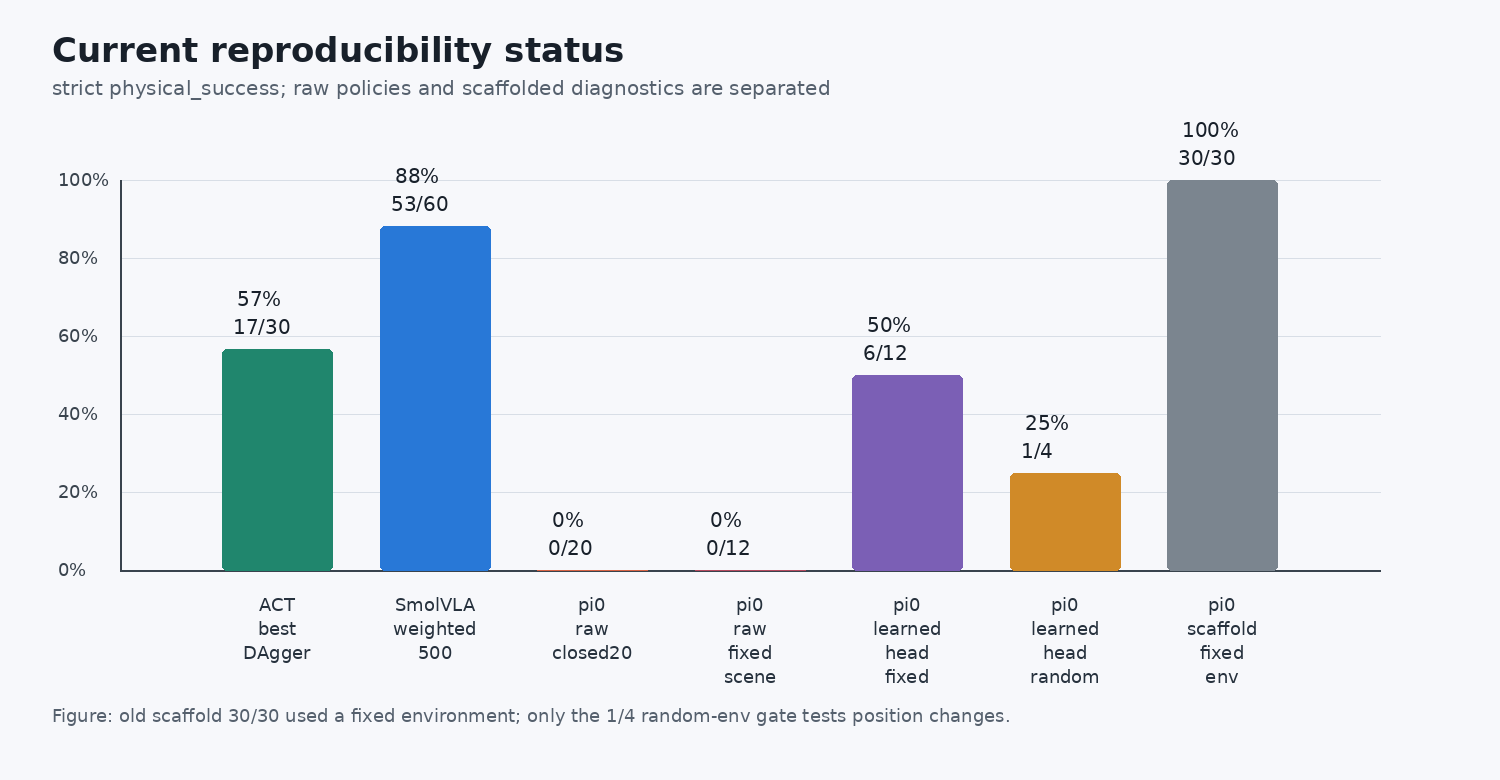
Figure 1: The阶段性 status of the example experiment in this topic. Here, more strict physical_success is used, and raw policy, learned head, and scaffold are separated. SmolVLA is currently the most stable, and ACT can now serve as a DAgger diagnostic case; the improvement in learned-head for pi_0 in fixed scenarios is real, but in random environments 1/4, position generalization has not been achieved. The evaluation of the old 30 scaffold entries later revealed that the environment always remains at seed 0, which can only be interpreted as stability in policy sampling and cannot be used as evidence for spatial generalization.
Recommended Learning Pace
| Order | Recommended Duration | Main Outputs |
|---|---|---|
| Task 01: Environment Confirmation | 0.5 day | AMD device resource table, ROCm inspection logs, cache directory planning |
| Task 11: Zero Training Preview | 5 minutes | Four-view playback successfully completed in the Notebook, understanding of the full action phase |
| Task 07: Collection and Audit | 0.5 to 1 day | 20–50 red/blue cup teaching data that have passed physical audit |
| Task 08: ACT Training | 0.5 to 1 day | ACT smoke, formal checkpoint, and the first closed loop baseline |
| Task 11: ACT Closed Loop | 0.5 day | held-out seeds success rate, JSONL, and success/failure videos |
| Task 02–03: ACT Diagnosis | 1 to 1.5 days | physical_success, open/closed-loop diagnosis tables, and DAgger data design |
| Task 09 → 11 → 04: SmolVLA | 1 to 1.5 days | SmolVLA checkpoint, red/blue cup success rate comparison, and weighted sampling experiments |
| Task 10 → 11 → 12–13: pi_0 / Pi0.5 | 2 to 3 days | permission gatekeeping, raw/head comparison, seed audit, EEF-delta and chunk alignment |
| Task 05–06: Comprehensive Review | 0.5 to 1 day | training gatekeeping, failure cases, troubleshooting records, and experiment reports |
Notebook or Python script
This topic recommends retaining both types of materials:
| Format | Suitable Content | Reason |
|---|---|---|
| Notebook | Environment check, single rollout visualization, instructional explanations | Facilitates per-cell observation of status, images, and actions |
| Python Script | Batch evaluation, strict success rate, batch video recording, training interface | The results are more reproducible, and suitable for long-term operation on remote AMD devices |
It is recommended not to cram all diagnoses into the notebook. The batch evaluation and training interfaces should be scripted, so that the results of different students during team learning can be easily compared.
How to Organize Learning Outputs
After completing the replication, don’t just leave behind a string of commands or a description like “worked”. A better approach is to compile the evidence into a small experimental report so that others can see what you have verified and what still needs verification.
A qualified experimental report must include at least:
| Data | Function | Recommended Format |
|---|---|---|
| Environment Table | Describes on which hardware and ROCm version the experiment was conducted | Include GPU/APU model, system, ROCm, PyTorch, temperature, and VRAM usage |
| Data Table | Indicates whether the training data is reliable | Include episode count, task type, red/blue cup ratio, and whether it passed physical playback auditing |
| Success Rate Table | Indicates whether the model actually completed the task | Write legacy_success and physical_success simultaneously, with the latter explained first |
| Representative Videos | Show both successful and failed behaviors | Include at least one real success case and one typical failure case, with key frames or captions |
| Troubleshooting Logs | Explains why certain fixes were applied | Organized in “phenomenon, evidence, root cause, fix, verification”; no long logs |
| Command Templates | Help others reproduce the experiment | Use variables such as $PROJECT_ROOT, $DATA_ROOT, and $OUTPUT_ROOT |
The result report does not need to include model weights, cache directories, complete training logs, or personal machine paths. Only the relevant content necessary for reproduction experiments should be retained: command templates, short log snippets, summary tables, key videos, and clear conclusions.
Minimum Output Template
After completing this topic, you can compile a summary of the results:
| Item | Content |
|---|---|
| Equipment | AMD GPU / APU model, ROCm version, system version |
| Data | Number of episodes, task types, red/blue cup ratio |
| ACT | best checkpoint, strict success rate, main failure types |
| SmolVLA | red cup success rate, blue cup success rate, sampling strategy |
| pi_0 | gated permissions, 1-step smoke, raw policy success rate, script terminator diagnostic results |
| Video | 1 real success case, 1 typical failure case |
| Review | The most critical issue in this replication |